
A tool that sends a test SMS may not tell you whether your app can receive and verify an OTP. That distinction matters: developer tools for sms testing cover different parts of the message flow. Choosing one by its feature list alone can leave important steps untested.
If you’re comparing mocks, provider APIs, and real-number tests, start by deciding what you need to prove. A mock can validate application logic without contacting a carrier. A sending provider can test outbound requests and related responses. An inbound number service can help test verification-code receipt without using personal numbers. Each covers a different layer, so a practical setup often combines them.
This comparison explains which tools fit each workflow, what their integrations can verify, and how to build repeatable tests with synthetic data. It also clarifies where Anosim fits: its API and number-rental options support inbound verification workflows, not outbound SMS delivery. You’ll be able to choose a setup that tests the right direction of traffic while keeping real user numbers and codes out of development logs.
Key Takeaways
- Match each test to the system boundary it needs to validate, from application logic to real message receipt.
- Compare developer tools for sms testing by workflow, message direction, integration needs, and limitations.
- Use mocks to test formatting and branching without sending live messages, then add controlled integration checks where needed.
- Keep test data synthetic and separate credentials, numbers, and logs across test, staging, and production.
- Use Anosim for inbound verification-code receipt and number-handling workflows, and pair it with a mock or sending provider for outbound tests.
Table of Contents
- What Developer Tools for SMS Testing Actually Need to Validate
- How SMS Testing Works Across Mocks, APIs, and Real Numbers
- Compare Developer Tools for SMS Testing by Use Case
- Build a Repeatable SMS Test Plan Without Exposing User Data
- Where Anosim Fits in a Developer SMS Testing Stack
What Developer Tools for SMS Testing Actually Need to Validate
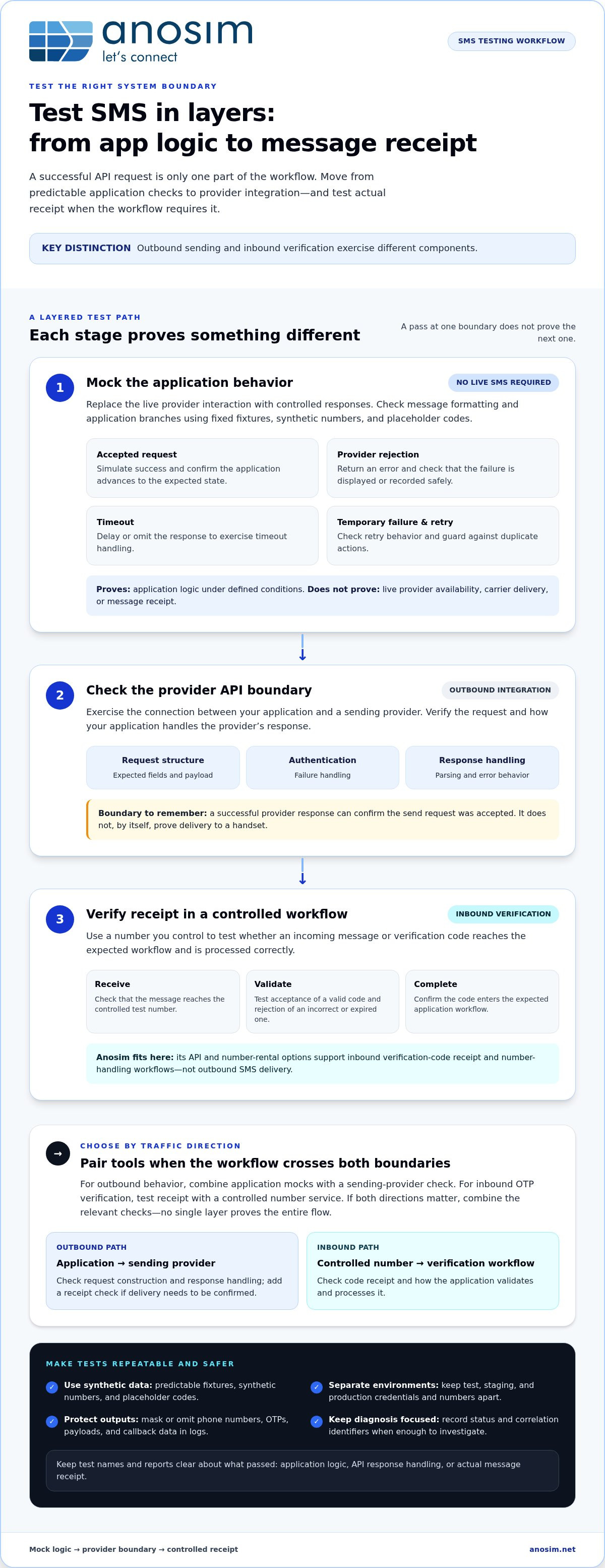
A successful API request does not prove that an SMS workflow works end to end. Testing should show how an application behaves when a message is requested, delivered, received, or used to complete a task. The right test depends on the system boundary: a sending integration and an inbound verification flow exercise different components.
An SMS API connects an application to messaging functions; an SMS testing environment provides controlled conditions for checking those functions and the application’s response. An API can return a successful response without proving that the recipient received the message or that an OTP was processed correctly. Understanding the basics of Short Message Service (SMS) helps frame the transport involved, but tests should focus on the behavior your application must handle.
Outbound delivery tests versus inbound verification tests
Outbound tests begin inside your application. They check whether it builds the right request, passes the expected fields to a sending provider, and handles the provider’s response or callback. For example, a signup flow might request an OTP and record whether the provider accepted the send request. That confirms an integration step, not necessarily delivery to a handset.
Inbound tests begin when a message arrives at a number you control. They check whether the application or verification workflow can receive the code and process it, including accepting a valid code and rejecting an incorrect or expired one. A sending tool may not provide an inbound number, and an inbound number service does not necessarily send messages. Choose tools based on message direction as well as function.
What a test should prove
Separate results into three checks. First, an API response test confirms that your application formed a valid request and can handle success and error responses. Second, an application logic test checks behaviors such as message formatting, retry paths, rate limits, and code validation. Third, a receipt test confirms that a message reached a controlled test number or that an incoming code entered the expected workflow. These checks answer different questions. Passing one does not establish the others.
Make tests repeatable with synthetic data, predictable fixtures, and isolated development credentials. A failed test should be reproducible without relying on a real customer’s phone or an unpredictable live interaction. Keep test, staging, and production credentials and numbers separate so a development run cannot affect a live messaging flow.
Protect test output, too. Logs and reports can capture request payloads, phone numbers, OTPs, or callback data. Mask or omit sensitive values, and record status and correlation identifiers when they are enough to diagnose a failure. Avoid copying production data into development just to make a test realistic.
For inbound verification workflows, Anosim provides number-rental options and developer integrations through the Anosim API documentation. Anosim supports receiving verification codes, not sending outgoing SMS, so pair it with application mocks or a separate sending provider when outbound behavior is part of the test plan. That boundary is a practical starting point for comparing developer tools for sms testing.
How SMS Testing Works Across Mocks, APIs, and Real Numbers
A reliable test strategy moves from controlled application checks to provider integration and, when needed, actual message receipt. Each layer answers a different question. A mock can confirm that your code reacts correctly to an expected response, while an API check can validate request handling. Neither proves that a message reached a number.
An end-to-end SMS test follows a message-triggered workflow across the application and relevant messaging boundary, from the initiating action through sending or receipt to the expected application outcome. Define that boundary before selecting developer tools for sms testing. For an outbound notification, the path may end at a provider response or delivery event. For OTP verification, include receipt of the code and the application’s response to it.
Use mocks for predictable application-level checks
A mock or stub replaces a live provider interaction with a controlled response. Use it to test how the application builds message content and handles different branches without sending a real SMS. Keep these tests deterministic: the same input should produce the same simulated outcome, making failures easier to reproduce.
- Success: Simulate an accepted request and confirm the application advances to the expected state.
- Rejection: Return a provider error and check that the application displays or records the failure safely.
- Timeout: Delay or omit the response to test timeout handling.
- Retry: Simulate a temporary failure and verify that retry logic does not create duplicate actions.
Use fixed fixtures with synthetic numbers and placeholder codes. Mock tests validate application behavior under defined conditions; they do not establish carrier delivery, live provider availability, or message receipt. Make that distinction clear in test names and reports so a passing unit test is not mistaken for a live integration result.
Use API and inbound-number checks for integration tests
An API-client check exercises the boundary between your application and a provider. Validate request structure, authentication-failure handling, response parsing, and how the application reacts to errors. Keep credentials isolated from production, and avoid recording secret values or complete OTPs in test output. The FTC CAN-SPAM Act compliance guide concerns commercial email, not SMS rules, so treat it as channel-specific guidance rather than a substitute for SMS requirements.
For inbound verification, use an authorized test number when you need to confirm that a code can be received and processed by the intended workflow. Trigger the test from your application, retrieve the incoming code through the number service, then verify that the application accepts the expected code and handles an invalid one appropriately. Anosim supports inbound verification through its API and number-rental options. Its API documentation for developer integrations is a starting point for setting up that integration. Use a separate sending provider or a mock for outbound tests.
Compare Developer Tools for SMS Testing by Use Case
The right option depends on what you need to observe. A local mock gives fast, repeatable feedback about application logic. A provider API check exercises an integration. An inbound number service tests whether a verification message can be received and processed. These categories solve different problems, so compare them by test goal rather than treating every SMS tool as interchangeable.
Which tool category fits each testing scenario?
Use this comparison to narrow the options. A tool’s test features and behavior depend on its category and implementation, so distinguish simulated events from live message receipt when interpreting results.
- Local mock or stub: best fit for message formatting, branching, error handling, and retries; message direction: simulated outbound or inbound events; main limitation: doesn’t validate a live provider, carrier delivery, or real receipt.
- API client: best fit for request structure, authentication handling, and response parsing; message direction: usually outbound API requests, depending on the API; main limitation: a valid response alone doesn’t prove delivery or OTP processing.
- Provider test environment: best fit for provider-specific integration checks under documented test conditions; message direction: depends on the provider’s supported features; main limitation: sandbox behavior may differ from live traffic.
- Real inbound-number testing: best fit for receiving a verification code and checking application handling; message direction: inbound; main limitation: requires controlled numbers and authorized, carefully managed tests.
Twilio, Sinch, and BulkSMS are examples of third-party messaging platforms developers may encounter when evaluating API integrations. Their names alone do not mean that a particular sandbox or test feature covers your scenario. The key distinction is whether a test simulates an event or verifies live message delivery and receipt.
Trade-offs developers should compare
Mocks are highly repeatable and easy to isolate, but offer the least realism. API clients and provider test environments expose more integration detail, including request failures and response parsing, but do not necessarily prove live delivery. Real inbound-number testing adds evidence about actual receipt and code handling, with more setup and less control over external message timing.
Pay attention to the result you’re measuring. A provider’s accepted request or delivery status does not prove that your application retrieved an OTP, matched it to the right session, and completed verification. Test those outcomes separately, and make results visible in logs without recording the full code or personal data.
For an inbound verification scenario, Anosim provides virtual number rentals and API integrations for receiving verification codes. It does not send outgoing SMS, so combine it with a mock or a separate sending provider if your test also needs to exercise outbound delivery. The Anosim API documentation supports integration planning. Use numbers and accounts only for authorized tests, and follow the relevant service’s account policies. No number service guarantees acceptance by every platform.
In practice, developer tools for sms testing work best as a small, layered toolkit: mocks for fast checks, provider-facing tests for integration behavior, and inbound-number testing when real code receipt is part of the workflow.
Build a Repeatable SMS Test Plan Without Exposing User Data
A repeatable plan makes failures easier to diagnose and keeps test traffic away from production systems. Start with the outcome you need to verify, then add the lightest test layer that can prove it. This sequence gives developer tools for sms testing a clear role without relying on real customer accounts or data.
- 1. Define the workflow and boundary. Decide whether you’re testing message formatting, a provider request, inbound code receipt, or the full verification journey. Assign each expected result to the application, provider, or inbound handler.
- 2. Write test cases and expected outcomes. Cover valid, malformed, expired, delayed, duplicated, and missing messages. For example, the application should reject an expired code, while the inbound handler should process a received code only for the intended test session.
- 3. Run isolated mock tests. Use fixed fixtures to exercise normal and failure branches, including retries and timeouts. Confirm that a missing message produces a controlled result rather than an indefinite wait. Keep mock assertions focused on application behavior, not access to a real customer account.
- 4. Check the integration with controlled data. Use test credentials and a provider’s documented test environment where appropriate. If the workflow requires actual inbound receipt, use an authorized test number and validate both code retrieval and application handling.
- 5. Review results and reset the environment. Record pass or fail, the test case, and a safe correlation identifier. Remove temporary test data when it’s no longer needed, and confirm that no test configuration can trigger production traffic.
Set test cases and expected outcomes
Make each case specific enough that a failed assertion identifies the responsible component. Application verification logic should reject a malformed code. An expired code should fail according to the application’s defined expiry behavior. A delayed message tests timeout and recovery handling; a duplicate checks that processing does not complete the same action twice. For a missing message, specify whether the application reports a timeout, allows a retry, or follows another defined path. Keep expected outcomes stable and independent of real account access.
Protect test data and production systems
Use synthetic identities and codes, redact OTP values when creating application logs, and avoid placing sensitive payloads in test reports. Separate test, staging, and production credentials, phone numbers, endpoints, and log destinations. Limit access to test credentials and rotate them according to your team’s security process. Follow applicable platform terms and data-protection requirements, including jurisdiction-specific requirements for your deployment.
SMS test-data checklist: use synthetic identities, isolate credentials and numbers by environment, redact codes, restrict log access, and never copy real user data into fixtures.
For inbound verification checks, Anosim supports number-rental workflows and API integrations for receiving codes. Use the Anosim API documentation to plan an inbound integration test, and use a mock or separate sending provider for outbound SMS checks.
Where Anosim Fits in a Developer SMS Testing Stack
Anosim fits the inbound side of an SMS test plan. Use its inbound SMS activation and number-rental options when a workflow needs to receive a verification message and pass the code into an application for processing. This lets you test what happens after a message reaches a controlled number, such as retrieving a code and confirming that the application handles it as expected.
The direction of traffic is the key boundary. Anosim does not send outgoing SMS. For an outbound test, use an application mock or a separate sending provider. For an inbound verification test, Anosim can be part of the setup. If your test needs both directions, combine the relevant components and make clear which result each one validates.
When an inbound SMS service is the right component
Choose an inbound number workflow when your application must receive and process verification messages, rather than merely submit a send request. A temporary activation flow can suit a focused check, while a longer-running test may need a rented number workflow for repeated testing over time. Neither setup guarantees acceptance by every third-party platform. Use numbers only for authorized tests and follow applicable platform terms.
For ongoing test scenarios, define how your team will associate each incoming message with a test case and avoid storing code values longer than needed. Keep the workflow separate from customer accounts so failures can be reproduced without exposing real user data.
Evaluate integration fit and next steps
Anosim API (v1) and SMS-Activate Standard API compatibility support developer integrations for receiving verification codes. Review the Anosim API documentation to understand its supported integration behavior and build assertions around what it documents. Keep tests focused on defined inputs and expected outcomes rather than assumptions about undocumented behavior.
A practical integration plan starts with a mock for application logic, then exercises the inbound API workflow with synthetic test data and a controlled number. Record whether the code was received and whether your application processed it, but keep sensitive values out of logs and reports. If outbound delivery is also in scope, test that path independently with a mock or sending provider.
That separation makes it easier to select developer tools for sms testing based on the actual requirement: receiving verification codes, managing a rented number workflow, and sending messages are distinct tasks. Explore inbound SMS activation to compare the service with your team’s inbound test requirements.
Turn Your Test Strategy Into a Working Setup
Map one critical SMS workflow from trigger to expected outcome, then choose the smallest test setup that can validate it. Keep the plan maintainable by documenting which checks are mocked, which use provider integrations, and which require an authorized inbound message. This gives your team a clear baseline for refining developer tools for sms testing as application requirements change.
For workflows that need inbound verification, Anosim brings together activation and number-rental options with developer integrations through Anosim API (v1) and SMS-Activate Standard API compatibility. Use the Anosim API documentation to align the integration with your test requirements, and keep outbound delivery checks in a separate sending-provider or mock workflow.
Explore Anosim's inbound SMS activation options and identify where a controlled inbound test can strengthen your application’s verification flow. A focused, privacy-conscious setup gives your team a practical path to more reliable releases.
Frequently Asked Questions
Can developers test SMS flows without sending a live text?
Yes. Use developer tools for sms testing such as a local mock to simulate provider responses and incoming-message events without transmitting a text. For example, return a simulated timeout and assert that the application shows a retry option rather than marking verification complete. This confirms your code’s response to the scenario, but it cannot establish that a live provider or carrier will deliver a message.
How do you test an SMS OTP flow end to end?
Trigger the verification flow with a synthetic test identity, send or simulate the code, then check that the application associates it with the correct session. Test acceptance of the expected code and rejection of an incorrect or expired one. Also verify that refreshing the page or starting a second session does not accidentally reuse the first session’s verification state.
Is a virtual number suitable for testing SMS verification?
It can be suitable when an authorized test needs to receive an actual verification message rather than simulate one. Use a number under your control, and make sure the test is permitted by the relevant platform. Acceptance varies by platform, so a virtual number cannot guarantee successful verification everywhere. For repeated testing, document which test environment and number are assigned to each case.
What is the difference between an SMS API and an SMS testing tool?
An SMS API exposes messaging functions that an application can call, while a testing tool helps you check application or integration behavior. Some tools are simple local stubs; others help inspect API requests or controlled message events. Before relying on a test result, identify what it covers: request construction, provider response, message delivery, or the application’s handling of a received code.
How should developers keep OTPs out of test logs?
Redact codes where logs are created, rather than depending on someone to remove them later. Log a test-case identifier, status, and non-sensitive correlation value instead of the OTP or full phone number. Review exception traces and CI reports too, since failed assertions can expose payloads. Use synthetic test values, and restrict access to logs that contain other sensitive test data.
Can one tool test both outgoing SMS and incoming verification codes?
A broader testing setup may cover both directions, but do not assume a single service does. Treat outbound sending and inbound message receipt as separate capabilities, then test each result independently. Anosim supports inbound verification-code receipt and number-rental workflows, not outgoing SMS. Pair it with a mock or a separate sending provider if your application also needs outbound delivery checks.