
A proxy can be configured correctly and still leave a Puppeteer scraping workflow unreliable. Using proxies with puppeteer for scraping involves more than adding an endpoint: browser traffic must route as intended, credentials must be handled securely, and sessions need to remain consistent with the task.
If you’re unsure where proxy settings belong or how to tell whether requests use them, this guide offers a practical starting point. You’ll learn how to configure an authorized proxy through Puppeteer’s launch options, handle authentication, and test the route without treating a successful connection as permission to collect data.
You’ll also learn how timeouts and inconsistent sessions can affect results, how to choose a setup for your needs, and when mobile-network routing may be relevant. The goal is a dependable workflow that respects website access rules, not simply one that sends more requests.
Key Takeaways
- Puppeteer controls Chromium, while a proxy changes the network route. Treat these as separate parts of your scraping setup.
- For using proxies with puppeteer for scraping, confirm authorized access, add the proxy endpoint to the browser launch configuration, then test that traffic follows the intended route.
- Choose direct access, a single proxy, or managed proxy access according to your session-continuity needs and configuration effort.
- Build responsible workflows around site terms, permissions, applicable data-use requirements, and conservative request pacing.
- Mobile proxies from Anosim’s partner proxied.com route traffic through mobile network infrastructure. Developers configure the proxy details they receive in their Puppeteer setup.
Table of Contents
- Why use proxies with Puppeteer for web scraping?
- How to configure a proxy in Puppeteer
- Which proxy setup fits your Puppeteer scraping workflow?
- Build a reliable and responsible Puppeteer scraping workflow
- Using proxied.com mobile proxies with Puppeteer: fit and next steps
Why use proxies with Puppeteer for web scraping?
A proxy can support an authorized scraping workflow, but it solves a specific problem: network routing. A proxy is an intermediary server that forwards browser network requests to their destination. Puppeteer controls Chromium, the browser that loads pages and runs client-side code, while a proxy changes the route those requests take. Using proxies with puppeteer for scraping can help when a task requires a defined network route or separation between the browser environment and the destination site.
Web scraping means extracting information from websites, using methods that range from simple page requests to browser automation. For a foundational overview, see What is web scraping? Suitable use cases include monitoring public information where access is permitted, testing a site you operate, or collecting data under an explicit agreement. A proxy doesn’t grant permission, override site rules, or guarantee access to restricted content.
What does a proxy change when Puppeteer opens a page?
A proxy is an intermediary server that routes a browser’s network requests between the browser and a destination site. In a Puppeteer workflow, Chromium makes the request, the configured proxy forwards it, and the site responds along that route. Puppeteer manages browser actions and page content; the proxy handles network routing. It doesn’t change page selectors, execute JavaScript, or make a blocked request authorized.
When is Puppeteer a better fit than a basic HTTP client?
Use Puppeteer when an authorized page relies on JavaScript to render the information you need, or when a permitted test requires browser interaction, such as opening a menu. Chromium can load and render the page before your script reads its content. For a static page or accessible endpoint that returns the needed data directly, a basic HTTP client is usually simpler and requires less browser overhead.
This distinction helps keep your workflow proportionate. Browser automation can reproduce page-loading steps, but it doesn’t make activity indistinguishable from a person or defeat anti-bot controls. If a site indicates that automated access is restricted, don’t treat a proxy as a workaround. Review the relevant terms, robots guidance, permissions, and data-use requirements before collecting information. Stop or adjust the workflow if access rules or limits require it.
- Authorized monitoring: Track permitted changes to public pages or information relevant to a defined task.
- Testing: Use a controlled proxy route when validating your own site or an approved test environment.
- Public information collection: Use a browser only when rendering is needed, and keep collection within the applicable access conditions.
The practical decision has two parts: determine whether the page requires Chromium, then decide whether a proxy is useful for the authorized network route. Neither tool substitutes for permission or a clear, limited collection plan.
How to configure a proxy in Puppeteer
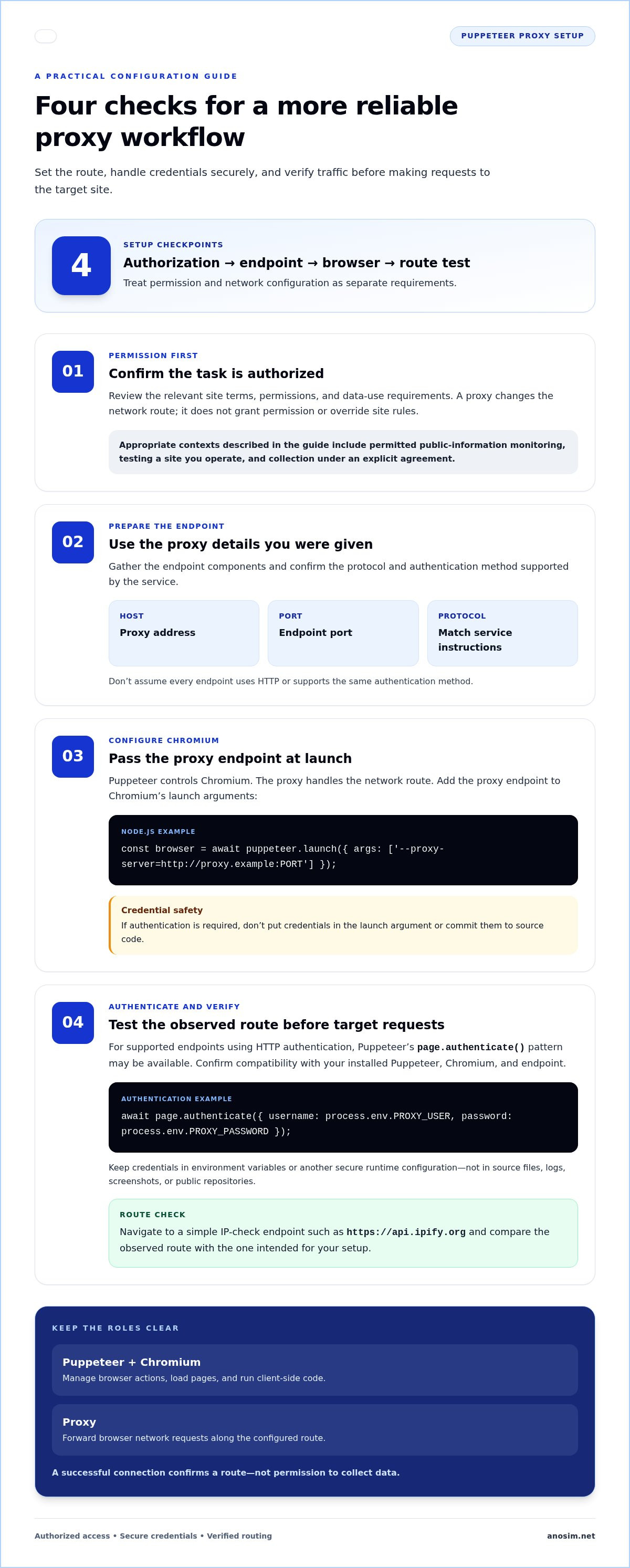
Keep setup predictable by handling one variable at a time. Before launching Chromium, confirm that automated access is permitted for your task. Then gather the proxy host, port, protocol, and any required credentials. The endpoint format must match the proxy service’s instructions. Don’t assume every endpoint uses HTTP or supports the same authentication method. Responsible setup also includes reviewing relevant data-use considerations, such as those discussed in Ethical considerations in web scraping.
- Confirm you’re authorized to access the target and that your planned collection fits the applicable rules.
- Prepare the endpoint and authentication details supplied for your proxy.
- Launch Chromium with the proxy configuration, then apply authentication if the endpoint requires it.
- Test the observed route before making requests to the target site.
Set an unauthenticated proxy in browser launch options
Pass the proxy endpoint as a --proxy-server argument inside Puppeteer’s launch args array. Replace the placeholder below with the endpoint details for your authorized workflow. Launch-level configuration generally applies to the Chromium process, so pages opened in that browser use its configured route.
Node.js example: const browser = await puppeteer.launch({ args: ['--proxy-server=http://proxy.example:PORT'] });
Use the protocol supported by your endpoint, and check the Puppeteer and Chromium documentation for the versions in your environment. This example shows where to place the setting, not a working proxy address. If the endpoint requires credentials, don’t add them to this argument or commit them to source code.
Handle authenticated proxy access and verify routing
Authentication behavior depends on the endpoint and browser version. For endpoints using HTTP authentication, Puppeteer’s page.authenticate() pattern is available in supported versions. Check compatibility with your installed Puppeteer and Chromium, and confirm that the endpoint’s protocol uses this method before relying on it.
Keep credentials in environment variables or another secure runtime configuration, not in source files, logs, screenshots, or public repositories. For example, after creating a page, apply credentials from the environment before navigation:
Authentication example: await page.authenticate({ username: process.env.PROXY_USER, password: process.env.PROXY_PASSWORD });
To test routing, navigate to a simple IP-check endpoint such as https://api.ipify.org and compare its reported address with the expected proxy route. This confirms the observed exit address for that request. It doesn’t establish anonymity or grant access to another site.
- Rejected credentials: Check for missing values, whitespace, or an authentication-method mismatch.
- Connection errors: Verify the host, port, protocol, and endpoint status.
- Unexpected route: Confirm the launch argument is applied to the browser instance making the request, then retest in a fresh process.
Once routing works, keep the browser session and proxy configuration consistent for the authorized task. Avoid logging sensitive values while debugging, and stop if the destination’s rules or limits disallow the planned access.
Which proxy setup fits your Puppeteer scraping workflow?
The right setup depends on what the authorized task requires. If the target is accessible from your current network and you don’t need a separate route, direct access keeps configuration simple. If a task needs a particular network route or consistent session conditions, a single configured proxy may fit better. Managed proxy access is another operational model, but its behavior depends on the service and setup. Assess its actual capabilities against your session and access needs.
Choose between direct access, a fixed route, and managed access
Start with the simplest setup that meets the task’s requirements. Direct access avoids proxy configuration. A single proxy route can make session conditions easier to keep consistent across requests, provided the endpoint itself remains stable. Managed access may suit workflows where proxy handling is part of a broader operational arrangement, but don’t assume it includes particular capabilities or outcomes. Compare its actual behavior with your session requirements and the site’s access conditions.
- Direct access: session continuity uses your existing network route; configuration effort is lowest; appropriate for permitted tasks with no need for proxy routing.
- Single configured proxy: session continuity can provide a consistent route while the endpoint remains the same; configuration requires endpoint setup and any needed authentication; appropriate for authorized tasks that benefit from a defined, steady route.
- Managed proxy access: session continuity depends on the service’s routing and session behavior; configuration effort varies with the arrangement and integration; appropriate for workflows where managed access fits operational requirements.
For using proxies with puppeteer for scraping, assess session continuity separately from the number of requests a workflow can make. A stable session can simplify testing and help you interpret results, but it doesn’t make requests permissible or remove a site’s limits. Don’t rotate proxy routes to get around blocks, rate limits, or access controls. If a site restricts automated access, pause and follow its stated rules rather than changing routes to continue.
When does using proxies with Puppeteer for scraping call for a mobile proxy?
A mobile proxy routes traffic through mobile network infrastructure. It may be relevant when an authorized task specifically requires mobile-network routing or when that route fits its privacy requirements. Choose it for the purpose of the work, not because you expect a mobile address to secure access or improve acceptance. Anosim’s partner proxied.com offers mobile proxies for workflows that need mobile-network routing. Developers configure the proxy details they receive in their Puppeteer setup.
Before choosing, define what must stay consistent: the route, the browser session, or both. Then compare those requirements with the setup effort and the site’s access conditions. This keeps proxy selection grounded in operational need, not attempts to evade restrictions.
Build a reliable and responsible Puppeteer scraping workflow
Plan the workflow before opening a browser. Review the site’s terms, robots guidance, permissions, and applicable data-use requirements. Robots guidance can help you understand how a site communicates its preferences, but it isn’t a substitute for permission when permission is needed. Limit collection to the information required for the authorized task, and define the conditions that require your script to pause or stop.
A proxy routes browser traffic through another server; it does not authorize scraping, override site rules, or grant access to restricted content. Using proxies with puppeteer for scraping should be part of a permitted, carefully scoped process, not a way to continue after a site signals that access isn’t allowed.
Make the workflow easy to inspect by separating its stages:
- Navigation: Open only approved pages and record whether navigation succeeds.
- Waits: Wait for the specific element that indicates the required content is ready.
- Extraction: Collect only the fields needed for the defined purpose.
- Error handling: Classify failures and apply a clear stop or retry rule.
Control browser sessions, waits, and retries
If an authorized task depends on session continuity, keep related requests in the same browser context and maintain a consistent route for that work. Avoid changing session conditions mid-task, since doing so can make results harder to interpret. To check page readiness, wait for a relevant selector, such as a product title or results container, rather than relying on a short fixed delay that may be too brief or unnecessarily long.
Reserve retries for transient problems, such as a temporary network interruption. Set a maximum attempt count and pause between attempts to avoid adding repeated load. Don’t automatically retry a denial, access restriction, or repeated rate-limit response. Those signals call for reviewing the permitted workflow, not sending more requests.
Diagnose proxy and page failures without evading restrictions
Separate failures by stage before changing code. A connection error points to a network path or endpoint issue. An authentication error suggests that the credentials or supported authentication method need attention. A navigation timeout means the page didn’t finish within the configured limit, while a missing selector may mean the page structure changed or the expected content wasn’t rendered. These are different problems, so record the category and investigate the relevant step.
Log useful operational details, such as the stage, timestamp, error category, and whether navigation completed. Exclude proxy credentials, unnecessary personal data, and sensitive page content from logs. If a site blocks access or its rules prohibit the planned activity, stop. Don’t switch routes to circumvent its controls.
A stable process depends on technical clarity and restraint. For authorized workflows that need mobile-network routing, explore proxied.com mobile proxies for a privacy-focused routing option.
Using proxied.com mobile proxies with Puppeteer: fit and next steps
Mobile proxies from Anosim’s partner proxied.com route traffic through mobile network infrastructure and are designed for users who need high-trust IP addresses for account management and privacy. They may suit an authorized task when mobile-network routing is a genuine requirement, rather than a workaround for access restrictions. If the task doesn’t call for that route, another setup may be simpler.
Assess whether mobile-network routing matches the use case
Start with the task’s network and privacy requirements. A mobile proxy changes the route used for browser traffic; it doesn’t guarantee that a website will accept requests, provide unrestricted access, or allow scraping. Mobile proxies from proxied.com are distinct from Anosim’s SMS verification and virtual number services, which address different needs. Choose routing based on the work itself, while keeping the target’s permissions and access conditions in view.
Mobile proxies aren’t a Puppeteer-specific integration or API. Developers configure the proxy details they receive in their Puppeteer and Chromium setup, following the endpoint’s instructions for protocol and any authentication. This distinction matters: Puppeteer manages browser automation, while the proxy supplies the network route.
Prepare a Puppeteer project for proxy access
Before processing target pages, put endpoint details in secure runtime configuration rather than committed source code. Keep credentials out of logs, shared examples, and public repositories. Test the configured route against an endpoint you’re authorized to use, then confirm that your browser session behaves as intended before running the approved task. For broader context on proxy fundamentals and related guidance, use Anosim’s proxy resources as part of your setup research.
Use this readiness checklist before starting:
- Authorized target: Review the site’s terms, permissions, and applicable data-use requirements.
- Tested route: Confirm the browser uses the expected proxy route on an authorized endpoint.
- Protected credentials: Store access details securely and prevent them from appearing in logs or version control.
- Suitable session plan: Decide what needs to remain consistent for the task, and avoid changing routes to get around site restrictions.
If the route fails, troubleshoot the endpoint configuration and authentication without using alternate routes to bypass a block. If the site disallows the activity or signals that access should stop, respect that boundary. A proxy supports routing; it doesn’t establish permission.
If mobile-network routing fits your authorized workflow, mobile proxies from Anosim’s partner proxied.com provide a routing option for your Puppeteer project. Choose them for your route and privacy requirements, not as a promise of scraping success.
Make your next scraping run deliberate
Before expanding a Puppeteer workflow, define what a successful, permitted run should accomplish and what signals mean it’s time to pause. Clear boundaries make it easier to improve code without treating access restrictions as technical obstacles to work around. Keep the setup proportionate to the task, and review the workflow whenever the target’s requirements change.
For teams evaluating using proxies with puppeteer for scraping, mobile proxies from Anosim’s partner proxied.com provide traffic routed through mobile network infrastructure, with a focus on privacy and high-trust IP requirements. Developers configure the proxy details they receive in their own Puppeteer setup. The proxy is a routing option, not permission to access a site.
Choose a route that fits your authorized use case and session needs. If mobile-network routing is relevant to your workflow, explore proxied.com mobile proxies. Start with a carefully scoped task, test responsibly, and build from there.
Frequently Asked Questions
Can Puppeteer use a proxy with a locally installed Chrome browser?
Yes, provided Puppeteer connects to local Chrome through a setup that applies proxy settings when the browser process starts. For example, launching Chrome with Puppeteer’s supported executable configuration lets you supply launch arguments. Attaching to a browser that’s already running may not let you change its existing route. For using proxies with puppeteer for scraping, check compatibility between your Puppeteer and Chrome versions, then test the route on an endpoint you’re authorized to access.
Does using a proxy with Puppeteer make scraping anonymous?
No. A proxy changes the network route visible to a destination, but it doesn’t make a browser session anonymous. Websites may still process cookies, account details, browser signals, and request patterns. Changing the route, for example, won’t erase identifying information already stored in a browser profile. Use a proxy for a legitimate routing or privacy need, protect credentials, limit personal data collection, and follow the target site’s rules.
Can a Puppeteer proxy bypass a website’s anti-bot protections?
No. Proxy settings don’t authorize access or guarantee that automated requests will be accepted. If a site blocks your workflow, don’t try another route to evade the restriction. Pause and review the site’s terms, documented access options, and the permissions required for your task. If the site provides an approved data source or access process, use that route instead.
Why does Puppeteer show a proxy authentication error?
Common causes include incorrect credentials, a mismatched endpoint, unsupported authentication handling, or differences between browser versions. Check the connection details supplied for your endpoint, including its protocol, then test a minimal authorized request without loading the target page. This helps distinguish authentication failure from navigation or selector problems. Keep credentials in secure runtime configuration, and never print them in error logs or commit them to a repository.
Is a mobile proxy different from a residential proxy?
Yes. A mobile proxy routes traffic through mobile network infrastructure, while residential proxy terminology generally refers to traffic associated with residential internet connections. These describe different network contexts, not guaranteed access outcomes. Choose based on the task’s authorized routing and privacy requirements. If mobile-network routing is specifically needed, a mobile proxy may fit, but it won’t override a site’s access rules or ensure a request is accepted.
Should I rotate proxies on every Puppeteer request?
No, not automatically. Frequent route changes can interrupt tasks that rely on session continuity, and rotation shouldn’t be used to get around blocks, rate limits, or access controls. Decide whether changing routes is genuinely required and permitted before starting. For verification workflows, keep the setup consistent: don’t switch between proxies, VPNs, or devices during verification. If a site denies access, stop and review its stated requirements instead of rotating routes.