A business account can receive a verification text without using an employee’s personal SIM. A virtual number for business app verification is a separate number that receives SMS codes for account setup or login through an online service. This helps keep employees’ personal numbers private, while app compatibility and continued access to the number remain essential.
Separating work and personal numbers can simplify account management, especially when a business needs dedicated numbers for work apps. But a virtual number won’t necessarily suit every verification flow, so consider how SMS reception, access duration, and the app’s requirements fit together.
This guide explains how virtual numbers work, how to choose and set one up, and how to use it for SMS verification while protecting personal information. It also covers what to do if an app rejects a number, when a rental suits the task, and how developers can connect number services to their applications.
Key Takeaways
- Choose a number based on the app’s country and verification requirements, then set it up with a clear process for accessing incoming codes.
- Distinguish between receiving SMS and sending messages; a number’s ability to receive verification codes doesn’t mean it supports outgoing texts.
- Separate business accounts from personal contact details by assigning numbers deliberately and limiting who can access verification messages.
- Online number services can receive SMS without a physical SIM in the device, but app compatibility and continued access still matter.
- For verification tasks, Anosim’s SMS Activation and number rental offerings provide options to match how you need to receive codes.
Table of Contents
- Selecting and setting up a business number
- Incoming and outgoing SMS
- Privacy and multiple numbers
- Using numbers without a SIM card
- Virtual numbers for SMS verification
- Anosim: SMS Activation
Selecting and setting up a business number
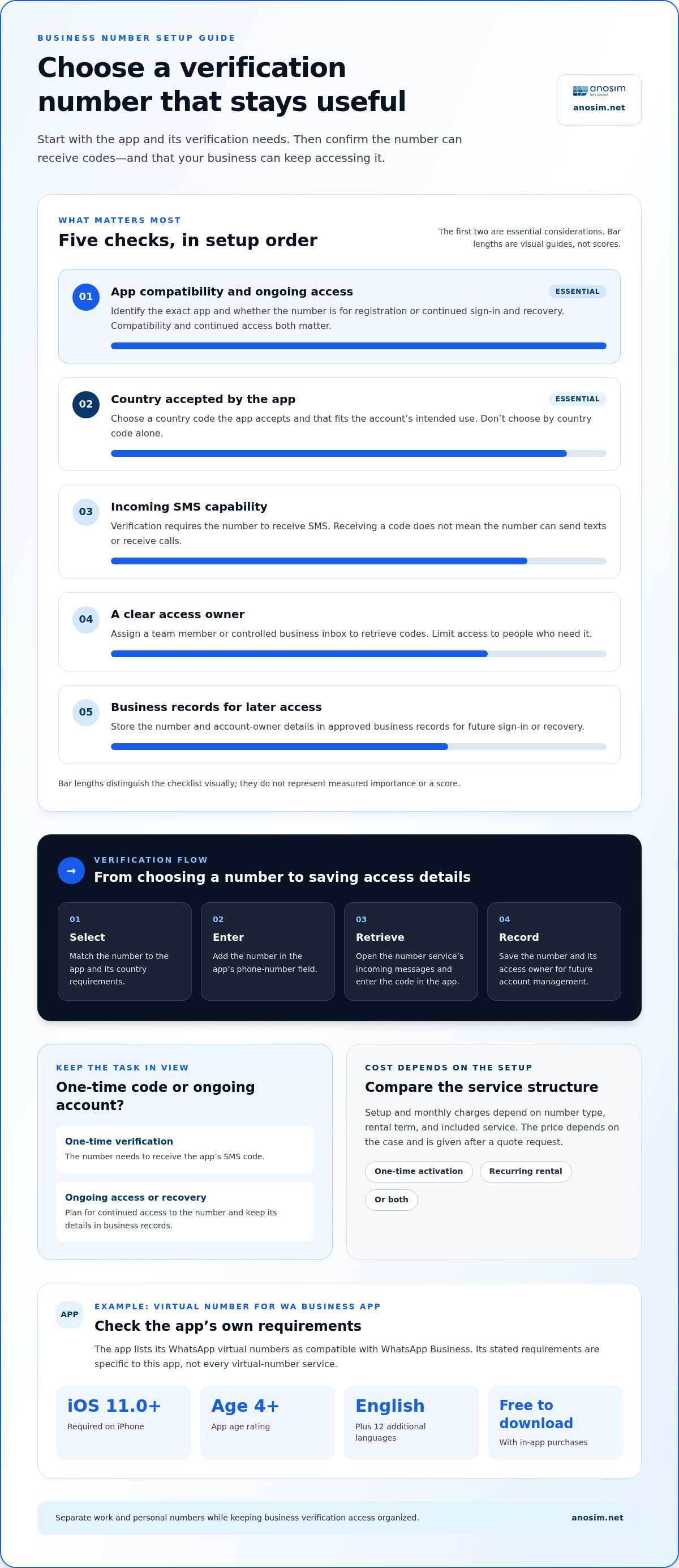
Choose a number based on the account’s purpose, not just its country code. For a WhatsApp Business profile, for example, the Virtual Number for WA Business app lists its WhatsApp virtual numbers as compatible with WhatsApp Business. A virtual number for business app verification separates the account’s phone number from an employee’s personal line, but the business still needs reliable access to incoming messages.
How much do U.S. virtual business numbers cost, including setup and monthly fees? Setup and monthly charges depend on the number type, rental term, and included service; the price depends on the provider, country, and rental term. These factors determine whether the cost is a one-time activation, a recurring rental, or both.
Before choosing a number, identify the app, country, and expected period of use. Decide who needs access to incoming codes and how the business will retain access over time. A one-time verification and an account that needs ongoing recovery access have different number-retention needs.
- Identify the app. Write down the exact service name, such as WhatsApp Business, and whether the number is for registration or continued account access.
- Choose the country. Select a number with a country code accepted by the app and appropriate for the account’s intended use.
- Check SMS reception. Confirm that the number can receive verification texts, rather than assuming every virtual number supports the same message functions.
- Set the access owner. Assign a team member or controlled business inbox to retrieve codes, and limit access to people who need it.
- Keep account records. Store the number and account owner details in the business’s approved records for future sign-in or recovery.
How do you set up a virtual number to receive an app verification code? Select a number for the app’s country, enter it in the app’s phone-number field, and retrieve the incoming SMS through the number service. Enter the code in the app, then record the number and its access owner for future account management.
Check the app’s device requirements before installing it. The Virtual Number for WA Business app requires iOS 11.0 or later on iPhone, is rated for ages 4 and older, and is available in English and 12 additional languages. It’s listed as free to download with in-app purchases. These details describe that app, not every virtual-number service.
Keep identity and account access in mind. The Board of Governors of the Federal Reserve System notes that financial institutions may flag an unidentifiable phone number as a deviation from a customer’s usual communication method. For banking or other sensitive accounts, use a number the business can access consistently and associate with its records, rather than treating verification as a one-time task.
Incoming and outgoing SMS
An SMS number may receive messages, send them, or support both functions. These capabilities are separate. A business using a number for a one-time login code needs incoming SMS; a team messaging customers also needs an outbound messaging channel. Don’t assume a number supports both functions.
For example, an app sends a one-time code to the number entered during registration. The number service receives the message and makes its text available to retrieve. The employee enters the code in the app. This incoming process differs from composing and sending an SMS to a customer.
Before assigning a number, map the required message direction to the task:
- Verification: The app sends a code, so the number must receive SMS.
- Account alerts: A service sends updates to the business number, so incoming message access remains relevant.
- Customer communication: Staff initiate texts, so they need a supported outgoing messaging capability.
- Voice contact: Incoming calls are a separate channel from SMS and require voice functionality.
Keep each channel distinct in your operating plan. An incoming SMS inbox doesn’t mean the number can send messages or receive calls. Similarly, mobile voice access doesn’t establish that verification texts will arrive. Match the exact task to the channel, then organize access accordingly.
For verification, use a controlled process. Enter the number in the app, open the service’s incoming-message view, and retrieve the code sent by the app. Enter it promptly in the correct verification field. If no message appears, check the country code and digits first, then confirm that the selected number is assigned to the intended task and can receive SMS. Avoid repeated code requests until you’ve checked the entered number and message inbox.
For outgoing messages, define the sender, recipient, and business purpose before staff begin. Use an approved messaging workflow and keep records where the business normally manages customer communications. This prevents a verification-only number from being treated as a general-purpose texting line and separates account access messages from customer conversations.
Finally, plan for replies. A one-way notification and a two-way conversation have different needs: the latter requires a way to receive responses and someone responsible for them. Document who monitors incoming SMS, who can access verification codes, and which channel handles incoming calls. This helps prevent missed account messages and keeps business communications organized across devices and apps.
Privacy and multiple numbers
Separate numbers can create clear boundaries between business accounts, teams, and public contact details. The privacy benefit depends on how access, message records, and account ownership are managed.
Privacy Across Multiple Numbers
Assign each number a defined role, such as a business messaging profile or account recovery. This limits how many services rely on a single contact point. Keep a private register linking each number to its app, account owner, and purpose. On a shared computer, restrict access to the register and sign out when finished.
Risks of Shared or Recycled Numbers
Shared or recycled numbers can expose verification messages to someone else with access, or cause confusion if a previous account remains associated with the number. A new holder may receive messages intended for an earlier user. Reduce these risks by assigning numbers carefully, controlling inbox access, and avoiding numbers with unclear message history or account ownership.
Before registering separate business accounts, create a simple allocation record. Include the app name, assigned number, responsible team, and approved message viewers. For example, a customer-support account shouldn’t share its verification inbox with unrelated staff. This makes it easier to see who can retrieve a code and manage account changes.
When an online service makes a number’s SMS inbox available on a computer, device security matters too. Use individual sign-ins where available, avoid saving verification messages in shared notes, and remove access when a staff member changes roles. If one employee receives a code while another handles account setup, share it through an approved internal channel rather than an open team chat.
- Separate purposes: Map each number to a specific business account or function.
- Limit access: Give inbox access only to staff who manage that account.
- Protect records: Store number assignments in a restricted business system.
- Review changes: Update ownership records when accounts or staff responsibilities change.
For a long-term business account, prioritize continuity as well as privacy. Keep the assigned number and recovery details under controlled business access, rather than relying on one employee’s personal computer. This clarifies account administration when the team changes and limits exposure from widely shared verification messages.
Using numbers without a SIM card
A virtual number can receive SMS without a SIM card in an employee’s phone. The number and device are separate: the phone connects to the internet, while an online service provides access to messages sent to the number. For example, a staff member can retrieve an app’s verification text on a laptop.
This setup changes where the message arrives, not what the app expects. During sign-up, enter the virtual number in the phone-number field, including its country code. The app sends an SMS to that number, and the service displays the incoming code. Enter the code in the app to complete verification.
The basic process is straightforward:
- Select the number. Choose one that supports incoming SMS for the app and account you’re registering.
- Open the message service. Sign in on a connected phone or computer that your business controls.
- Start sign-up. Enter the number in the app’s registration screen and request its verification code.
- Retrieve the SMS. Open the number’s inbox, copy the code, and enter it in the app.
- Record account ownership. Store the assigned number and its business owner in your account records.
This arrangement can help when a work phone has no SIM slot, a tablet handles business apps, or staff need to separate personal and work accounts. The device still needs an internet connection to access an online inbox. A SIM-free workflow doesn’t mean an account can be created without a phone number; it means the number isn’t tied to a physical SIM in that device.
SMS and voice are separate functions. Don’t assume a number used for verification texts can also receive calls. If a service requests a voice call instead of an SMS, the number must support that method. Similarly, receiving an app code doesn’t mean the number can send messages or handle customer conversations.
Virtual numbers can receive SMS verification codes for popular apps. The Virtual Number for WA Business app lists numbers for WhatsApp and WhatsApp Business. These are app-specific examples, not proof of universal compatibility. A number that works for one registration flow may not meet another app’s requirements.
For business continuity, keep the number accessible to the people who manage the account. If a shared work profile uses the number, don’t store its code only on one employee’s device. Document where messages arrive, who can access them, and how the team will retrieve a code for a later sign-in. This makes a SIM-free setup useful beyond initial registration.
Virtual numbers for SMS verification
A virtual phone number can receive app verification texts without a physical SIM in the device. For business use, the key question is whether it can receive the specific app’s code.
Provider Support for Business App Verification
Which virtual number providers support business app verification in the United States? Look for a service with U.S. numbers and incoming SMS access, then match the number to the intended app. There’s no universal compatibility list: compare the app, number country, and message type before registering. A number’s ability to receive texts doesn’t mean every app will accept it.
When practical, use a test account or low-risk registration flow. Record the app, number, and result so your team can choose an appropriate number for similar accounts later.
Comparing Number Types for Verification
A virtual business number delivers messages through an online service, while a prepaid SIM or eSIM connects through mobile service on a device. A landline may suit voice verification, but it isn’t interchangeable with a number that receives SMS. Compare the app’s verification method, where messages arrive, and whether the business can retain access.
For example, a virtual number can suit staff who retrieve codes on a computer. A SIM or eSIM may better suit a phone-centered workflow.
App Verification Rules and Terms
Are virtual numbers allowed under app verification rules and terms of service? Rules vary by app, so follow the service’s phone-verification terms and instructions. Before signing up, check whether the app accepts the number type and whether it requires SMS or offers another verification method.
Use the number only for the account and purpose permitted by the app. Successful code delivery doesn’t prove that all future account activity complies with its terms.
Apps Requiring Phone Number Verification
Which business apps require SMS or voice verification on a phone number? The required step depends on the app and registration flow. Virtual numbers are listed as compatible with WhatsApp and WhatsApp Business; these examples don’t establish a universal rule for other services.
When an app displays a verification prompt, note whether it requests an SMS or offers voice verification. Choose a number that supports the required channel, then enter its country code and digits exactly as shown.
For a reliable decision, compare the app’s instructions with the number’s message capabilities before linking a business account. If you need a number for SMS-based account setup, virtual number rental is an option for receiving verification messages.
Anosim: SMS Activation
Anosim offers SMS Activation for receiving verification codes, as well as Rent Number and Rent Service options for number access. For a specific app registration, choose the option that matches the task and the access period you need. Also plan how your team will manage incoming codes and retain account access after registration.
Developers can also integrate Anosim services into their applications using the Anosim API (v1), which is compatible with the SMS-Activate Standard API. This can suit workflows where verification operations need to connect with existing software. These offerings focus on number access and SMS activation, not outgoing SMS or voice calls.
Visit Anosim’s SMS Activation page to choose the next step for your verification workflow.
Build a Number Plan Your Team Can Maintain
Before adding an account, decide who owns its number and how the business will manage access over time. A clear assignment process helps prevent verification messages from becoming tied to one employee or forgotten device. It also lets your team review which accounts depend on each number.
For your next virtual number for business app verification, match the number service to the app’s verification flow and your team’s access needs. Anosim offers SMS Activation, Rent Service, and Rent Number for businesses managing verification and number access. Choose the option that fits the task, then record number ownership with your account details.
When you’re ready to discuss business numbers, contact Anosim about business numbers. A deliberate setup gives your team a clearer starting point for managing business app access.
Frequently Asked Questions
What is a virtual phone number?
A virtual phone number is managed through an online service rather than assigned to a SIM in a particular handset. A business can use it as an account’s contact number while authorized staff access its messages through the service. For example, an administrator can manage account communications from a work computer without using an employee’s personal number as the primary contact.
What is a virtual phone number for business app verification?
A virtual number for business app verification receives an app’s confirmation code for a work account. It connects the account to a business-controlled contact point rather than an employee’s private line. Before assigning one, decide who owns the account, which team manages access, and how recovery will work if staff responsibilities change.
Do apps accept VoIP or virtual numbers for business verification?
Some apps accept virtual or VoIP numbers, while others may reject them based on number type or verification rules. Code delivery and app acceptance are separate: a number can receive a text, yet the app may decline it during registration. If an app rejects a number before sending a code, trying another way to retrieve messages won’t address the number-type restriction.
Can virtual numbers receive short-code SMS verification messages?
Short-code delivery depends on the number’s supported message routes and the sender’s delivery rules. Receiving ordinary SMS doesn’t establish that short-code messages will reach the inbox too. If a business app sends its code from a short code, identify that message type and use a number with a route that supports it. This can help explain why some app codes arrive while others don’t.
What privacy and security steps protect business accounts verified with a virtual number?
Protect the account by limiting number and inbox access to authorized staff, securing service logins with unique credentials, and storing recovery details in a controlled business system. Don’t forward verification codes to public channels or save them in shared documents. When a team member leaves the account role, remove their access and update ownership records so the number remains under business control.