
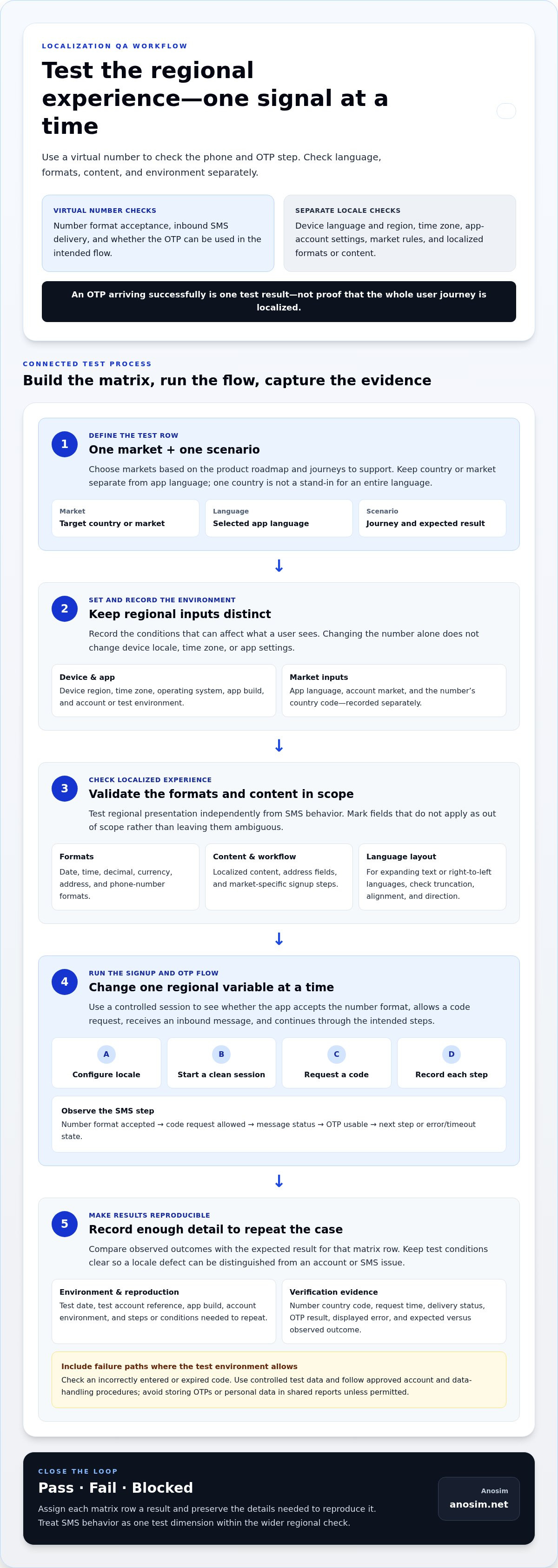
What if an app shows the right country code but the wrong regional experience? Learning how to test app localization with virtual numbers starts by separating two signals: a phone number can help test SMS verification for a market, but it can’t confirm that the app’s language, formats, or content are localized correctly. An OTP arriving successfully is one test result, not proof that the whole user journey works.
Number behavior can be easy to confuse with device or app settings, especially when results vary across test environments. A virtual number lets you test inbound verification messages without using a personal number, while device locale, language, and other app settings need separate checks. Anosim offers SMS activation for a focused, one-off check and number rental for repeat testing over a longer period.
This guide lays out a practical workflow for building a market-by-market test matrix, isolating the signals that affect regional content, and recording reproducible results across devices and environments. You’ll also learn how to test OTP flows manually or integrate inbound SMS access into automated QA, so each test answers a specific question instead of blending localization and telecom behavior.
Key Takeaways
- Build a test matrix that treats each target market separately, including its app language, device region, time zone, number format, and SMS outcome.
- Use virtual numbers to assess inbound OTP steps, while testing language, regional formatting, and localized content as separate parts of the app experience.
- Follow a repeatable signup test: configure the locale, start a clean session, request a code, and record what happens at each step.
- Choose among mock SMS, virtual-number receipt, and real-device testing based on the scenario’s needs for repeatability, realism, and automation.
- Use this workflow for how to test app localization with virtual numbers, then record each result as pass, fail, or blocked with enough detail to reproduce defects.
Table of Contents
- How virtual numbers fit into app localization testing
- Prepare a localization test matrix before using virtual numbers
- How to test localized signup and OTP flows with virtual numbers
- Choose the right number-testing method for each QA scenario
- Turn localization test results into a reliable release decision
How virtual numbers fit into app localization testing
App localization testing checks whether an app works as expected for a target market. That includes more than translated text: testers also validate regional formats, content, and workflows, such as date displays, address fields, or signup steps. Internationalization and localization describes how software is prepared for and adapted to different languages and regions. In QA, each signal needs a deliberate check rather than an assumption based on a single setting.
A virtual number can help validate whether an app accepts a phone number’s format and whether an inbound verification message arrives and can be used in a controlled flow. It tests a specific SMS and OTP step. It doesn’t establish that the app is fully localized or that every country and service will accept that number.
A country code is only one input. Device language and region, time zone, app-account settings, and server-side market rules can each influence what a user sees. Keep these settings distinct in test records so an unexpected currency or language isn’t misdiagnosed as a phone-number issue.
What a virtual number can test in an app
Use a virtual number to receive an inbound verification message during a controlled signup or account-recovery test. Check whether the app accepts the entered format, lets the tester request a code, and continues through the intended steps. Record whether the message arrived, whether the OTP was usable, and any error or timeout state. Results depend on the app and verification flow, so one successful test doesn’t prove universal delivery.
What a virtual number cannot localize by itself
Changing the number doesn’t change the device’s language, regional settings, or time zone, and it won’t automatically update an app’s currency, dates, or content. Test those independently. For example, set the device to the target locale and verify the app’s displayed formats while recording the number’s country code separately. A market-specific feature may also depend on the account’s assigned market or test environment, so changing the number alone may not reveal it.
When learning how to test app localization with virtual numbers, treat number behavior as one test dimension within a wider regional check. This separation helps identify whether a failure comes from input validation, SMS delivery, locale configuration, or account eligibility, and makes the result easier to reproduce.
Prepare a localization test matrix before using virtual numbers
Choose markets based on the product roadmap and the user journeys you need to support. Don’t treat one country as a stand-in for an entire language: users who share a language may have different number formats, date conventions, app-store markets, and eligibility rules. A matrix makes those differences explicit and helps you spot gaps before testing begins. For businesses expanding operations into regional markets, business telecommunications specialists like nexgen.com.au help navigate local phone system setups and modern VoIP requirements.
Start with one row per market and scenario. Track these fields:
- Market and app language: Record the target country or market separately from the selected language.
- Environment: Note device region, time zone, operating system, app build, and account or test environment.
- Regional formats: Include date, time, decimal, currency, address, and phone-number formats where relevant.
- Verification outcome: Record the number country code, message status, OTP result, and any error state.
- Reproduction details: Add the test date, test account reference, and steps or conditions needed to repeat the case.
Which regional variables belong in the test matrix?
List supported languages separately from countries and app-store markets. Then add the regional details that affect the screens in scope, such as date order, 12- or 24-hour time, decimal separators, currency display, address fields, and phone-number formatting. For languages that expand text or read right to left, include checks for truncation, alignment, and layout direction. Mark irrelevant fields as out of scope rather than leaving them ambiguous.
How to make SMS test cases reproducible
For each verification scenario, record the number’s country code, account environment, request time, delivery status, displayed error, and whether the OTP was accepted. Test expected success and failure paths, including an incorrectly entered or expired code, where the test environment allows. Use controlled test data and follow the app team’s approved account and data-handling procedures. Avoid storing OTPs or personal data in shared reports unless the team’s process permits it.
Keep the matrix actionable: assign each row a clear expected result, then compare the observed outcome against it. This makes it easier to distinguish a locale defect from an account or SMS issue and gives teammates enough detail to reproduce a failure. For a short-term inbound verification check, Anosim’s SMS activation service provides a way to test OTP receipt as part of that matrix.
How to test localized signup and OTP flows with virtual numbers
Test the signup journey as one connected experience. The goal is to verify both the interface and the verification step, while changing one regional variable at a time. If you change the device locale, account market, and number region together, a failure becomes harder to diagnose.
- Configure the locale. Set the device language and region for the target market. Record the app-account market separately, since it may not follow the device setting.
- Start a clean test session. Use an approved test account and a fresh app session so saved preferences or previous verification attempts don’t affect the result.
- Enter the test number. Use the expected international format and check whether the input field accepts it, formats it correctly, or displays a localized validation message.
- Request the OTP. Observe the confirmation, any wait or retry guidance, and the localized consent text, help content, and labels shown during the flow.
- Record the outcome. Note whether the inbound message arrived, whether the code was accepted, and what happened after an incorrect or expired code, if those paths are available in the test environment.
Repeat relevant cases across the selected device locales and number regions, changing only one variable per comparison. A successful SMS receipt validates that specific test path, not delivery for every carrier, number, or user. Keep the result scoped to the configuration you actually tested.
Manual test workflow for one target market
For a hands-on check, set the device language and region deliberately, then confirm the account’s assigned market. Enter the virtual number in the expected international format and inspect input validation before requesting a code. Once it arrives, verify that the message and in-app instructions are understandable in the selected language. Test code acceptance and retry behavior, and capture unexpected states so they can be reproduced.
Automating repeatable localization checks
Automate stable assertions, such as translated labels, validation text, and navigation through signup. Treat SMS receipt as an external dependency: log request and message outcomes separately rather than making every UI test depend on delivery. For API-based inbound SMS workflows, consult the Anosim API documentation for integration details. Keep credentials and verification data within approved handling procedures.
This is the practical core of how to test app localization with virtual numbers: verify the regional interface and the OTP path together, but report them as distinct results so a failure points to the right part of the system.
Choose the right number-testing method for each QA scenario
The best method depends on what you need to learn. A mock or test-environment SMS can isolate app behavior. A virtual number lets you check an inbound message path. Real-device market validation can reveal how the experience behaves under a broader set of regional conditions. These methods answer different questions, so a reliable QA plan may use more than one.
- Mock or test-environment SMS: Useful for repeatable checks of OTP entry, validation, error messages, and retry states. It reduces reliance on external delivery, but doesn’t confirm that a real SMS reaches a number.
- Virtual-number receipt: Adds an inbound verification step to the test. It provides evidence about that number and app flow, but delivery can depend on the app’s verification rules and other external factors. Virtual-number acceptance isn’t universal.
- Real-device market validation: Helps assess the broader experience on a device configured for a target market. It can add realism, but may require more setup and can be harder to reproduce consistently.
Compare methods by repeatability, realism, automation effort, and dependence on external SMS delivery. For example, use a mock message to verify that an expired code produces the correct localized error, then use inbound SMS testing to check whether a real verification path behaves as expected. Neither result substitutes for the other.
When short-term SMS activation is suitable
Choose activation for a discrete test that needs an inbound verification message, such as checking one signup or recovery scenario. It suits a focused test session rather than ongoing access to an account or repeated tests over an extended project. Anosim’s SMS activation service supports short-term inbound-code testing.
When a rented number supports repeat testing
If a project needs to revisit verification flows over a longer testing period, renting a number can provide continuity across repeat runs. This supports comparisons across builds or locale settings, but doesn’t guarantee permanent access or acceptance by a particular app. Anosim offers virtual number rentals, and this guide to longer-term virtual number use provides related context.
Base the choice on test duration, reuse needs, and the behavior you need to validate. Use SMS activation for a short-term inbound-code check and number rental when your workflow calls for repeat testing over a longer period. For organizations with broader telecom requirements that extend to deploying their own virtual or IoT network infrastructure, Virtuser offers specialist consulting and turnkey solutions for MVNOs and private cellular networks.
Turn localization test results into a reliable release decision
Set acceptance criteria before testing, and assign an outcome to each market and verification scenario. A result should describe the tested configuration, not imply that every user or carrier will have the same experience.
- Pass: The localized screens and expected verification behavior match the scenario’s acceptance criteria.
- Fail: A reproducible defect appears, such as a truncated label, incorrect regional format, or rejected code despite following the expected flow.
- Blocked: The test can’t reach a conclusion because of an external dependency or unavailable test condition, such as inconsistent message delivery.
A blocked OTP test is not automatically a localization failure. Record the delivery issue separately and investigate the SMS dependency; report a localization defect only when the observed behavior points to the app’s regional experience. This distinction keeps release decisions tied to evidence.
What evidence should a localization QA report include?
Capture the app build, device and operating system, device language and region, time zone, account market, number region, test date, and verification outcome. Attach screenshots or recordings that show the localized screen and relevant OTP state, while following approved procedures for handling verification data. Separate translation, formatting, layout, and message-delivery defects so the right team can investigate each one. If a result can’t be reproduced, note the conditions and avoid generalizing from a single attempt.
How to move from manual checks to a repeatable workflow
Start with a small matrix of priority markets, devices, and verification paths. Expand coverage according to product risk, and preserve the same result fields as tests become automated. For supported inbound SMS integration, use the SMS-Activate Standard API integration guide to inform implementation. Keep external delivery results distinct from stable UI assertions.
A consistent record turns how to test app localization with virtual numbers into a traceable release process: each outcome links to a defined market, scenario, and reproducible observation. Use Anosim SMS verification for inbound code testing as one component of that workflow, and evaluate the rest of the localized journey separately.
Make Your Localization Tests Repeatable
A virtual number validates a specific inbound SMS and OTP path, not the whole regional experience. A market-by-market test matrix helps keep language, device settings, account market, number region, and delivery results distinct, while clear pass, fail, and blocked criteria make findings useful for release decisions.
Choose the testing method to match the scenario. Inbound SMS activation suits a focused verification test, while longer-term number rental can support repeat runs across a project. For automated workflows, Anosim API v1 and the SMS-Activate Standard API provide integration options. The right workflow for how to test app localization with virtual numbers produces scoped, reproducible evidence without treating one OTP result as proof of complete localization.
Ready to include inbound verification in your QA plan? Explore Anosim SMS verification options and choose a practical next step for your test workflow. With clear scenarios and careful records, your team can approach each market with greater confidence.
Frequently Asked Questions
Can virtual numbers test app localization?
Yes, a virtual number can help validate number entry and inbound SMS verification for a specific test path. To test app localization with virtual numbers, pair that check with separate tests for device language, region, time zone, currency, and market-specific content. Record the active settings, app build, number region, and message outcome. One successful code confirms only that scenario; it doesn’t establish delivery across other markets or users.
Does changing a phone number change an app’s language or region?
No, changing a phone number alone doesn’t establish an app’s full locale. Depending on its design, an app may use device settings, account preferences, network signals, or market configuration to select regional content. Test language, region, and time zone as separate variables, then check the relevant verification flow with the number. Document which settings were active so you can distinguish number behavior from app or device localization.
How do you test OTP verification with a virtual number?
Set the target device and app locale, start an approved test session, and enter the number in the expected format. Request the code, then record whether the inbound message arrives, how the app displays the verification step, and whether it accepts the code. Repeat the test with controlled settings and note errors or retry behavior. Delivery depends on the app’s rules and message route, so scope conclusions to the tested scenario.
Can virtual numbers receive every app verification code?
No, virtual numbers aren’t accepted by every app or verification flow. Acceptance and delivery can depend on the app’s rules and the specific number and message route. Treat an unsuccessful attempt as a result to document, not automatic proof that localization is broken. Record the app, market, number region, and error state, then use another approved QA method if that number path doesn’t represent the scenario you need to test.
How many virtual numbers do you need for localization testing?
The number depends on the markets, account states, and verification scenarios in scope. First map the cases your test plan requires, then decide whether each needs a distinct number or can use an existing test setup. Don’t assume one number represents every user in a country. Keep number use and test data consistent with your team’s security and account policies, and record the number region for each result.
Is a virtual number enough to validate a localized app release?
No, a virtual number can support testing inbound SMS and related signup steps, but it can’t validate the complete localized experience. Check translated content, regional formats, layout, and market-specific behavior separately, alongside device-locale and functional tests. Base the release decision on the full test matrix. Document untested conditions and blocked SMS scenarios so a successful OTP result isn’t mistaken for proof that every regional journey is ready.
Should you use SMS activation or rent a number for repeat localization tests?
Choose based on test duration and repeatability. SMS activation suits a discrete test that needs an inbound verification code, while number rental may suit testing across a longer project period. Neither approach guarantees that a particular app or carrier will accept the number. Define the test cases first, select the option that matches the workflow, and document its limitations and the results for each scenario.