Requesting another code isn’t always the fastest fix. If a verification text hasn’t arrived, the cause may be the platform’s restrictions, the number type, or the delivery route. Rapid repeat requests can trigger a temporary limit. This troubleshooting sms not received on virtual number guide starts with checks that help pinpoint where the request stalled.
A missing message doesn’t automatically mean the number is unusable. Some services restrict virtual or foreign numbers, while incorrect settings or a mismatch between number and IP location may also affect verification. Follow a clear sequence before retrying so you can avoid unnecessary requests and identify what to change.
Start by confirming the number and service compatibility, then review the activation or rental status and the platform’s response. You’ll also learn when a one-time SMS activation suits a single verification and when a rented number better fits ongoing access. For automated workflows, the guide explains when API integration may be relevant. The goal is to locate the likely failure point and choose an option that fits your use.
Key Takeaways
- Trace the delivery path before requesting another code to determine whether the issue is with the platform, number, or your settings.
- Use a measured troubleshooting process to avoid rapid retries that may trigger limits or make the cause harder to identify.
- Check whether the service restricts virtual, VoIP, shared, or previously used number ranges before changing your setup.
- Match the number option to your need: activation for a single verification task, or rental when you need continued access.
- For an automated workflow, include the API integration and its status in your delivery checks.
Table of Contents
- SMS Not Received on a Virtual Number? Start With These Checks
- Why Verification SMS Can Fail on a Virtual Number
- Activation or Number Rental: Which Option Fits the Problem?
- What to Do When a Code Still Does Not Arrive
- Choose the Next Step for Your Virtual-Number Workflow
SMS Not Received on a Virtual Number? Start With These Checks
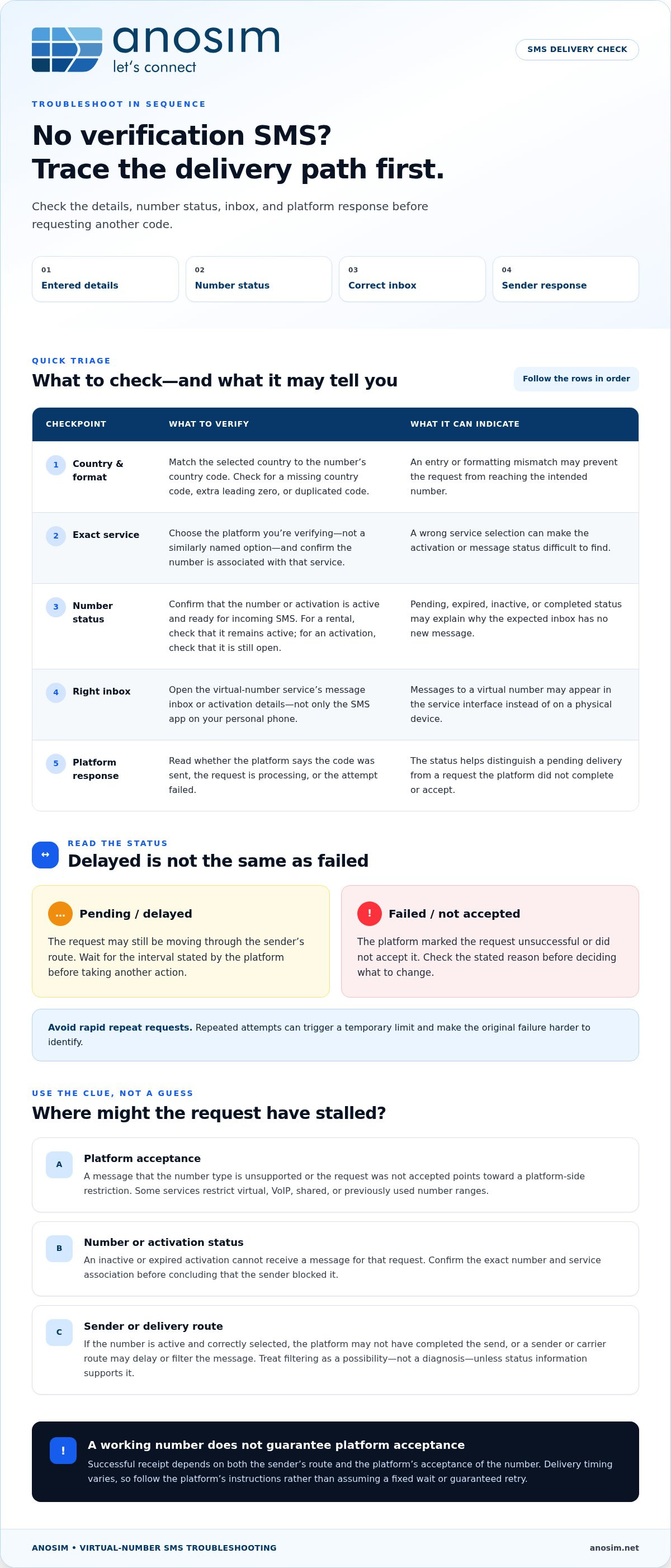
You requested a verification code, but no message appeared in the virtual-number inbox. Before requesting another code or switching numbers, check the full delivery path: the details you entered, the number’s status, the inbox you’re monitoring, and the sending platform’s response. This triage helps distinguish an input error from a pending or unsuccessful request.
A virtual number isn’t necessarily tied to a physical SIM card. For background on what a virtual number is, see Wikipedia. For SMS verification, the practical point is that the sending service and number must support and route the message. Receipt is not guaranteed on every platform.
- Check the country and format. Compare the selected country with the number’s country code, then enter the full number as the platform instructs. Look for a missing country code, an extra leading zero, or a duplicated code.
- Confirm the intended service. Select the exact platform you’re verifying, not a similarly named option. A wrong selection can make it harder to locate the correct activation or message status.
- Check number status. Confirm that the number or activation is active and ready to receive an incoming SMS. If it’s pending, expired, or marked complete, a new request may not reach the inbox you expect.
- Open the right inbox. Check the virtual-number service’s message inbox or activation details, not just the SMS app on your personal phone. A message to a virtual number may appear in the service interface instead of on a physical device.
- Review the sender’s response. Check whether the platform says the code was sent, the request is processing, or the attempt failed. Each status points to a different part of the delivery path.
What to check before requesting another code
Compare the details above with the platform’s instructions. If you’re using a rented number, confirm that it remains active. If you’re using an activation, check that the current activation is still open. Keep the original request and number details visible while correcting an entry, so you don’t mistake a new attempt for the original one.
Is the delay temporary or a failed delivery?
Wait for the interval stated by the platform before taking another action. A pending request may still be moving through the sender’s route; a failed status means the platform did not complete or accept the request. A delayed delivery is still pending; a failed request has been marked unsuccessful or wasn’t accepted by the sending platform. If the status is unclear, avoid rapid repeat requests while you check it. This sequence is a practical starting point for troubleshooting sms not received on virtual number issues without adding unnecessary attempts.
Why Verification SMS Can Fail on a Virtual Number
A missing code doesn’t identify the cause on its own. The request may be rejected before a message is sent, delayed along the sender’s route, or sent to a number that is no longer active. Separate these possibilities before deciding whether to check the platform, number status, or inbox.
Successful SMS receipt depends on both the sender’s route and the platform’s acceptance of the number. A number may be active and able to receive inbound SMS while a particular service still declines its number type or range.
Platform restrictions and number-type compatibility
Some platforms restrict virtual, VoIP, shared, or previously used number ranges. A verification system may reject a number when you enter it, or accept the request without successfully routing a code. Review the sending platform’s supported-number and verification guidance. A stated restriction points to a compatibility issue; a pending request without a restriction message may instead indicate a delay. Don’t treat these as the same diagnosis.
These restrictions can be part of a service’s authentication policy. NIST discusses the security risks of SMS verification, including risks associated with telephone-based authentication. This context helps explain why services may set their own limits, but it doesn’t establish why a specific request failed.
Activation status, routing, and timing
An inactive or expired activation can’t receive a message for that request. If you selected a number for a different service, you may be checking the wrong activation or inbox. Confirm the exact number and service association, then review the status shown in the number service before concluding that the sender blocked it.
If the number is active and correctly selected, the issue may be farther along the delivery path. The platform may not have completed the send, or a sender or carrier route may delay or filter the message. Treat filtering as a possibility, not a diagnosis, unless the platform or service status provides evidence. Delivery timing varies, so follow the sending platform’s instructions rather than assuming a fixed wait or guaranteed retry.
- Platform-side clue: The service reports that the number type isn’t supported or the request wasn’t accepted.
- Number-status clue: The activation is inactive, expired, or linked to a different service.
- Routing clue: The number is active and the request is accepted, but the message remains pending or absent.
For a single verification workflow, Anosim’s SMS activation option provides an inbound-SMS route. Acceptance still depends on the service you’re verifying. To troubleshoot missing SMS on a virtual number, identify where the request stalled before choosing another number.
Activation or Number Rental: Which Option Fits the Problem?
A missing code doesn’t always mean you need a different number. First decide whether your workflow requires one verification or continued access. Activation and rental serve different timeframes, but neither changes a platform’s rules about accepted number types. If the service rejects virtual or VoIP numbers, switching from activation to rental alone may not resolve the restriction.
- SMS activation: best suited to a specific, one-time verification task. Check that the correct service is selected and the activation is active before requesting a code.
- Virtual-number rental: best suited to workflows that may need the same number for later verification messages. Consider how long you need access and whether the platform permits that number type.
When a one-time SMS activation is the practical route
Choose an SMS activation service when you need an inbound verification message for one task, rather than continued access to the number. Before requesting a code, confirm that the selected service matches the account you’re verifying and check the activation status. If you’re troubleshooting a missing SMS on a virtual number, an activation with the wrong service selected can make the message appear missing when the actual problem is the request setup.
When longer-term access better matches the workflow
If you expect follow-up codes for the same account or need the number throughout an ongoing workflow, a virtual-number rental may fit better. Continued access can simplify later verification steps, but it doesn’t guarantee that a platform will accept the number or route every message to it. Include the platform’s verification rules in your decision.
Let the need for repeat access guide your choice. A one-off task points toward activation; recurring verification needs point toward rental. If the current request failed because the platform doesn’t support the number category, address that compatibility issue before changing the access period. Choose the option that fits the workflow, not as a workaround for a platform restriction.
What to Do When a Code Still Does Not Arrive
If the message hasn’t appeared after the platform’s stated wait, pause before requesting another one. A deliberate check-and-retry sequence can uncover a setup issue or a failed delivery, while reducing the risk that rapid requests trigger limits or make the cause harder to trace.
A careful retry sequence
- Verify the details. Recheck the country selection, full number format, and selected service or account. Confirm that the current activation is still active, or that your rented number remains available to receive messages.
- Wait for the stated interval. Use the sending platform’s guidance as your timing reference. Don’t keep pressing resend while a request is pending.
- Check both statuses. Review the sender’s request or delivery status and the relevant virtual-number inbox. Note whether the platform says the code was sent, the request is processing, or the attempt failed.
- Record the attempt. Keep the request time, status, and any error message. This helps you identify a pattern instead of confusing several rapid requests.
- Retry once, if allowed. If the platform permits another attempt and the details are correct, make one deliberate retry. If that request also fails, stop and follow the platform’s stated support process.
Repeated requests aren’t a reliable way to force delivery. They may trigger a temporary limit, and each new request can make it less clear which attempt the inbox or status refers to.
When to change the verification route
Use a different verification method only if the platform explicitly offers it and allows it for your account. If the platform presents another method, follow its instructions rather than assuming every account or virtual number can use that route.
Change number options only when the access period better fits your workflow. A one-time activation suits a single task; a rental may fit a need for later verification messages. Neither option overrides the platform’s number-acceptance rules, so don’t switch simply to bypass a restriction.
For service-specific guidance, consult the SMS receiving FAQ. Anosim offers inbound SMS options for verification workflows, with activation and rental suited to different access needs. In troubleshooting cases where SMS hasn’t arrived on a virtual number, stop when the platform reports a failed request and follow its support process rather than continuing to resend.
Choose the Next Step for Your Virtual-Number Workflow
After checking the number details and delivery status, choose your next step based on what failed. Correct an input or activation-status issue first. If the platform reports a failed or unsupported request, follow its verification guidance rather than repeating attempts or assuming another number will work. If the number is active but your workflow needs a different access period, choose between one-time activation and longer-term rental.
Match the next step to the verification need
- One verification task: SMS activation is suited to receiving an inbound code for a specific verification workflow.
- Recurring access: A longer-term virtual-number rental fits workflows where you may need the same number for later verification messages.
- Automated workflows: Developers can integrate SMS-related workflows using the Anosim API or SMS-Activate Standard API. Consult the applicable API documentation for implementation details.
These options serve different operational needs, not different platform restrictions. Before changing your setup, check whether the account platform accepts the number type you intend to use. Choosing a rental instead of an activation won’t override its policies or guarantee that it will send a code.
Keep verification secure and policy-compliant
Follow the platform’s terms and use only verification methods it accepts. Treat a verification code as sensitive: don’t share it with others or expose it in logs or public channels. A virtual number can help separate verification activity from your personal number, but it doesn’t replace secure account recovery methods. Keep recovery details current and use the platform’s recommended security controls.
The practical decision is straightforward: correct an input or status problem, follow the platform’s instructions when it declines a request, or choose activation or rental according to how long you need access. Effective troubleshooting starts by locating the failure, then selecting an option that fits the workflow. Number selection can support privacy, but it can’t guarantee acceptance by every service.
To use an inbound SMS activation for a verification task, explore SMS activation options.
Make Your Next Verification Attempt Count
A missing code doesn’t automatically mean the number is unusable. Check the number format, selected service, and activation or rental status, then review the platform’s delivery status before deciding what to do next. A single measured retry, when allowed, is more useful than repeated requests that can trigger limits or obscure the cause.
When troubleshooting an SMS that hasn’t arrived on a virtual number, separate a setup or status problem from a platform restriction or delivery delay. Then match the number option to your workflow: activation for a single verification task, or longer-term rental when you need continued access. Neither guarantees acceptance by a particular platform, so follow its verification rules.
Anosim provides inbound SMS activation and longer-term number rentals. Developers can also integrate through the Anosim API or SMS-Activate Standard API for automated workflows. Explore Anosim SMS activation options for your next verification task.
With a clear diagnosis and the right access period, you can make your next attempt with greater confidence.
Frequently Asked Questions
Why is my SMS verification code not arriving on a virtual number?
A code may be delayed, sent to an incorrectly formatted number, blocked by the platform, or tied to an inactive activation. Confirm the country selection and full number, check that the number is active and linked to the intended service, then review the platform’s request status. A missing message doesn’t necessarily mean your device is at fault, since some services don’t accept certain virtual-number types.
Can a platform block SMS codes sent to virtual numbers?
Yes. Some platforms restrict virtual, VoIP, shared, or previously used number ranges. Check the platform’s supported verification methods and number policies to see whether the number type is accepted. Refreshing an inbox or changing devices won’t resolve a platform restriction. If the number category isn’t supported, follow the platform’s permitted verification options rather than repeatedly requesting codes.
How long should I wait before requesting another verification code?
Follow the wait interval shown by the service sending the code. If it doesn’t provide a timeframe, avoid rapid repeat requests and allow time for delivery before considering another attempt. First confirm the number and activation status, then check whether the request is pending or marked failed. Make another request only if the platform allows it, since repeated attempts may trigger limits or complicate troubleshooting.
What should I check first when an SMS activation code is missing?
Check that you selected the correct country and entered the complete number in the required format. Then confirm the activation is active and linked to the intended service. Look in the virtual-number service inbox and review its status rather than expecting the message in your personal phone’s SMS app. If these details are correct, consider a sender delay or platform restriction before retrying.
Will renting a virtual number guarantee that I receive verification SMS?
No. A rental can provide continued access to a number, but it can’t guarantee that every platform will accept that number or route a verification code to it. The sending service determines which number types it supports. Choose rental when you need ongoing access, and check the platform’s verification rules before relying on any number for an account.
Should I use SMS activation or rent a virtual number for repeated verification?
Choose based on how long you need access. SMS activation is suited to a specific, one-time verification task, while renting a virtual number is designed for continued access, including the possibility of later verification messages. Neither option overrides platform restrictions. Before deciding, check whether the service accepts the number type and whether you may need to receive future codes on the same number.
What happens if I keep pressing resend but no SMS arrives?
Stop repeated requests and check the number format, country selection, service, and activation or rental status. Then follow the platform’s stated wait period and retry instructions. Repeated resends won’t overcome a number-type restriction and may trigger a temporary limit. If a controlled retry fails or the platform reports a failed request, use another verification method only if offered, or follow its support process.
Can I receive verification SMS on a virtual number through an API?
Yes. An API can integrate supported inbound SMS workflows into an application, but it doesn’t make a platform accept every number or guarantee code delivery. Anosim supports the Anosim API and SMS-Activate Standard API. Confirm the number and service status, then consult the relevant API documentation for integration details. Keep the platform’s verification policies in mind when designing automated workflows or tests.