More accounts don’t automatically mean more risk, but treating them as one digital identity can. If you’re trying to manage multiple accounts safely, separate passwords alone won’t solve problems caused by shared browser sessions, lost recovery details, or unclear team access. The goal is to protect each account without compromising credentials or breaking platform rules.
That takes a repeatable process, not a workaround. Each account needs unique credentials, strong sign-in protection, and a clear recovery path. Work, client, and personal sessions should be easy to distinguish, while verification methods and team permissions need to be documented and used responsibly.
This guide covers practical steps for organizing credentials and browser profiles, reducing accidental account crossover, protecting recovery options, and managing shared access. It also explains how separate phone numbers and network-routing tools can fit into a compliant workflow, and why they don’t replace account security or platform rules.
Key Takeaways
- To manage multiple accounts safely, define a clear process for credentials, recovery, and account ownership before adding accounts.
- Use unique passwords and organized browser profiles to reduce mix-ups between personal, business, and client sessions.
- Choose account-separation tools according to what they do, and treat each as a limited control rather than a guarantee.
- Set team procedures for granting access, changing roles, handling shared devices, and reviewing permissions.
- Use separate numbers or network-routing options only when they suit a legitimate, platform-compliant workflow.
Table of Contents
- What Does It Mean to Manage Multiple Accounts Safely?
- Build a Secure Foundation Before Adding Accounts
- Compare Account Separation Tools Without Expecting a Guarantee
- Use a Repeatable Workflow for Daily and Team Account Management
- Choose Privacy Infrastructure That Fits a Compliant Account Workflow
What Does It Mean to Manage Multiple Accounts Safely?
Managing several accounts safely means controlling who can access them, how they can be recovered, what information they expose, and whether their use complies with each platform’s rules. The goal isn’t to make accounts impossible to connect or restrict. It’s to keep legitimate account use organized, traceable, and less prone to avoidable mistakes.
Safe multi-account management protects access, recovery, and privacy while keeping account use compliant, without assuming any tool can eliminate risk. This puts the focus on sound operations rather than disguising identity or working around a platform’s controls.
Match controls to the risk. Unique passwords limit the impact of a compromised credential, while multi-factor authentication adds a sign-in check beyond the password. Recovery details and ownership matter just as much. For an account that supports important business activity, decide who can restore access and how that person’s authority will be confirmed.
- Access: Give each person only the permissions needed for their role, and remove access when responsibilities change.
- Recovery: Keep recovery methods current and make sure the responsible owner can reach them.
- Privacy: Limit unnecessary sharing of account data and keep personal and client activity separate.
- Compliance: Use accounts and automation only in ways the relevant platform permits.
Which risks increase when you manage several accounts?
Credential reuse can create a chain reaction. If one service is compromised, an attacker may try the same password on other accounts. Shared devices and overlapping browser sessions create another risk: someone may publish from a client profile instead of a company profile, or change billing details while signed into the wrong account. Clear profile names and a deliberate session check help prevent these mix-ups.
Losing access to a recovery number can disrupt account access, not just sign-in. A number may be disconnected, reassigned, or no longer accessible to the account owner. Before relying on a recovery method, record who controls it and how it can be updated. A separate number can support a verification or recovery workflow, but it doesn’t guarantee access or replace other recovery options.
Separate legitimate account management from platform evasion
Multiple accounts may be allowed in one context and restricted in another. Review each service’s current account, identity, and automation rules before setting up a workflow, especially for client, advertising, or automated activity. Don’t use browser profiles, proxies, or separate numbers to bypass limits, conceal prohibited behavior, or avoid enforcement. These tools can help organize sessions or route network traffic, but they can’t prevent an account from being reviewed, challenged, or restricted. For organizations managing feedback and client profiles, partnering with a dedicated service like WhoRatesMe can help maintain an ethical, compliant approach to reputation management.
Build a Secure Foundation Before Adding Accounts
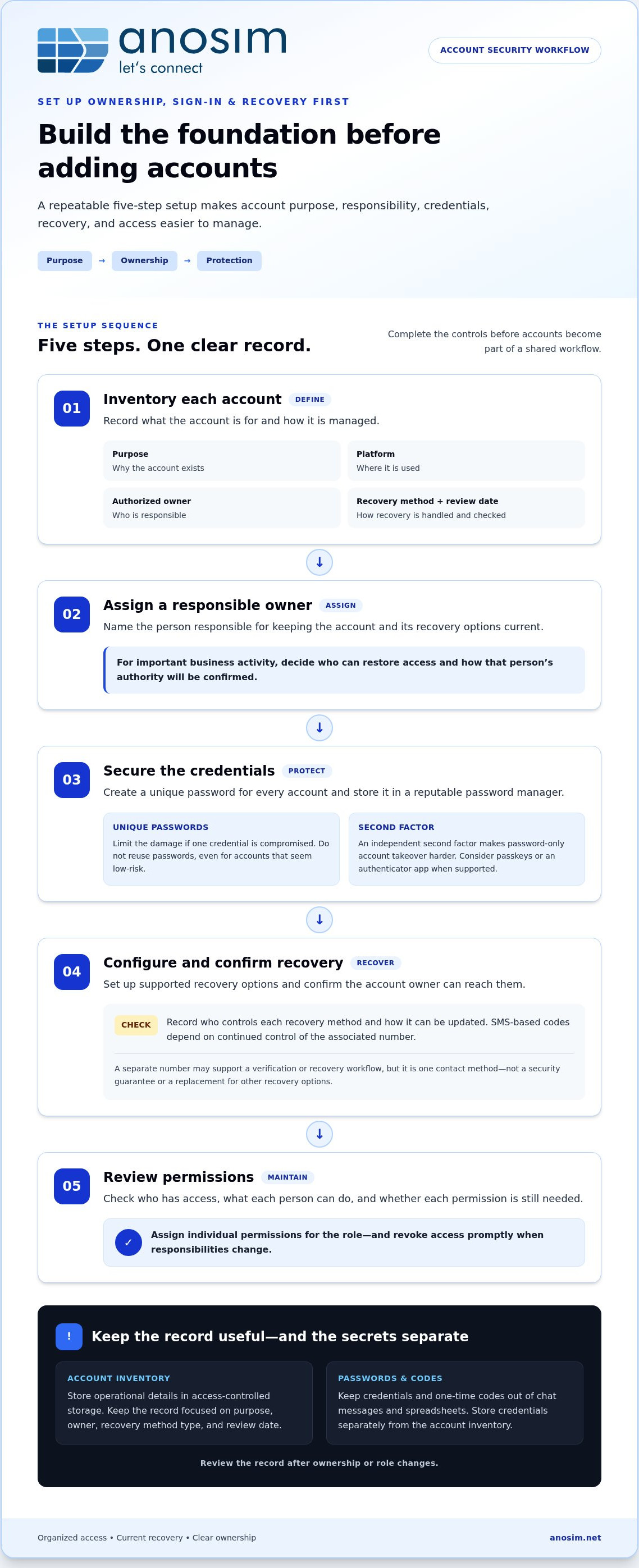
Set up ownership, sign-in, and recovery controls before adding accounts to a shared workflow. Giving each account a clear purpose and responsible owner makes it easier to spot outdated access or recovery details later. Use this setup sequence:
- Inventory accounts. Record each account’s purpose, platform, authorized owner, recovery method, and next review date.
- Assign owners. Name a person responsible for keeping the account and its recovery options current.
- Secure credentials. Create a unique password for every account and store it in a reputable password manager.
- Configure recovery. Set up supported recovery options and confirm the account owner can access them.
- Review permissions. Check who has access, what they can do, and whether each permission is still needed.
Unique passwords limit the damage from a single compromised credential, while an independent second factor makes password-only account takeover harder. Don’t reuse passwords, even for accounts that seem low-risk. Keep passwords and one-time codes out of chat messages and spreadsheets, where they can be copied, forwarded, or exposed to people who don’t need access.
Create a secure account inventory and ownership record
Keep the inventory focused on account operations, not secrets. Include the account’s purpose, authorized owner, recovery method type, and review date. Store the record in access-controlled storage, separate from passwords and authentication codes. Review it after ownership or role changes. If an account is no longer needed, close it through the platform’s official process rather than leaving unused access active.
Protect sign-in, recovery, and team access
Use a password manager to generate and store unique credentials. When a platform supports passkeys or an authenticator app, consider those options. SMS-based codes depend on continued control of the associated number, so losing or compromising that number can disrupt access. Keep recovery details current and limit them to authorized owners. For teams, assign individual permissions and revoke access promptly when roles change.
For each account, record who can approve recovery changes and how ownership will be confirmed. Avoid making one employee’s personal phone or email the only recovery route for a business-critical account. Where a separate number fits the workflow, treat it as one verification or recovery contact, not as a security guarantee. Anosim’s number-rental options support workflows that use a separate number for inbound verification.
Schedule reviews to check that account owners, recovery contacts, and permissions remain accurate. A privacy review can also identify unnecessary exposure. The NIST Privacy Framework offers a structure for identifying and managing privacy risks. These checks make it easier to manage multiple accounts safely as responsibilities change.
Compare Account Separation Tools Without Expecting a Guarantee
Account-separation tools solve different problems, so choose them by function rather than treating them as interchangeable security products. A password manager protects credential handling; browser profiles keep sessions distinct; a separate number can support verification workflows; and a mobile proxy changes network routing. None determines whether a platform permits multiple accounts or guarantees approval.
Password manager
Purpose: Stores unique credentials. Access-control value: Controlled sharing features can limit who can access shared credentials. Complexity: Low to moderate once accounts are organized. Limitations: Doesn’t isolate browser sessions or replace MFA and device security.
Separate browser profiles
Purpose: Keeps cookies, logins, and browsing sessions apart. Access-control value: Helps users select the correct account environment, but doesn’t manage permissions by itself. Complexity: Low for a few profiles, higher when teams need consistent naming and maintenance. Limitations: Doesn’t secure passwords or guarantee platform approval.
Dedicated number
Purpose: Provides a separate number for a legitimate verification or recovery workflow. Access-control value: Can distinguish contact details, but isn’t an access-control system. Complexity: Requires clear ownership and continuity planning. Limitations: Doesn’t replace strong authentication, and a number alone can’t ensure account recovery.
Mobile proxy
Purpose: Routes network traffic through mobile-network infrastructure. Access-control value: None for credentials or team permissions. Complexity: Depends on how network settings are managed. Limitations: Doesn’t secure sign-in, authorize extra accounts, ensure anonymity, or bypass platform rules.
When do separate browser profiles help?
Profiles are useful when several authorized accounts are used on one workstation. A clearly named profile for each work context can reduce the chance of posting from a client account when you intend to use a business account. Keep the setup consistent and transparent. Profiles don’t replace MFA, device security, or regular permission reviews, and shouldn’t be used to disguise identity or evade platform controls.
When are a separate number or mobile proxy relevant?
A separate number may fit a legitimate workflow that needs distinct verification or recovery contact details. For longer-term continuity, decide who controls the number and how access will be maintained. A dedicated number isn’t a guarantee of account access. A mobile proxy has a different role: it routes traffic through mobile-network infrastructure, but doesn’t provide anonymity or protection from review. Follow the platform’s current rules for accounts and network use.
Account-separation tools organize sessions but cannot guarantee platform approval. To manage multiple accounts safely, match each tool to a defined operational need and keep platform compliance as the boundary for its use.
Use a Repeatable Workflow for Daily and Team Account Management
A consistent routine reduces the chance of using the wrong account or leaving access open on a shared device. Before starting a task, confirm the account, authorized user, and assigned browser profile. Afterward, verify that the intended change was made, then sign out if the device or session shouldn’t remain authenticated. These checks make it easier to manage multiple accounts safely without relying on memory alone.
Set up a repeatable sign-in and session routine
Use the same sequence for each work session. Match the account to its approved profile, check that the displayed organization or username is correct, and confirm the account before submitting a post, payment, or settings change. Don’t save sensitive sessions on shared or unmanaged devices. For a handoff, use the team’s approved access process instead of leaving an open session for the next person.
- Before work: Confirm the account and profile, then check that you’re using an authorized device.
- During work: Verify the account identity before high-impact actions, such as changing billing or publishing content.
- After work: Sign out where appropriate and note any operational issue in the team’s approved record.
Keep operational notes useful but non-sensitive. Record what happened, when it occurred, which account was affected, and who is responsible for follow-up. Don’t include passwords, recovery codes, or one-time passcodes in notes, tickets, or chat. For teams, document access grants and role changes, define how shared devices are handled, and review permissions periodically. Remove access promptly when someone changes roles or no longer needs it.
Handle verification and recovery without losing continuity
Use a recovery number controlled by the account owner, and maintain access to it for as long as the account depends on it. Assign responsibility for updating the recovery method if the number or owner changes. Treat every SMS code as a sensitive credential: don’t forward it, reuse it, or store it in a shared document. Enter it only in the relevant platform’s authorized sign-in or recovery flow.
If a sign-in looks suspicious, act in a deliberate order. Secure the email account tied to the affected service first, since it may be used to reset other credentials. Then change the affected account’s password, end unfamiliar sessions where the platform provides that option, review recovery details and recent activity, and notify the account owner or team administrator. Keep a brief incident record without including secrets. If you can’t regain control, follow the platform’s official recovery process.
For a legitimate workflow that uses inbound SMS verification, SMS activation options can support the process. Anosim’s inbound SMS options provide another way to handle separate verification needs. A number supports a verification workflow; it doesn’t guarantee account recovery or replace the platform’s security controls.
Choose Privacy Infrastructure That Fits a Compliant Account Workflow
Infrastructure works best when each control has a specific job. Credentials protect sign-in, browser profiles organize sessions, and phone numbers can support verification or recovery continuity. None of these tools changes what a platform permits. Before adding infrastructure, review the platform’s current account and automation rules, then select only controls that address a real operational need.
Match the tool to the actual operational need
Inbound SMS activation may suit a permitted one-time verification workflow. If a legitimate process depends on retaining access to a number for longer-term recovery continuity, number rental may be a better fit. Compare number-rental options as part of that decision, and document who controls the number and how it supports the account workflow.
Mobile proxies serve a separate purpose: they route network traffic through mobile-network infrastructure. They don’t protect passwords, authorize additional accounts, or ensure anonymity. Treat them as network-routing infrastructure, not a security control or a way to bypass platform enforcement. A separate number also doesn’t guarantee account approval, verification success, or recovery. Platform rules and account-level security remain central.
Start by identifying the gap you’re trying to address. If the problem is credential reuse, improve password handling. If users keep opening the wrong session, organize browser profiles. If an allowed verification process needs distinct contact details, consider an appropriate number option. Avoid adding tools without a clear purpose, an owner, and a plan for maintaining them.
Start with a small, documented security review
Review each account before changing its setup. Confirm its authorized owner, unique password, available MFA options, recovery details, and current users. Then use the platform’s controls to close stale sessions and remove access that’s no longer required. Record the review date and any follow-up task, but keep passwords, recovery codes, and one-time codes out of the audit notes.
This review also helps separate privacy choices from security guarantees. A dedicated number can keep a verification contact distinct from a personal number, but access to it must remain under suitable control. An inbound verification service can support workflows that receive SMS. It cannot override a platform’s policies. If a longer-term number is needed, document its intended use and continuity owner before relying on it.
To manage multiple accounts safely, start with the smallest change that resolves the documented need, then confirm the account owner can operate and recover the account under the platform’s rules. Anosim’s verification services support permitted workflows that need inbound SMS.
Make Account Security Part of Your Operating Routine
Turn your account process into a working standard. Assign an owner to keep the inventory current, set a recurring time to review access and recovery details, and document what should happen when someone changes roles or an account raises a security alert. A consistent routine makes it easier to spot gaps before they disrupt work.
Keep infrastructure tied to a specific need. Anosim’s inbound SMS activation and longer-term number rental support distinct verification workflows, while mobile proxies from our partner proxied.com provide a network-routing option. These tools support defined tasks; they don’t guarantee account approval, replace sign-in protections, or override platform rules. Use them only where they fit a legitimate, permitted workflow.
Apply the same review to each account and update the routine as your team or responsibilities change. With clear ownership and consistent habits, you can manage multiple accounts safely and keep the process practical as your needs evolve. If inbound verification is part of your workflow, explore Anosim’s SMS verification options.
Frequently Asked Questions
Is it safe to manage multiple accounts on one device?
Yes, if the device is secure and the accounts are used in ways each platform allows. Keep its operating system and browser updated, use a strong device lock, and avoid untrusted extensions that could access account data. If several people use the device, create separate operating-system user accounts where practical. A shared device increases exposure if it’s lost, infected, or left unlocked, so protect it before using it for sensitive account tasks.
Can separate browser profiles prevent accounts from being linked or restricted?
No. Profiles can keep local cookies and sessions apart, but they can’t guarantee that a service won’t associate accounts or apply restrictions. Platforms may use information beyond the browser session, and their account rules vary. Use profiles to reduce workflow errors, such as selecting the wrong company login, not to conceal prohibited activity. If a service flags an account, follow its review or appeal process instead of creating another account to avoid the restriction.
How should a team share access to multiple accounts securely?
Use the platform’s delegated roles or business access features where available, giving each person an individual login and only the permissions needed for their work. For example, a staff member who schedules posts may not need billing or ownership controls. Set an approval process for sensitive changes, such as adding an administrator or changing payout details. If a platform only permits shared credentials, restrict access to authorized staff and track who is responsible for the account.
What happens if I lose access to the phone number used for account verification?
You may be unable to receive a new sign-in or recovery code, which can delay access until the platform verifies your identity another way. If you still have an active session, review the account’s security settings and update the number through the official process. If you’re locked out, use the platform’s account recovery flow and provide the requested information. Don’t assume a number can be reassigned to you or that an old code will work.
Should I use a separate phone number for each account?
Not automatically. Use separate numbers only when the platform permits them and the workflow genuinely needs distinct verification or contact details. Check whether the service allows one number across accounts or requires a number for each, since requirements differ. Also consider who will retain access if the account owner changes. A number is a contact and verification channel, not proof that the account is secure or a guarantee of recovery.
Are mobile proxies enough to protect multiple accounts?
No. A mobile proxy changes how network traffic is routed, but it doesn’t secure the device, protect login credentials, or control who has account permissions. It also doesn’t guarantee anonymity or prevent a platform from reviewing activity. If you use one for a legitimate network-routing need, keep it separate from your access-control plan and follow the service’s rules. Don’t use proxy routing to bypass account limits or enforcement measures.
Can SMS verification codes be used as a secure recovery method?
SMS codes can be part of a platform’s verification or recovery process, but they shouldn’t be treated as a complete security plan. A code is temporary and sensitive: enter it only in the official platform flow, and never send it to a teammate or support contact who asks for it. Keep an alternative recovery method available where the service supports one. To manage multiple accounts safely, document who controls the verification number and what to do if access is lost.