
Separate browser profiles help keep authorized ecommerce accounts organized, but they don’t override a platform’s rules or guarantee that accounts won’t be linked. To verify multiple ecommerce accounts, provide accurate information for each account, follow the platform’s requirements, and be prepared for checks during sign-up, purchases, account recovery, or profile changes.
It’s reasonable to want distinct accounts without accidental overlap, especially when managing separate stores or testing a business model. The practical approach is to separate account activity, address verification errors carefully, and keep details current without misrepresenting who owns or operates an account. This guide explains how browser profiles support account separation, what verification can involve, how to troubleshoot common issues, and how to follow platform rules.
Key Takeaways
- Use separate browser profiles to keep each store’s sessions, cookies, and workspaces organized, but follow the platform’s account rules.
- When a verification attempt fails, diagnose the specific issue before retrying, such as an incorrect detail, a blocked code, or a browser-session problem.
- Keep account information current and be prepared for verification during sign-up, purchases, recovery, or sensitive profile changes.
- For SMS verification-code workflows, Anosim SMS Activation is one option to consider when it fits the platform’s requirements.
Table of Contents
- Browser profiles and account independence
- Errors and technical challenges
- Ongoing monitoring and re-verification
- Platform rules and account legality
- Anosim: SMS Activation
Browser profiles and account independence
Separate browser profiles help keep ecommerce workspaces distinct, but they don’t make accounts invisible to a platform. Each profile can store its own cookies, saved sessions, and tabs, reducing mix-ups when you switch between stores. A separate account can also help test a product line or business model without putting a flagship store’s reputation and performance at risk.
Before setting up another account, confirm the platform permits it and that it serves a legitimate business purpose. Then create a dedicated browser profile, sign in only to the intended store, and submit accurate details through the platform’s verification process. Keep the profile’s bookmarks and saved credentials specific to that store. Don’t use browser separation to disguise shared ownership or evade account limits.
Verification may take place when you create an account, make a purchase, recover access, or change profile details. For example, a marketplace may request a biometric Face Match check after a seller changes payout details. Liveness checks may also appear during a high-value checkout or account recovery to help connect a buyer with a transaction. A browser profile cannot prevent these platform checks or replace requested identity and business information.
How long seller verification takes depends on the platform’s review process, the information submitted, and whether additional checks are needed. Any fee is set by the platform and may depend on the account type or verification process.
For clearer account separation, use this workflow:
- Create a named browser profile for each permitted store, such as “North Store” and “South Store.”
- Use each profile only for its assigned account, and avoid switching accounts inside the same session.
- Submit truthful details and complete the exact verification steps shown by the platform.
- Record each account’s recovery method and review dates in a secure business record.
This approach separates routine browser sessions while keeping ownership information accurate. If one business operates multiple stores, make that relationship clear wherever the platform requests it. Separate profiles are an organizational tool, not a way to bypass account policies or identity checks.
Errors and technical challenges
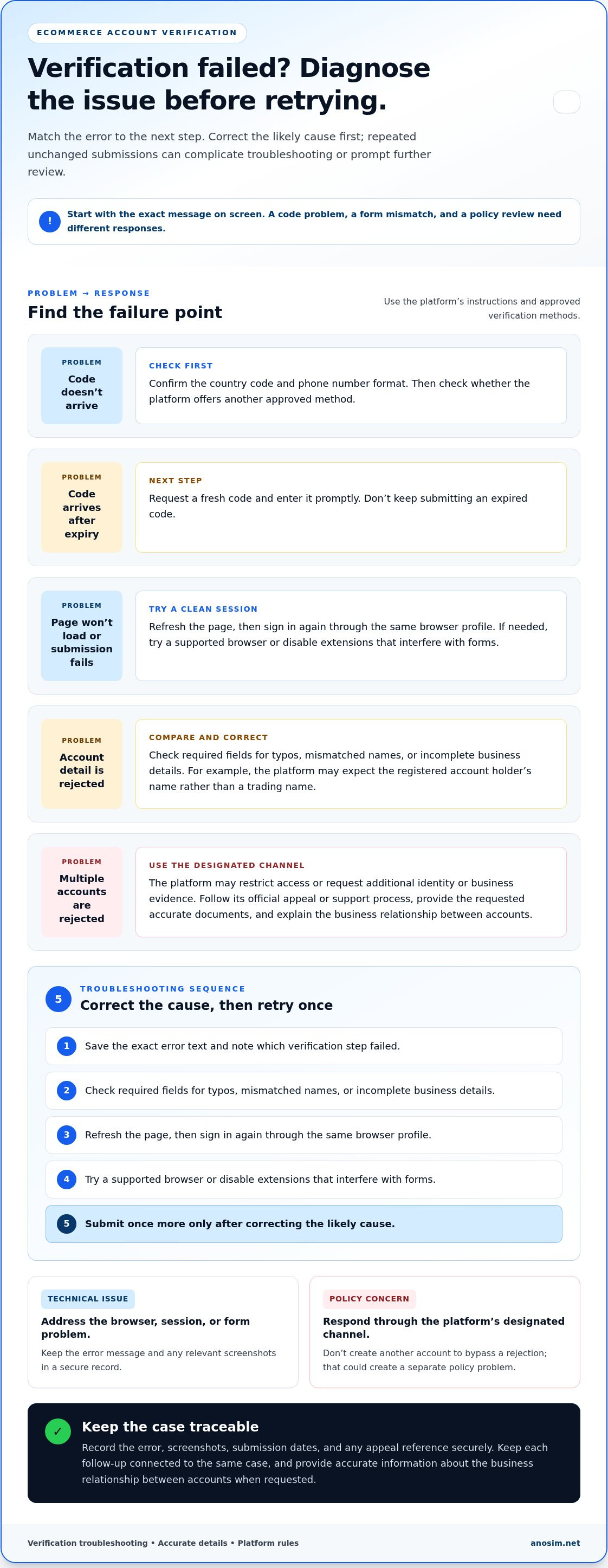
Verification can fail because of incorrect account details, an expired code, or a browser session that no longer meets the platform’s requirements. Identify the specific error before trying again. Repeatedly submitting unchanged information may complicate troubleshooting or prompt further review.
Start with the message on screen. If a code doesn’t arrive, confirm the country code and phone number format, then see whether the platform offers another approved method. If the code arrives after it expires, request a fresh one and enter it promptly. Don’t keep submitting an expired code.
For a page that won’t load or a submission that fails, follow this sequence:
- Save the exact error text and note which verification step failed.
- Check required fields for typos, mismatched names, or incomplete business details.
- Refresh the page, then sign in again through the same browser profile.
- Try a supported browser or disable extensions that interfere with forms.
- Submit once more only after correcting the likely cause.
For example, a business owner might enter a trading name when the platform expects the registered account holder’s name. Compare the rejected field with the platform’s instructions, then correct the mismatch. Keep screenshots and submission dates in a secure record. This information can help explain the issue if support asks for context.
If verification for multiple accounts is rejected, the platform may restrict access or request additional identity or business evidence. Use its official appeal or support process, provide the requested accurate documents, and explain the business relationship between the accounts.
Distinguish technical issues from account-policy concerns. You may be able to address a browser fault by correcting the session or form, while a policy review requires a response through the platform’s designated channel. Don’t create another account to bypass a rejection, as this could create a separate policy problem. Keep the original error message and any appeal reference together so each follow-up relates to the same case.
Ongoing monitoring and re-verification
Verification isn’t always a one-time task. An ecommerce platform may request another check during account recovery, a purchase, or a sensitive profile change. Treat each request as a new platform instruction, not as a reason to replace account details or repeat earlier submissions without reviewing them.
Keep a secure record for each store. Include the account owner, platform, registered contact details, verification status, and date of the latest completed check. For example, if a payout contact changes, record the change and watch for a platform prompt related to the update. Limit access to this record to people who manage the account.
Use a simple review process to catch issues before they disrupt account access:
- Compare each account’s contact and business details with current records.
- Confirm that the person responsible can access the registered email and phone.
- Review platform notifications for new verification requests or deadlines.
- Log completed checks and retain any confirmation messages securely.
- Remove access for former staff through the platform’s account controls.
Handle contact changes carefully. If you can no longer access a registered phone number, use the platform’s account recovery process before changing other details. If a team member leaves, update user permissions and recovery contacts through the official settings. Don’t use a colleague’s personal number as a permanent substitute unless the platform’s rules and account ownership details allow it.
Re-verification can involve more than a code. A marketplace may request a biometric Face Match check after a seller changes payout details. Liveness checks may also appear during a high-value checkout or account recovery to connect a buyer with a transaction. Keep the account owner available to complete these steps. A saved browser session cannot complete identity checks on someone else’s behalf.
For multiple accounts, maintain a separate status entry for each store instead of relying on memory. When a platform sends a notice, identify the affected account, follow the requested process, and update the record once the check is complete. This creates a clear audit trail and helps distinguish a routine review from an unresolved technical issue.
Platform rules and account legality
Before opening another store, read the marketplace’s multiple-account policy and identify who owns each account. Platform permission, accurate ownership details, and the business purpose determine the appropriate setup.
In the United States, each marketplace sets its own seller verification process. Amazon, eBay, Etsy, and Walmart may request account, identity, business, or payment details, but requirements differ. Follow the instructions shown for each account.
Shared addresses, bank accounts, or tax IDs can indicate a relationship between accounts, but don’t by themselves establish a policy violation. Be transparent about the relationship and explain which person or legal entity operates each store if the platform requests clarification.
Rules for Multiple Accounts
Check the platform’s rules for additional seller accounts, permitted business purposes, and links between stores. A separate account may suit a distinct business or product line when the marketplace allows it, but browser separation does not create permission.
Keep the account purpose and ownership details consistent across the application and supporting records. If a platform flags accounts for review, follow its stated review or appeal steps rather than opening another account to avoid the decision.
Different Owners and Legal Entities
For accounts with different owners, submit each owner’s accurate details through the relevant platform process. For separate legal entities, keep each entity’s registration and account information distinct, then disclose shared ownership or management wherever the platform asks. For example, two subsidiaries may use one operations team while retaining separate legal identities. For businesses looking to simplify entity onboarding and record collection, workflow tools like cateno.ai help automate and verify entity information seamlessly.
If accounts share a bank account, tax ID, or business address, explain why when asked. Don’t use one entity’s documents for another. Keep records linking each store to its responsible owner, and use the marketplace’s support or appeal process to clarify any mismatch.
Anosim: SMS Activation
Anosim offers SMS Activation for workflows that require receiving verification codes. If a marketplace allows the number type you plan to use, this service can support a separate account’s phone verification step. It doesn’t replace the platform’s identity, business, or ownership checks. Follow the marketplace’s rules for contact details.
For an account workflow that requires a longer-term number, Anosim also offers Rent Number and Rent Service. Choose according to the verification process and the platform’s requirements, not to conceal account ownership. Keep account information accurate and accessible for follow-up checks.
For a code-receiving option, visit Anosim SMS Activation.
Build a repeatable account workflow
Make account management part of your operating process, not a task handled only after a platform raises a concern. Assign an owner for each store, record who can access its recovery methods, and document the approved steps for onboarding or changing account details. This gives your team a consistent way to manage new stores as operations grow. If your organization also works with external sellers or distribution networks, consulting resources from Computer Market Research can help clarify how different partnership models function across sales channels.
A useful next step is to turn each platform’s requirements into a short internal procedure. Specify who submits verification details, where records are stored, and how staff should respond to a new review. This keeps account access deliberate and reduces confusion during team or ownership changes. The right approach to how to verify multiple ecommerce accounts starts with matching each account’s process to its legitimate owner and the platform’s rules.
If SMS-based code receipt is part of your permitted workflow, explore Anosim’s options and choose the service that fits your use case. Contact Anosim about account verification to discuss the available SMS-related services.
With a clear process in place, your team can manage account changes with greater control and confidence.
Frequently Asked Questions
How do I prevent platforms from linking my multiple accounts?
You can’t reliably prevent a platform from recognizing accounts connected to the same person or business. A practical approach to how to verify multiple ecommerce accounts is to keep ownership transparent and each account’s purpose legitimate. For example, if separate teams manage two stores under one company, keep an internal record of which team handles each account. Use privacy measures to protect account access, not to conceal ownership.
What is the biggest risk of a multi-account strategy?
The main risk is losing access to essential business operations if a platform restricts an account or requests further review. A disruption can affect store management, customer service, or order handling. Reduce dependence on any single account by documenting ownership, assigning authorized staff, and keeping business records accessible. Don’t create extra accounts without a clear purpose and the platform’s permission.
Can one person legally operate multiple ecommerce seller accounts?
Whether one person may operate multiple seller accounts depends on applicable law and each marketplace’s rules. There isn’t one universal answer for every jurisdiction and platform. If you’re deciding how to verify multiple ecommerce accounts, identify each account’s actual owner and business purpose, then review the relevant marketplace terms. Keep those details consistent in business records so you can explain the arrangement if asked.
How do you avoid duplicate-account flags during ecommerce verification?
Use accurate account details, and don’t create another profile to work around a verification rejection. If a new store has a distinct business purpose, document that purpose and its relationship to any existing store. For instance, record whether it serves a separate legal entity or a genuinely different operation. If a platform flags it, respond through the designated review process with a concise explanation.