
A 429 response is a stop signal, not an invitation to retry immediately. To understand how to handle rate limiting during account creation, pause requests when the endpoint rejects them, follow any Retry-After value, and retry with backoff rather than sending repeated attempts. One recommendation for account-creation endpoints is to limit requests to no more than 5 per minute per IP address, with the threshold tuned to the service’s traffic.
Rate limits protect signup systems from sudden traffic spikes and automated abuse, but overly strict limits can interrupt legitimate registrations. The right response depends on the API’s response and how the limit is applied, such as per IP address, account, or time window.
This guide explains how rate limits work, what HTTP 429 and Retry-After tell you, and how those controls affect account creation. It also covers practical retry behavior and the trade-offs of IP-based limits, so you can distinguish a temporary throttle from a registration problem.
Key Takeaways
- Choose a rate-limiting algorithm based on whether the endpoint needs smooth traffic, controlled bursts, or predictable request processing.
- Read request quotas alongside their time windows; a fixed-window boundary can allow traffic bursts that are easy to miss when looking only at the stated limit.
- When an API returns a retry delay, respect it and use backoff to avoid compounding the throttle with repeated requests.
- For sign-up endpoints, balance abuse prevention with legitimate access by considering shared IPs and pairing rate limits with other controls.
Table of Contents
- What is API rate limiting and how does it work?
- Rate limits expressed as requests per time interval
- HTTP 429 responses and Retry-After headers
- Rate limiting for account-creation endpoints
- Anosim
What is API rate limiting and how does it work?
An API rate limiter controls how quickly a client can send requests to a server. During account creation, it can slow or reject signup requests after a configured threshold is reached.
Rate-Limiting Algorithms
A rate-limiting algorithm determines how a server counts requests and when it delays or rejects them. During signup, this can protect an endpoint from automated bursts while still affecting legitimate users. Fixed-window and sliding-window algorithms count requests over time; token-bucket and leaky-bucket algorithms regulate how requests pass through.
Window and Bucket Trade-Offs
A fixed window resets its counter at set boundaries, making it simple to configure but allowing bursts around a reset. A client could use its full quota at 12:00:59 and another full quota at 12:01:00. A sliding window tracks a rolling interval, smoothing traffic more accurately. A sliding-log approach tracks requests precisely, but can use more memory at high volumes.
A token bucket lets requests accumulate tokens at a set rate, then spend them to allow bursts. For example, a web server might limit one IP address to 50 requests per minute while adding 10 tokens per minute. A leaky bucket processes requests at a predictable output rate, such as one email every six minutes. The right choice depends on whether the endpoint needs controlled bursts or steady processing.
Account-creation limits activate when requests exceed a configured threshold within a time window. Signup surges, repeated automated attempts, or traffic shared by users on one IP address can all reach that threshold, even when some requests are legitimate.
CAPTCHA challenges can add friction for automated signup attempts, while email or phone verification asks users to demonstrate access to a communication channel. These controls complement rate limits: a request quota controls traffic volume, while verification adds a separate check before registration is completed.
A VPN or proxy can change the apparent IP address, but it does not remove an endpoint’s rate limit. Distributed or dynamic IP addresses can make enforcement harder, while shared IPs can cause legitimate users to be affected by other traffic from the same address.
Rate limits expressed as requests per time interval
A rate limit combines a request ceiling with a time interval. Together, these determine when throttling begins and how long it may affect an API client.
Request and Transaction Thresholds
An API request limit caps calls to an endpoint, while transactions per second describe how quickly a service processes work. The distinction matters because one signup transaction may involve several API requests. A REST API example allows 100 requests per minute, while a server-based example allows 100 requests per second. These limits measure different intervals and shouldn’t be treated as interchangeable.
To implement a custom threshold, providers consider endpoint behavior and resource demand. An expensive route may have a lower ceiling than a lightweight one. For example, a limit of 10 requests per minute on an expensive API route can protect backend responsiveness. The maximum should also account for ordinary traffic, so throttling doesn’t unnecessarily interrupt valid activity.
Client and IP Thresholds
A fixed-window threshold counts requests during a defined interval and resets the counter when that window ends. Limits may apply per client, API key, account, or IP address. The distinction matters: a per-client ceiling treats each identity separately, while a per-IP ceiling groups requests that share a network address.
An online retailer example applies 10 requests per minute per IP address. Another API pattern permits 10 requests in any 60-second interval, rather than resetting at a fixed clock boundary. The rolling approach tracks recent traffic more continuously; a fixed window is simpler to implement. Either can affect legitimate users behind shared networks, so availability depends on selecting a threshold that reflects real usage.
Quota headers can help API clients understand these rules. For example, an API may return an X-RateLimit-Limit header showing the overall request limit. A client can use this value to pace calls before reaching the ceiling instead of relying on repeated failed requests.
HTTP 429 responses and Retry-After headers
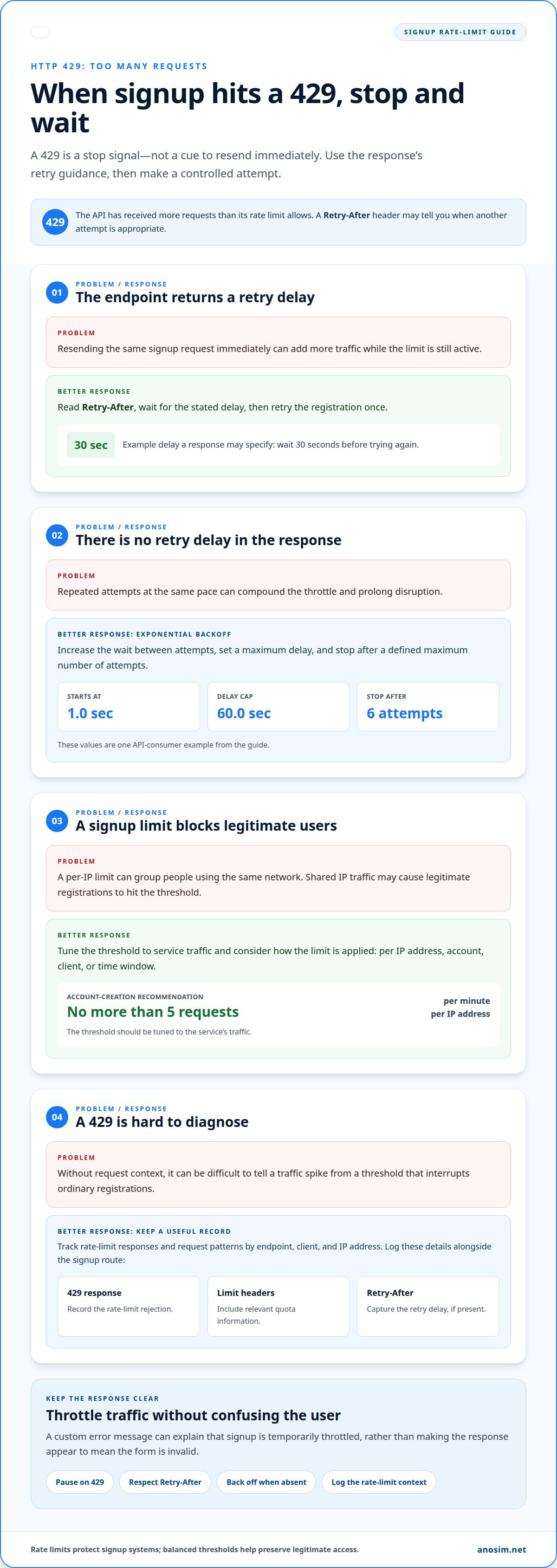
An HTTP 429 response means the API has received more requests than its rate limit allows. RFC 6585 identifies this status as “Too Many Requests,” and a Retry-After header can indicate when another attempt is appropriate.
Responding to Signup Errors
A signup rate-limit response tells the user to pause, not to resend the same request immediately. Check the Retry-After value and wait for its stated delay; for example, a response may specify 30 seconds. Then retry the registration once, rather than adding more requests while the limit remains active. This avoids extending the disruption through repeated attempts.
If the response has no retry delay, a client can use exponential backoff: increase the wait between attempts and stop after a defined maximum. One API-consumer example starts at 1.0 seconds, caps delays at 60.0 seconds, and gives up after 6 attempts. A custom error body can also explain that signup is temporarily throttled, instead of appearing to indicate an invalid form.
Monitoring and Troubleshooting Limits
Monitoring rate limits means tracking responses and request patterns by endpoint, client, and IP address. It matters because developers can distinguish a genuine traffic spike from a threshold that is blocking ordinary registrations. Log the 429 response, the relevant limit headers, and any Retry-After value alongside the signup route.
Compare those records with the configured algorithm and time window. In a 100-requests-per-minute example, the 101st request can receive HTTP 429 with a retry header. That response helps identify when the limit activates. Review repeated 429s by IP address and client to spot shared-network effects or concentrated traffic, then adjust thresholds if monitoring shows legitimate signup attempts are being rejected.
Keep custom errors consistent with the actual limit behavior. A clear response can identify throttling and provide a retry delay without revealing unnecessary internal details. Distinguish a temporary request limit from a validation failure, for example, so users know whether to wait or correct their signup information.
Rate limiting for account-creation endpoints
Account-creation limits protect a specific endpoint from automated attacks while preserving capacity for legitimate signups. The threshold needs to balance abuse prevention with access for real users.
Account-Creation Endpoint Limits
An endpoint limit controls how many signup requests a service accepts within a defined interval. It matters because a strict threshold can block legitimate users, while a loose one may leave the endpoint exposed to malicious traffic. One recommendation sets account-creation requests at no more than 5 per minute per IP address. The effective limit and duration depend on the service’s configured window and retry instructions.
To understand how to handle rate limiting during account creation, start with the platform’s own rules: there is no single signup threshold for every service. Limits can reflect traffic patterns, endpoint capacity, and the activity being protected.
Signup Limits Across Platforms
Platforms may apply limits per IP address, account, or other request attributes, then adjust them to match signup behavior and system capacity. The same signup activity may be accepted by one service and throttled by another. CAPTCHA or email verification can add checks alongside request thresholds, rather than relying on rate limiting alone.
Multiple Accounts and Platform Rules
Whether a platform permits multiple accounts depends on its rules and the purpose of the accounts. A rate limit controls request frequency; it does not grant permission to create additional accounts. Follow the platform’s stated account policies, and do not use multiple IP addresses or repeated signup attempts to evade a restriction.
When phone verification is part of a permitted registration, a number that receives verification codes can support that step. It does not change the platform’s rules or remove its request limits.
Avoiding Signup Rate Limits
For users deciding how to handle rate limiting during account creation, the practical approach is to submit one complete request and wait for the response. Correct validation errors instead of repeatedly resending unchanged data, and respect any Retry-After instruction after a 429 response. The duration follows the service’s configured window or retry delay, so there’s no universal wait time for every website or app.
Anosim
Anosim offers SMS Activation and Rent Number options for receiving verification codes during account registration. These services can support verification workflows when the platform permits the number type and registration follows its rules. They do not change an endpoint’s rate limit or authorize repeated account creation.
For teams integrating digital communication into an application, the Anosim API (v1) and SMS-Activate Standard API can connect supported services with their own systems. This may be useful when a signup process includes verification and developers need an integration path alongside responsible request pacing. Select the approach that fits the platform’s requirements, then respect its retry instructions and account policies.
Contact Anosim to discuss which communication option fits your account-verification workflow.
Build a More Predictable Signup Experience
A rate limit shapes the account-creation experience, not just backend operations. Plan for moments when signup slows down: make the next action clear, keep error handling consistent, and ensure your team knows how legitimate users should proceed. This helps make the flow more predictable for users and developers alike.
To learn how to handle rate limiting during account creation, review the full signup journey, including verification steps and messages shown when requests are throttled. Then determine where communication tools fit your workflow. Anosim offers SMS Activation, Rent Service, and Rent Number options for supported verification needs.
Explore Anosim’s communication options as you plan your next steps. A clear, considered signup flow helps your team move forward with confidence.
Frequently Asked Questions
How can businesses implement rate limiting for account creation securely?
Use layered controls instead of relying on an IP address alone. Set signup thresholds based on typical endpoint traffic, monitor rejected requests for false positives, and adjust thresholds as usage changes. Pair request limits with CAPTCHA or email verification to add checks for automated signups. Also account for request complexity, since different account-creation operations can place different demands on server resources.
What signup rate limits are recommended for web applications?
A recommendation for account-creation endpoints is no more than 5 requests per minute per IP address. Treat this as a starting point, not a universal setting: traffic patterns, endpoint capacity, and the impact on people sharing a network all matter. Monitor legitimate signup attempts alongside blocked traffic, then tune the threshold to reduce abuse without unnecessarily preventing valid users from registering.