Programmatic SMS reception for applications uses an SMS API to receive incoming texts, send replies, and track delivery status. SMS can work without an installed app or an internet connection, and delivery may take seconds. The key decision is whether to build and maintain the messaging infrastructure yourself or connect through a provider.
An API can simplify messaging, but your application still needs to handle inbound messages, replies, delivery updates, and any media you support. This guide explains the send-and-receive flow, factors that affect delivery, and how to compare a custom system with a provider. It also covers integrating SMS into application workflows, including automated handling and verification.
Key Takeaways
- Plan how your application will handle incoming messages, replies, and delivery updates before integrating an SMS API.
- Account for the different workflows involved in sending and receiving SMS and MMS.
- Understand what can influence delivery speed, including the path a message takes through messaging systems and mobile networks.
- Choose between building messaging infrastructure and using an API provider based on the integration and maintenance your application requires.
Table of Contents
- Inbound messaging and two-way communication
- Programmatic SMS and MMS sending and receiving
- SMS delivery speed and internet requirements
- Building an SMS system versus using a provider
- Anosim
Inbound messaging and two-way communication
An SMS API connects an application to mobile messaging infrastructure so it can send, receive, and route texts. In a two-way workflow, the application processes an incoming message and can send a relevant response.
Inbound SMS APIs and Providers
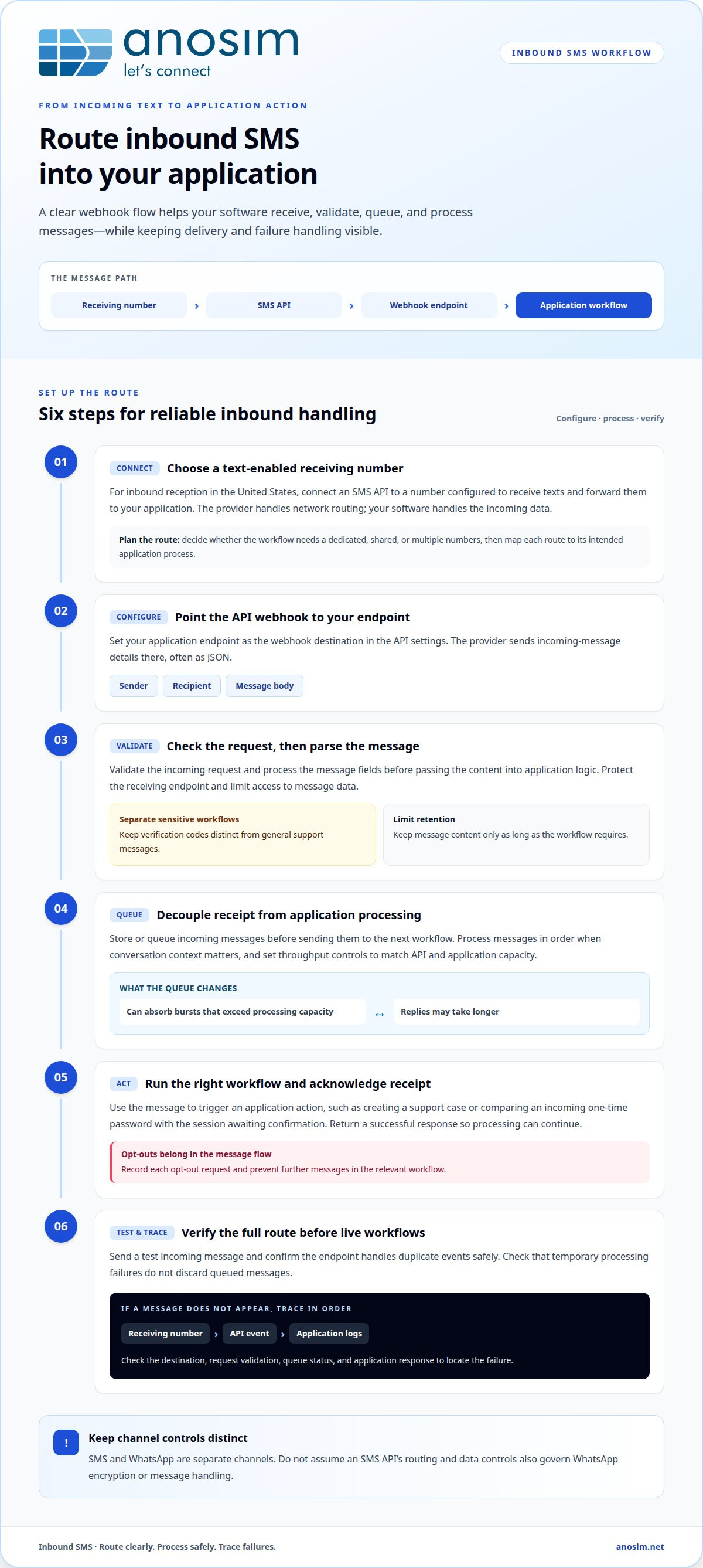
In the United States, inbound reception requires an SMS API connected to a number that can receive texts and forward them to your application. The API provider handles network routing; your software processes the incoming data. Compare inbound-message support, webhook options, delivery-status reporting, and throughput controls. For example, JSON data can pass the sender and message text into an application workflow.
Choose an integration that fits the response your application needs. A verification flow may process one incoming code, while a support queue may need to assign messages and track replies. For U.S. consent, privacy, and retention, establish processes to record permission, honor opt-outs, restrict access to message data, and set a retention schedule suited to your use case.
Message Routing and Webhook Setup
To receive SMS messages, set your application endpoint as the webhook destination in the API settings. The provider routes each incoming message there, typically with fields such as sender, recipient, and message body. Your application should validate the request, parse the data, store or queue the message, and return a successful response so processing can continue.
Test the route with an incoming message before connecting it to live workflows. Confirm that the endpoint handles duplicate events safely and that temporary processing failures do not discard queued messages.
A queue separates message receipt from application processing. For example, queue incoming texts before sending them to a support workflow, and process them in order when conversation context matters. Set throughput controls to match the API and your application’s capacity. A queue can absorb bursts that exceed processing capacity, but replies may take longer.
Handle opt-outs within the message flow: record each request and prevent further messages in the relevant workflow. Keep SMS and WhatsApp integrations separate. They are distinct channels, so do not assume an SMS API’s routing and data controls also govern WhatsApp encryption or message handling.
Programmatic SMS and MMS sending and receiving
Applications can use an API to send SMS or MMS and process incoming messages. A programmatic SMS reception for applications workflow connects a receiving number to application logic, which can act on a message or route it for review.
Application-Based SMS Reception
When a text arrives, the route forwards its details to the application, often as JSON. The software can validate the sender, process the message body, and trigger an action. For example, a support request could create a case for follow-up. A verification flow could compare an incoming one-time password with the session awaiting confirmation.
Phone Number Types for SMS Reception
For application-based SMS reception in the United States, the number must be configured to receive texts and route them to the application. A number’s category alone does not establish that capability. Plan whether the workflow needs a dedicated, shared, or multiple numbers, then map each route to its intended application process. Programmatic SMS reception for applications depends on that connection being configured.
SMS Reception Security and Troubleshooting
Protect the receiving endpoint by validating incoming requests and limiting access to message data. Separate verification codes from general support messages, and retain message content only as long as the workflow requires. Temporary or shared numbers can expose account codes or recovery messages if another user later receives texts routed to the same number.
If a message does not appear, trace a test from the number through the API event and application logs. Check the destination, request validation, queue status, and application response to find the failure.
For outbound messaging, the application submits a request with a recipient and message, then processes the resulting status. MMS also requires handling media references and failures. At higher volumes, separate outbound queues from inbound processing so sending messages does not block incoming ones.
SMS delivery speed and internet requirements
SMS can reach a recipient in seconds, but that is a typical delivery path, not a guaranteed deadline. The application first sends a request to its messaging API; the message then travels through messaging infrastructure and the recipient’s mobile network. Queueing, network conditions, and an unavailable or unreachable device can affect arrival time. For a time-sensitive login code, distinguish API acceptance from delivery status so the interface does not show a submitted message as received.
The recipient does not need an app or an internet connection to receive SMS, but the phone must be reachable through its mobile network. The application server, meanwhile, needs network access to connect to its API and process status events. This matters for offline workflows: a recipient may get a text without mobile data, while your application cannot submit or process messages if its API connection is unavailable.
Message length can also affect how content is transmitted. A standard GSM-7 SMS contains up to 160 characters in one segment. A Unicode SMS contains up to 70 characters in one segment, according to the 3rd Generation Partnership Project (3GPP). For example, adding a character outside the GSM-7 set can change encoding and increase the number of segments. Keep alerts concise, and test accented characters, symbols, and emojis before using them in production messages.
For troubleshooting, trace a message through each stage: application request, API response, delivery status, and recipient device. If the API accepts a request but delivery is delayed, inspect the status event and check for messages accumulating in an application queue. If events stop reaching your system, test its connection and webhook processing separately from the mobile route. Tracking each stage helps pinpoint whether a delay occurs before submission, during network delivery, or after the application receives an update. Use the findings to provide realistic interface feedback without implying that every message arrives instantly.
Building an SMS system versus using a provider
Building an SMS system means owning the application logic and operational components behind messaging. Your team must connect to messaging networks, route inbound events, manage queues, and process delivery statuses. For example, a support application needs logic to link a reply to the right conversation. A custom build gives you control over these workflows, but your team is also responsible for maintaining them.
Using an API provider means integrating an existing messaging connection with your application. Your developers still build the user experience and message-handling rules, but the provider supplies the API path for sending and receiving. Your application can submit requests, accept inbound events, and process delivery updates through defined integration points. This can reduce infrastructure work, while the integration remains limited to the provider’s supported capabilities.
Compare the ongoing operational tasks, not just the initial integration. A complete workflow may require queue management, retry handling, opt-out records, access controls, and monitoring. MMS adds media handling alongside text. An application that sends verification codes also needs a clear way to match each response to the correct session. These requirements apply whether your team builds the messaging layer or integrates through an API.
Choose a custom system if messaging is central to your product and your team can maintain network connections, monitoring, and failure handling. Choose a provider if you want developers to focus on application logic instead of building each messaging component. For example, a small product team launching a basic notification flow may prefer an API integration; a platform with specialized routing needs may benefit from greater control.
Before deciding, map a message from the application request to the recipient, then trace the reply back into your software. Identify who owns each step, including queue recovery and delivery-status processing. If your team can support every operational component, a custom build may fit. Otherwise, an API provider can supply the messaging connection while your application retains control of its workflow.
Anosim
Anosim is a practical next step when your application needs virtual communication services or access to verification messages. Developers can integrate services into their applications using the Anosim API (v1) or SMS-Activate Standard API. For workflows that need to receive verification codes, Rent Number and Rent Service offer virtual number rental options.
For account verification rather than application integration, Anosim offers SMS Activation to receive verification codes. Rent Mobile VoIP is another option for workflows that require a rented mobile VoIP service. Match the offering to the task: use API integration for application workflows, or a rental or activation service to receive verification messages.
Contact Anosim to discuss the right fit for your application or verification workflow.
Turn your messaging plan into an implementation
Turn the design into a working plan by documenting one complete user journey. Specify what starts the SMS exchange, what the application receives, how it responds, and what the user sees if processing is delayed. This gives developers a clear integration target and helps keep message handling consistent across the product.
For programmatic SMS reception for applications, define each component’s role before implementation: application logic, API connection, receiving number, and operational owner. Decide how to handle sensitive message content and who can access it. A focused initial workflow can reveal integration needs before messaging expands to additional features or user journeys.
If you’re ready to discuss the API and related options for your use case, contact Anosim about SMS APIs. Take the next step with a clearly scoped workflow and a practical plan for your application.
Frequently Asked Questions
How to Get Started With an SMS API?
Start by defining one messaging workflow, such as account verification or customer replies. Identify what triggers a message, what data the application must process, and what outcome completes the workflow. Then choose an API integration, connect it to a test environment, and verify success and failure handling before release. Keep credentials out of client-side code and limit access to systems that need them.
What are the Benefits of an SMS API?
An SMS API lets an application include text messaging in existing user workflows instead of requiring staff to send each message manually. For example, a booking system can send a confirmation after a reservation, while a service desk can route an incoming reply to the relevant case. API events can also help teams assess delivery and response patterns, then refine message timing and content.
What is an SMS API and how does it work?
An SMS API is a software interface that lets an application interact with messaging services through requests and event data. A typical exchange starts when application code submits a message request; the API returns a result for the software to record. In inbound workflows, message data can be passed to application logic, which decides whether to create a task, update a record, or trigger another action.
What is an SMS API, Exactly?
Think of an SMS API as a defined connection between software and SMS functionality, not as the messaging application itself. Developers use the interface to pass structured instructions, such as a recipient and message body, and receive relevant results. For instance, a CRM could use an API call to trigger a customer update while keeping the message workflow connected to its existing records.
What is an SMS API?
An SMS API is a programming interface that connects an application to SMS operations. It lets developers incorporate texting into software, such as a booking platform or account portal. The API handles communication between application code and messaging infrastructure; the application determines what event sends a text and how users or staff respond.
How can applications verify phone numbers using inbound SMS?
An application can verify control of a number by linking an incoming message to a specific verification session. For example, it can ask a user to send a generated code from the number being verified, then match the received text to that pending session. Reject reused or mismatched codes, restrict access to verification data, and do not treat receipt alone as proof of a person’s identity.