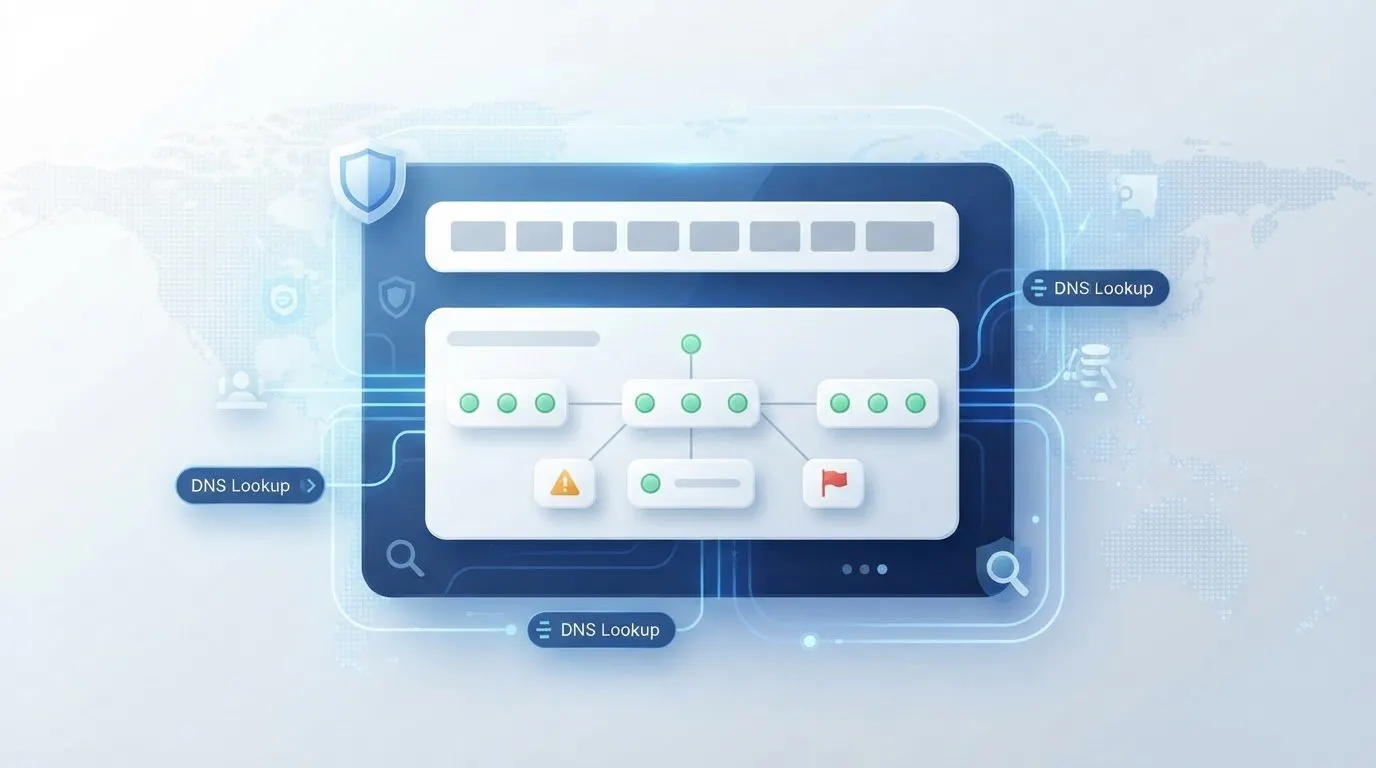
A new IP address can change how a request reaches a website, but it doesn’t make every request invisible. To understand what IP rotation is and why it’s important, start with the basic mechanism: a rotating proxy routes traffic through a pool of addresses and switches between them, often after a set time or number of requests. This can distribute activity across IPs and reduce reliance on a single address, but rate limits, throttling, and CAPTCHAs can still apply.
If you’re looking for steadier access or more privacy, the details matter: changing addresses too often can interrupt sessions, while keeping one address for a period can help maintain continuity. This guide explains how rotating proxies select and change IPs, when rotation can help, and what its limits mean for web access.
You’ll also learn how request patterns and session consistency affect blocks and CAPTCHA challenges, so you can judge when IP rotation suits a task and when it may create new friction.
Key Takeaways
- Learn how residential, mobile, and datacenter IP pools differ, and what that means for a proxy’s role.
- Understand how rotation can be triggered by time or request count, and why the right pattern depends on the task.
- See how rotating proxies differ from VPNs and static proxies when a connection needs either a changing or consistent address.
- Recognize how repeated requests can lead to rate limits, throttling, blocks, or CAPTCHAs, and why changing IPs doesn’t remove a website’s controls.
Table of Contents
- What is proxy rotation?
- What is a Rotating IP Address and How to Rotate it?
- What is IP rotation, and how does it work?
- Rate limits, blocking, throttling, and CAPTCHAs
- Anosim
What is proxy rotation?
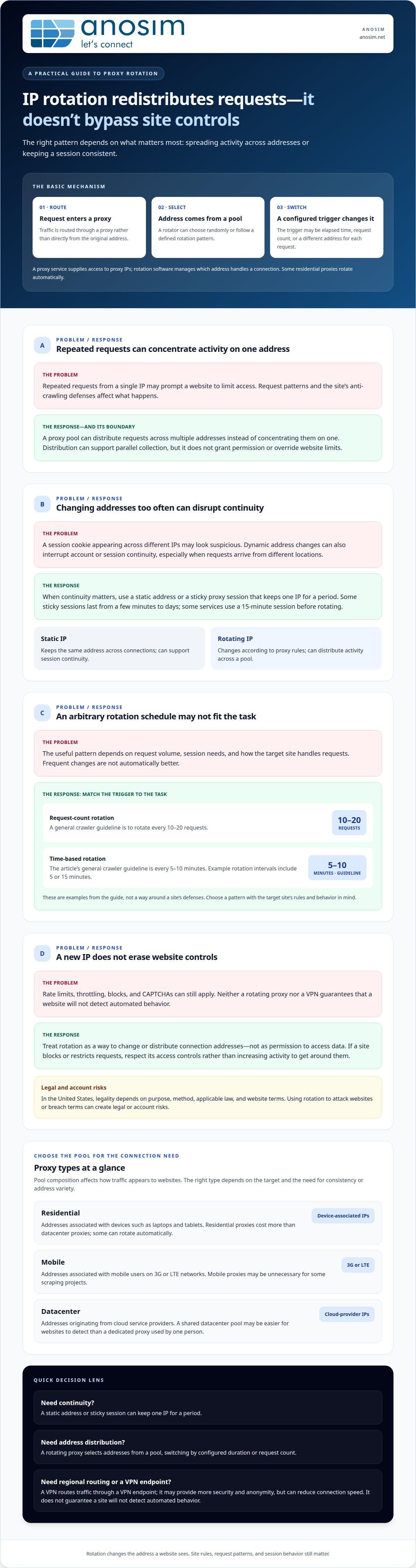
Proxy rotation routes requests through a proxy and changes the IP address used to reach a target website. In the United States, legality depends on the purpose and method, applicable law, and website terms. Using rotation to attack websites or breach terms can create legal or account risks.
IP Pools and Proxy Types
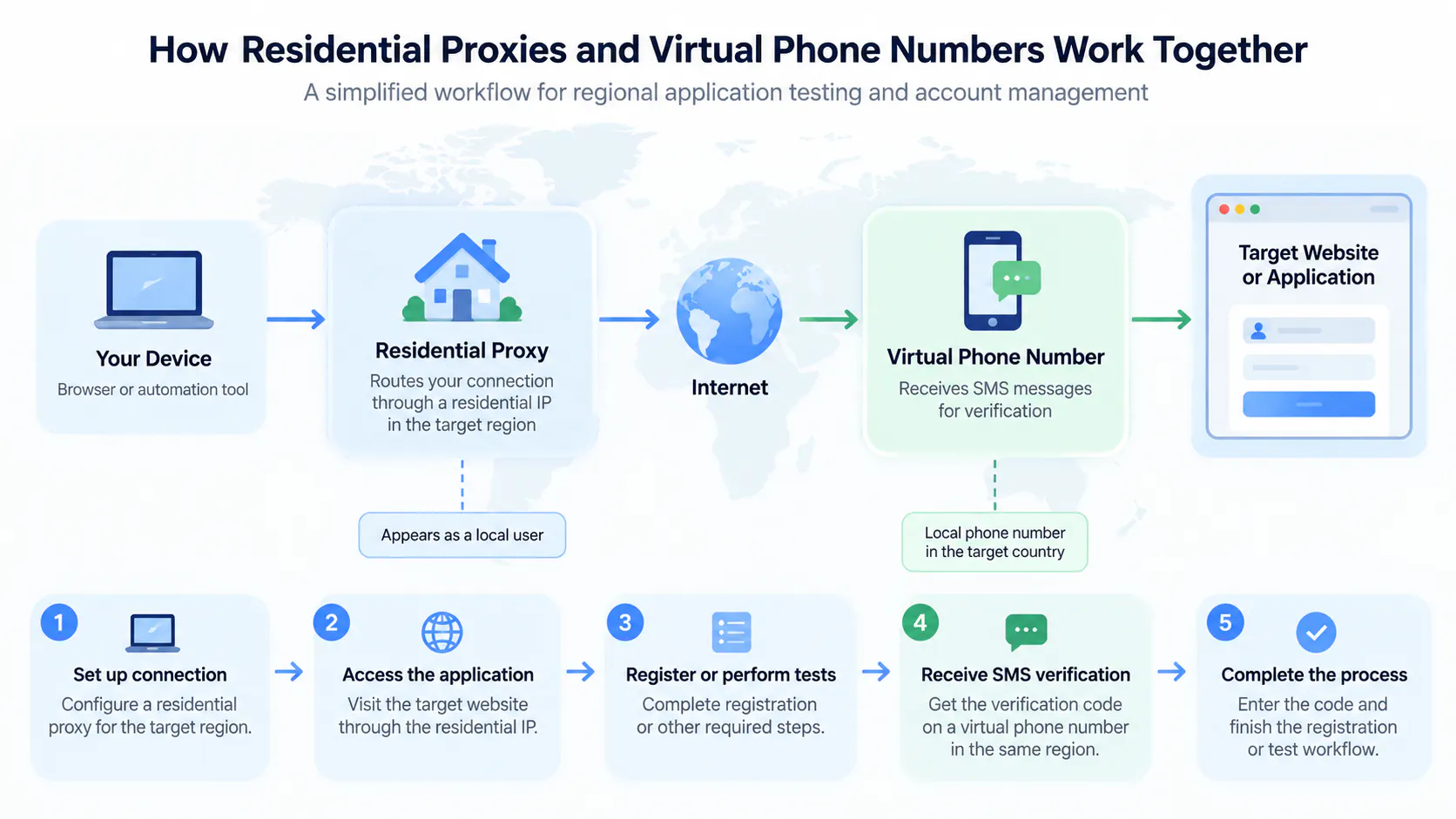
An IP pool is a set of addresses available for routing requests, and its composition affects how websites see that traffic. Residential proxies use addresses associated with devices such as laptops and tablets; mobile proxies use addresses associated with mobile users on 3G or LTE networks. Datacenter proxies originate from cloud service providers. A VPN also routes traffic through another address, but may use a smaller pool than a rotating proxy service. These differences matter when choosing between a varied pool and a consistent connection.
Proxy Services and Rotation Software
A proxy service provides access to proxy IPs, while rotation software manages which address handles each connection. Depending on its settings, a proxy rotator can select an address randomly or follow a defined rotation pattern. Residential proxies can also rotate automatically without a separate rotator. This distinction matters when a task needs automatic address changes or when an operator needs more control over the pool and rotation behavior. That control may require technical skills and resources.
IP rotation means changing an IP address; proxy rotation means using proxies to make that change. A static proxy keeps the same address, which can support continuity across a session. A rotating proxy selects addresses from a pool, potentially distributing requests rather than concentrating them on a single IP. For example, websites may find a shared datacenter pool easier to detect than a dedicated proxy used by one person. Residential proxies cost more than datacenter proxies, while mobile proxies may be unnecessary for some scraping projects. The right type depends on the target, the need for session consistency, and how the website handles requests.
What is a Rotating IP Address and How to Rotate it?
A rotating IP address changes as requests move through a proxy pool. Rotation can distribute activity, but it doesn’t override website limits or access rules.
Reasons to Rotate IP Addresses
Rotation changes the address associated with requests, which can help distribute web scraping activity instead of concentrating it on one IP. That matters when repeated requests from a single address may prompt a website to limit access. The appropriate pattern depends on request volume and the target site’s anti-crawling defenses. For crawlers, a general guideline is rotating every 10-20 requests or every 5-10 minutes.
Distributing Scraping Requests
Distributing scraping requests means sending them through multiple IP addresses instead of relying on one. A proxy pool can spread collection tasks across addresses and support parallel work, potentially improving data-gathering efficiency. It doesn’t grant permission to access data or override a website’s limits. If the target site blocks or restricts requests, respect its access controls rather than increasing activity to get around them.
How Rotating Proxies Change IP Addresses
A rotating proxy selects an address from its pool and changes it according to a configured trigger. The trigger may be a specified duration or request count; a proxy rotator can also use one endpoint to assign a different IP to each request. Time-based examples include intervals of 5 or 15 minutes. The chosen interval should account for the site’s defenses and the task’s request volume.
Rotating and Static IP Addresses
A static IP stays the same across connections, while a rotating IP changes according to the proxy’s rules. Static addresses can help maintain a consistent session; rotation can distribute activity across a pool. Frequent changes aren’t always useful: a website may treat a session cookie appearing across different IPs as suspicious. Choose based on whether continuity or address distribution matters more for the task.
Rotation can support broader collection across IP addresses, but results depend on site behavior and request patterns. For tasks that specifically require mobile-network addresses, mobile proxies from Anosim’s partner proxied.com are an option to consider.
What is IP rotation, and how does it work?
A proxy or VPN changes the public address a website sees, but each handles connections differently. Choose based on whether a task needs regional routing, a consistent session, or changing IPs.
Rotating Proxies, VPNs, and Static IPs
A rotating proxy selects an address from a pool when a connection starts. It can switch after a configured duration or number of requests. A VPN routes traffic through a VPN endpoint, while a static proxy keeps using one address. A VPN may provide more security and anonymity, but can reduce connection speed. Neither tool guarantees that websites won’t detect automated behavior. A static address can support continuity; a rotating pool changes the address seen by a target site.
Location and Session Behavior
For location-specific access, IP rotation can present requests from different regions. That may help with content limited by geographic location, but it doesn’t override a website’s access rules. Sticky proxy sessions serve a different need: they keep one IP for a short period when a task needs continuity. Some sessions last from a few minutes to days; some services use a 15-minute session before rotating. A dynamic address change can interrupt account or session continuity if related requests arrive from different locations.
Python Requests and Sticky Proxies
A Python requests workflow can send each connection through a proxy selected from a pool. For example, a sample script can cycle through proxies for 10 web requests and set a 5-second timeout per request. The timeout limits how long each request waits for a response; it doesn’t set the rotation interval. With sticky proxies, several requests can share one address before rotation. That can suit a short task requiring session consistency, while rotating after each connection distributes requests more widely. Select the pattern according to the task and target website’s behavior, not simply to maximize address changes.
Rate limits, blocking, throttling, and CAPTCHAs
A website can respond to repeated traffic from one IP with a rate limit, a block, slower service, or a CAPTCHA. These controls work differently: a rate limit restricts request frequency, blocking refuses access, throttling slows responses, and a CAPTCHA asks a visitor to complete a challenge. Rotating proxies can distribute requests, but they don’t remove these controls or grant permission to continue.
Repeated requests from the same address can trigger restrictions, especially when their volume or pattern conflicts with a site’s rules. Rotation may reduce reliance on a single IP, but it can’t guarantee fewer blocks or bans. Websites can assess other signals, too. For example, sending the same session cookie from multiple IP addresses may itself prompt a block, even if the proxy pool changes addresses.
When a server returns a block, slowdown, or CAPTCHA, treat it as a signal to pause and assess. Record the response, request timing, and affected session; then reduce or stop traffic and review the target website’s access rules. Don’t automatically switch IPs to continue blocked activity. A new address doesn’t resolve the underlying restriction, and trying to bypass CAPTCHAs or access controls can violate site terms or applicable law.
Monitoring helps distinguish a temporary network issue from an intentional access limit. For instance, compare whether an error follows one connection, one session, or requests across the proxy pool. If the same session cookie appears across multiple addresses, preserve session consistency rather than rotating again. Resume only when the site permits access and the request pattern follows its rules. This prioritizes reliable, compliant access over simply increasing request volume.
If a website’s permitted flow requires phone verification, use Rent Number for verification codes. It addresses verification, not proxy blocks or CAPTCHA bypass.
Anosim
Anosim supports online workflows with communication services; for tasks that require mobile-network IP addresses, its partner proxied.com offers mobile proxies. These proxies can suit work where connection type matters, but they don’t remove website limits, authorize restricted access, or guarantee fewer CAPTCHAs. Match the tool to the task: use proxy infrastructure when the network address matters, and consider Rent Number or SMS Activation when a service requires a verification code. Rent Mobile VoIP is another option for workflows that need a mobile VoIP rental.
IP rotation is only one part of responsible access. Request patterns, session behavior, and the target website’s rules still matter. Contact Anosim to discuss which service fits your workflow.
Choose the Right Setup for Your Next Workflow
Before adjusting a workflow, identify what it needs from its connection: changing addresses, a consistent session, or a separate verification step. Knowing what IP rotation is and why it’s important helps you make that choice deliberately, rather than treating address changes as a fix for every access issue. Understanding what IP rotation is and why it is important also helps you match the setup to your task. Keep the target website’s rules and session behavior in view, especially when a block or challenge appears.
For communication tasks beyond proxy access, Anosim offers SMS Activation, Rent Service, and Rent Number. These services address different workflow needs; they don’t replace IP rotation or remove website restrictions. Consider what IP rotation is and why it is important for your specific workflow, then choose the support that matches the task and keep access practices aligned with the site’s requirements.
Contact Anosim to discuss your needs. A clear understanding of your workflow is a practical starting point, and you can build the next step around it.
Frequently Asked Questions
Why Is IP Rotation Important in Web Scraping?
IP rotation can distribute a permitted scraping task across addresses instead of concentrating requests on one connection. Understanding what IP rotation is and why it is important helps teams decide whether separate addresses suit a specific collection task. For example, a crawler collecting public product listings can assign separate batches to different IPs while following the target site’s access rules. Track errors and CAPTCHA responses; changes can signal the workflow needs adjustment.
Why rotate proxies?
Rotate proxies when a task needs traffic to use different IP addresses, such as collecting pages from region-specific versions of a site. A pool can also separate work into distinct sessions rather than tying every connection to one address. For a logged-in workflow, however, continuity can matter more than variety. Keep the session consistent, since changing addresses mid-task can disrupt access or prompt security checks.
Are rotating IPs better than static ones?
Neither option is universally better; the right choice depends on the connection’s purpose. A rotating address suits work that needs requests distributed across a pool. A static address suits a workflow that relies on a consistent identity, such as maintaining a session with a service. For example, a research task across public pages may favor rotation, while a single account session may favor a stable connection.
Can I use IP rotation for my small business?
Yes, a small business can use IP rotation when a legitimate workflow needs traffic distributed across addresses, such as permitted research across regional website versions. Start by defining the task and checking the target site’s access rules; rotation doesn’t replace permission. For routine account access, a consistent connection and session can be more practical than frequent address changes.
How Does IP Rotation Prevent Getting Blocked or Banned?
IP rotation doesn’t prevent blocks or bans. It can distribute requests so one IP isn’t responsible for all activity, but websites can assess other signals, including request patterns and session data. If a CAPTCHA or block appears, stop the affected activity and review the site’s rules and your request behavior. Switching addresses to continue after a block can still violate access restrictions.
How does IP rotation contribute to privacy and security?
Understanding the privacy implications of IP rotation starts with knowing what it changes: the address a website sees. Routing traffic through a proxy can reduce direct exposure of your originating IP, but rotation doesn’t make activity anonymous or encrypt traffic by itself. Keep account credentials secure, use encrypted connections, and consider how the proxy service handles traffic and connection data.