A passing OTP test proves the SMS flow works for that test, not that it verifies a person’s identity. QA testing with real mobile numbers lets a team check whether a live number can receive a code and whether the application handles it correctly; E.164 allows up to 15 digits after the plus sign. A phone-number lookup can return number information, but it doesn’t prove that the person entering the number controls the phone.
SMS is a practical way to test verification and two-factor authentication because it exercises the code-delivery step users experience. Delivery can vary, however, and an OTP has limits as a security measure. Tests with real numbers can reveal issues that simulated inputs miss, provided you keep those limits in mind.
This guide explains how real-number tests work, what to include in a test plan, and where SMS OTP may fall short. You’ll also learn how number formats differ across countries and how virtual number services can support verification testing when your workflow needs them.
Key Takeaways
- Test the full OTP journey, from entering a number to receiving and submitting a code, across the locations your application supports.
- Separate number validation from proof of phone control; a lookup alone can’t establish who has access to a device.
- Use real-number tests to assess delivery behavior, and simulators to exercise predictable app responses without relying on live SMS delivery.
- Choose a number option that fits the test workflow: Anosim’s Rent Number can support verification testing when a number for receiving codes is needed.
Table of Contents
- SMS verification and two-factor authentication
- SMS OTP limitations
- How can QA teams test SMS and voice flows using real mobile numbers?
- How do real mobile numbers compare with virtual numbers and SMS simulators for QA?
- Anosim: Rent Number
SMS verification and two-factor authentication
Real-number tests exercise the delivery path used by SMS verification and two-factor authentication. They also show whether number validation and code entry work together across supported countries.
SMS and Voice Flow Testing
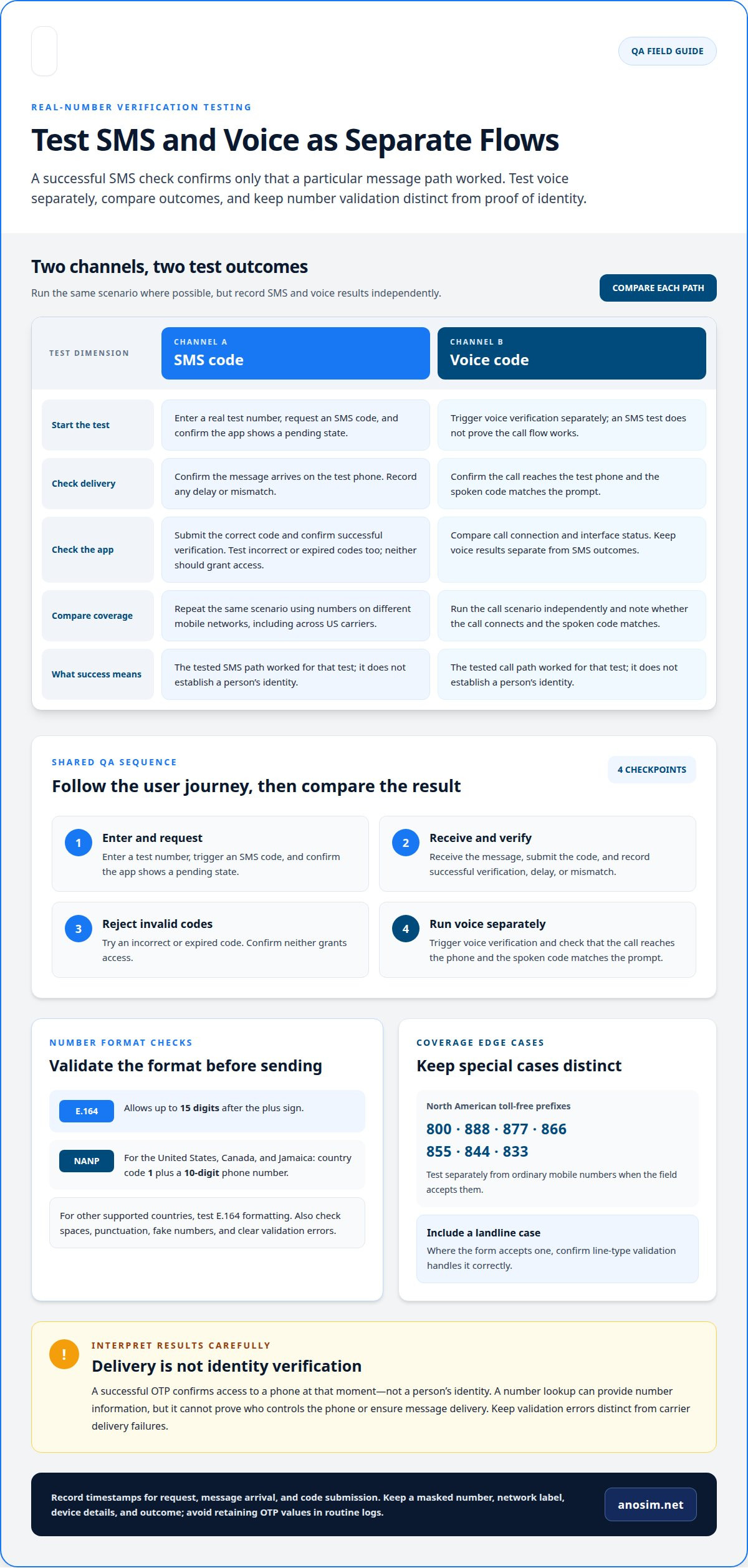
Test SMS and voice flows with numbers that can receive the relevant message or call. Across US carriers and mobile networks, repeat the same flow using numbers on different networks, then compare delivery, timing, and application responses. Include a landline where the form accepts one, and confirm that line-type validation handles it correctly. Test voice fallback separately: a successful SMS test does not prove the call flow works.
OTP Delivery and Number Verification
To verify OTP delivery, enter a real phone number, request a code, confirm the message arrives, and submit the correct code. Then test an incorrect or expired code to assess the application’s response. This confirms access to the number during the test, not a person’s identity. A phone-number lookup provides information about a number, but does not prove control of the phone.
Check formatting before sending. E.164 permits up to 15 digits after the plus sign. For the United States, Canada, and Jamaica, test NANP formatting: country code 1 and a ten-digit phone number. For other supported countries, test E.164 formatting. Also test whether entering spaces, punctuation, or a fake number triggers clear validation rather than a misleading success state.
Area codes and prefixes can suggest a number’s origin, but they don’t show the phone’s current location. If the field accepts them, North American toll-free prefixes include 800, 888, 877, 866, 855, 844, and 833. Test these separately from ordinary mobile numbers, and include a landline case to confirm line-type handling.
Handle test data and messages in line with applicable rules. Calls and texts are governed by TCPA in the United States, CASL in Canada, and GDPR plus national telecom rules in the EU. Your test plan should cover the full flow, from number entry to code acceptance, without treating successful delivery as proof of identity.
SMS OTP limitations
An SMS OTP confirms access to a phone at one moment, not a user’s identity. A shared phone, unlocked screen, or message preview can expose the code. A number can also change hands, making a previously valid database record outdated. These limits matter if an application treats successful code entry as its only security check. Use OTP as one layer, not as proof that every account action is safe.
In the United States, TCPA rules apply more strictly to calls and texts to mobile numbers than to landlines, particularly for automated dialing. Carrier filtering can also affect message delivery. Separate test traffic from production workflows, keep message content limited to the OTP, and account for carrier delivery when interpreting a failed test. A lookup can report number data, but it cannot ensure delivery or identify who currently controls the phone.
Real phone numbers can create privacy risks if test records, message logs, or screenshots retain personal data. Restrict access to test databases, avoid storing OTP values longer than necessary, and remove numbers from logs when they’re no longer needed. For example, a screenshot showing both a phone number and its message can expose the entire verification path. Masking the number in reports reduces unnecessary exposure while preserving test results.
Accuracy also depends on the format and the application’s response to invalid input. Test automated form handling with spaces, punctuation, and long entries; a field can accept up to 100 characters, so test its permitted maximum to assess resistance to mass data entry. Keep validation errors distinct from carrier delivery failures. For isolated test workflows, a number for receiving verification codes can help separate testing from personal phone records. It doesn’t remove the need for access controls or careful message retention.
How can QA teams test SMS and voice flows using real mobile numbers?
Build a test matrix for QA testing with real mobile numbers, matching each number to a scenario and expected result. Record the device, network, application build, and outcome. This helps distinguish delivery problems from defects in code generation, screen handling, or verification logic.
Run each flow from the user’s perspective, then compare the application’s result with what appears on the phone.
- Enter a test number and trigger an SMS code. Confirm the application shows a pending state.
- Receive the message, enter the code, and confirm successful verification. Record any delay or mismatch.
- Repeat with an incorrect or expired code. Confirm neither grants access.
- Trigger voice verification separately. Confirm the call reaches the test phone and the spoken code matches the prompt.
For US carrier coverage, use test numbers on different mobile networks. Run the same scenario on each network, keeping the application build and device conditions consistent where possible. Compare message receipt, call connection, and interface status. A successful test shows only that the particular path worked.
Track SMS and voice outcomes separately. A delivered message does not validate voice fallback, and a connected call does not prove SMS handling. Include cases where a user requests another code, switches channels, or leaves the verification screen. These steps can reveal inconsistent session state, duplicate prompts, or codes accepted in the wrong flow.
Record timestamps for the request, message arrival, and code submission. Store a masked number, network label, device details, and outcome with each result. Avoid retaining OTP values in routine logs. These records help pinpoint whether a failure occurred during number entry, delivery, call connection, or application validation.
Repeat the matrix after changes to authentication logic or messaging configuration. This makes QA testing with real mobile numbers useful for finding regressions, including cases where a live device receives no message even though the application reports success.
How do real mobile numbers compare with virtual numbers and SMS simulators for QA?
Choose a test method according to what the scenario needs to prove. A real mobile number exercises an actual phone and network path. A virtual number can receive verification codes without using a tester’s personal number. An SMS simulator checks application behavior without testing live message delivery.
Use real numbers for end-to-end checks. For example, test whether a code reaches a phone, whether the user can retrieve it, and whether the application accepts it. This can expose issues with real delivery and number entry. It also requires managing access to the test phone and protecting number-related records.
Virtual numbers are useful when a workflow needs to receive verification codes without relying on a tester’s personal phone. They can support repeatable scenarios while keeping personal contact details separate. However, a virtual-number test does not represent every device or carrier condition. Treat the result as evidence about that test path, not a guarantee of behavior across all networks.
SMS simulators are suited to testing application logic. They can help test application responses without relying on live message delivery. Use them for frequent regression checks, interface states, and error handling. A simulator cannot show whether a carrier delivers a message or whether a real phone displays it correctly.
A layered QA plan gives each method a distinct role:
- Simulator: test code entry, rejection states, and application responses.
- Virtual number: test code receipt while separating the workflow from personal numbers.
- Real mobile number: test the live delivery path and user experience on a phone.
Run simulator checks during routine application changes, then use real or virtual numbers for delivery-focused scenarios. Compare outcomes by method, device, and network. If a simulator passes but a live test fails, investigate the delivery path separately from the application’s code-validation logic.
Anosim: Rent Number
Anosim’s Rent Number provides a virtual number for receiving verification codes, making it a practical option when QA needs to test code receipt without using a tester’s personal number. It complements SMS simulators: use a simulator to test application responses, then use a number that can receive codes to exercise the verification step.
Choose this option when your test plan needs to keep verification workflows separate from personal phone records. For broader activation needs, Anosim also offers SMS Activation. The right fit depends on whether your scenario tests receiving a code for a specific service or a wider activation workflow.
Keep the test scope clear: receiving a code helps assess that verification path, but does not prove a person’s identity or replace testing across devices and networks. Contact Anosim to discuss using Rent Number for your QA workflow.
Build Your Next Verification Test With Confidence
Make your next step a test plan that reflects how people actually use your application. Define which flows need live delivery, which can use a simulator, and what information your QA team will retain. This keeps testing focused while limiting unnecessary exposure of phone numbers and OTP data.
A consistent approach to QA testing with real mobile numbers can help your team evaluate the user journey without treating successful code entry as proof of identity. Match each test method to the question it can answer, then use the results to refine your authentication flow.
Anosim offers Rent Number, SMS Activation, and Rent Service for verification workflows that need number-based support. If you’re planning a test or deciding which option fits its scope, contact Anosim about mobile number testing.
Use your next test cycle to make verification clearer, more deliberate, and better aligned with your application’s security needs.
Frequently Asked Questions
What services provide real phone numbers for mobile app QA testing?
Services that provide numbers for receiving verification codes can support mobile app QA workflows. Anosim offers Rent Number and SMS Activation for verification use cases. For automated test setups, developers can also integrate the Anosim API (v1) or SMS-Activate Standard API into their applications. Choose a method based on whether your test needs a number-based activation flow or integration with an existing testing process.
How can teams avoid SMS spam, rate limits, and carrier blocking during tests?
Keep test messaging controlled: request OTPs only when a scenario requires them, and avoid repeated requests during debugging. Separate test accounts and numbers from production users, then record request outcomes so teams can distinguish application errors from delivery issues. Set a defined test schedule and stop retries when the application reports a limit. Keep message content focused on verification, and treat test numbers and OTPs as sensitive data.