A virtual number can separate business communications from personal calls and help limit unsolicited contact, but it does not guarantee anonymity. Best practices for using virtual numbers include securing the account with a strong, unique password, enabling two-factor authentication where supported, and reviewing account activity. Some platforms reject virtual numbers for verification, so don’t rely on one as the only way to secure or recover an account.
Privacy and reliability both matter: a number can reduce exposure, but it still requires careful account management. This guide explains how virtual numbers fit into business communications and verification, how they compare with traditional phone lines, and what to consider before choosing a setup.
You’ll find practical steps for managing number access and account activity, along with criteria to help choose an approach that fits your business communications and security needs.
Key Takeaways
- Limit exposure by keeping business communications separate from personal contact details, and manage number access as part of your security routine.
- Use strong, unique passwords and enable two-factor authentication where supported; some platforms reject virtual or VoIP numbers for verification.
- Compare virtual numbers with traditional lines based on how your team needs to access calls and manage communications across locations.
- Understand how a virtual number routes communications before using it for work or account verification, so you can match the setup to the task.
Table of Contents
- 1. How Safe Are Virtual Phone Numbers for Businesses?
- 2. Account security and two-factor authentication
- 3. Virtual phone numbers versus traditional phone lines
- 4. What are virtual phone numbers and how do they work?
- Anosim: SMS Activation
1. How Safe Are Virtual Phone Numbers for Businesses?
Virtual numbers let employees handle business calls without sharing personal contact details. For example, a remote employee can give clients a work number instead of a private line. That creates a buffer from unsolicited callers, but it doesn’t provide complete anonymity. Review the provider’s privacy and data-handling practices to understand what information is retained.
For remote teams, assign numbers by role or workflow, such as customer support or project coordination. Limit access to staff who need it, and remove permissions when responsibilities change. On public Wi-Fi, use a secure connection for business calls. If calls are recorded, define the purpose and retention process before recording begins.
To choose a virtual-number provider in the US, compare its security controls and data practices. Ask how it protects communications, how long it retains call and SMS data, and whether retention policies can be customized. Look for controls such as Transport Layer Security (TLS), firewalls, and intrusion detection systems. These details help assess whether the service fits your business workflow.
For US businesses, identify the federal and state requirements that apply to each use, including calls, SMS, recording, and data handling. Map each workflow separately rather than assuming one rule covers every virtual number.
Remote VR fleet management can also benefit from a dedicated communication channel. A coordinator, for example, can use a work number for headset setup questions, maintenance updates, and staff escalations, keeping those exchanges separate from personal calls. Document who monitors the number and how issues are handed off. For healthcare teams, the U.S. Department of Health and Human Services explains that HIPAA governs the protection of patient information, including information involved in phone communications. Handle patient-related calls accordingly.
2. Account security and two-factor authentication
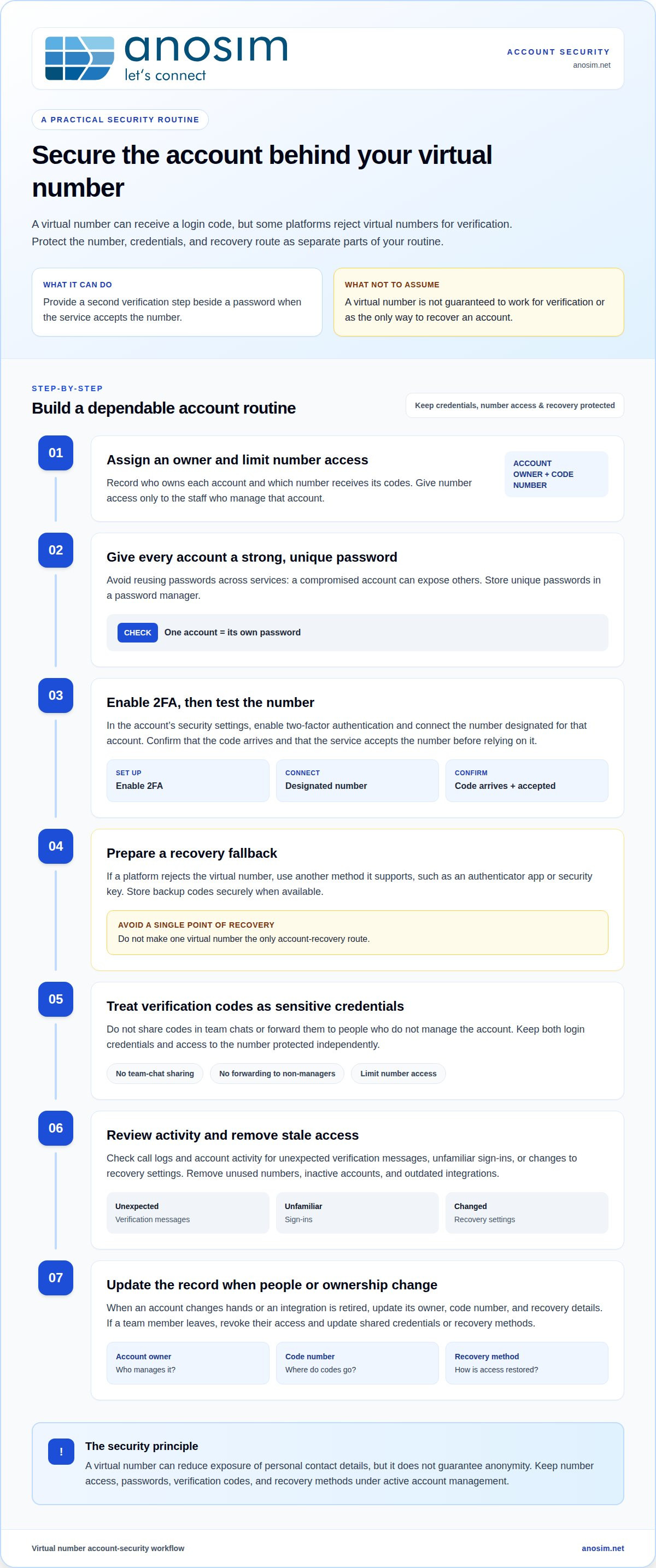
A virtual number can receive a login code, adding a second verification step beside a password. Two-factor authentication (2FA) is most useful when each factor is protected independently. For example, if a password is reused across services, one compromised account can expose others. Create a strong, unique password for every account and store it in a password manager.
Enable 2FA in each account’s security settings, then connect the number designated for that account. Check that the code arrives and that the account accepts the number before relying on it. The effectiveness of this setup depends on keeping both the login credentials and the number’s access protected. Limit number access to the staff who manage that account.
Some platforms reject virtual numbers for verification. If that happens, use another method the service supports, such as an authenticator app or security key. Avoid making one virtual number the only account-recovery route. Store backup codes securely when available, and update recovery details when staff or account ownership changes.
Make security maintenance part of account administration. Remove unused numbers, inactive accounts, and outdated integrations so old access paths don’t remain connected. Review call logs and account activity for unexpected verification messages, unfamiliar sign-ins, or changes to recovery settings. If a team member leaves, revoke their account access and update any shared credentials or recovery methods.
For a practical routine, record who owns each account, which number receives its codes, and how recovery works. Update that record when an account changes hands or an integration is retired. This makes gaps easier to spot before a login issue disrupts work. Treat verification codes as sensitive credentials: don’t share them in team chats or forward them to people who don’t manage the account.
3. Virtual phone numbers versus traditional phone lines
A traditional telephone number is often connected to a desk phone, which can suit a fixed office. A virtual number can be accessed from different locations, making it useful for staff working remotely. For example, an employee can handle business calls through a connected device rather than an office handset. Choose based on where calls are handled and how staff need to access them.
Virtual numbers can work across different communication setups. A team may use one number through its chosen phone system, while a traditional line remains connected to a desk phone. Some virtual phone systems include voicemail, allowing callers to leave messages when staff can’t answer. Decide who checks voicemail and how messages reach the right person.
For a distributed team, best practices for using virtual numbers start with matching the number type to its daily workflow. A small office with a fixed reception desk may prefer a traditional line’s direct connection to that phone. A remote team may favor virtual access when employees need to handle calls away from the office. Virtual numbers can also help businesses avoid expensive add-ons and fees associated with local phone numbers, depending on the setup.
Landline use had already declined in the United States by 2019: 60% of U.S. adults lived without a landline. A separate market report says 61% of surveyed trades had moved from traditional communication lines to VoIP services. Those figures show different contexts, not a universal recommendation. A trades team working across job sites may value phone access away from a fixed desk, while a stationary office may prioritize its existing setup.
Apply best practices for using virtual numbers by listing where employees answer calls, which devices they use, whether voicemail matters, and how calls are handed off. Then match the number type to those needs. A business with remote staff, for example, may choose a virtual setup, while a single-location office may keep a traditional line at reception. For businesses looking to integrate flexible routing with reliable hardware, telecommunications providers like Nexgen Australia offer modern phone and VoIP systems designed for small business needs.
4. What are virtual phone numbers and how do they work?
A virtual phone number isn’t tied to one physical desk phone. As outlined by businesstelecom.com.au, a communications service routes calls or messages to connected software or devices. For example, a business can send incoming calls to a team member’s mobile app rather than an office handset. The number remains the point of contact while the receiving device or location changes.
For voice calls, the routing setup determines where an incoming call goes. A company might send calls to a receptionist first, then route unanswered calls to voicemail. A remote employee can use a supported device and internet connection to handle business communications away from the office. Define routing and responsibility clearly, since the number itself doesn’t specify the equipment or process.
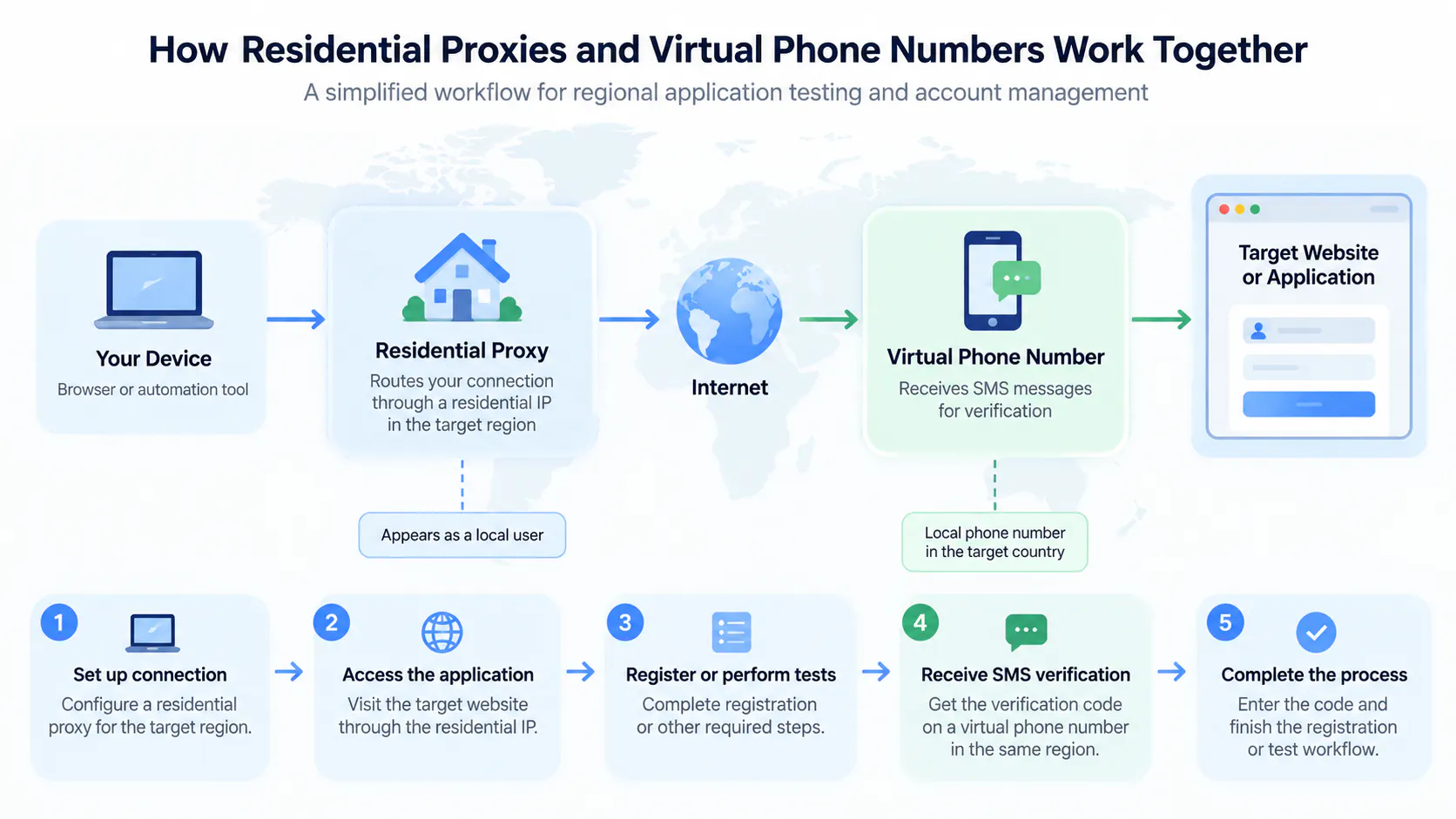
Some virtual numbers receive SMS, including verification codes, but support varies by number and service. Before using one for an account, confirm that the platform accepts it. A number that receives a one-time code may not be suitable for ongoing account recovery. Document the recovery process and make sure the account owner can access it.
To understand a setup, trace one communication from start to finish. For a call, note the number dialed, where it routes, and who handles missed calls. For an SMS, identify the receiving inbox and who can access its messages. Review access when roles change or integrations are retired. This map can reveal shared inboxes, outdated destinations, and unclear ownership.
Choose a setup based on its purpose: business calls, message receipt, and account verification each have different routing needs. If you need to receive verification messages, consider a virtual number service designed for that use.
Anosim: SMS Activation
Anosim’s SMS Activation service receives verification codes for online services that require a phone number. For ongoing account verification, explore Rent Number or Rent Service. Rent Mobile VoIP is another option for workflows that call for a virtual number.
Choose according to the task: receiving a code, renting a number, or using mobile VoIP. Keep account credentials and recovery methods secure, and remember that some platforms reject virtual numbers for verification. Match the rented number to a service that accepts it and to your intended workflow.
For details on the available options, visit anosim.net.
Put Your Number Strategy Into Practice
Your next step is to match each number to a defined business task. Decide who needs access, what communications it will handle, and how you’ll manage access as roles change. That gives your team a clear operating plan rather than another disconnected account or contact channel. Use best practices for using virtual numbers as part of your broader account and communications workflow, not as a substitute for securing accounts.
Anosim offers SMS Activation, Rent Service, and Rent Number for workflows involving verification and virtual numbers. Consider the task you need to support, then discuss which option fits that use. A focused conversation can help you move from general security guidance to a practical next step for your business.
Contact Anosim to discuss virtual numbers and take the next step with a clear purpose.
Frequently Asked Questions
How Safe Are Virtual Phone Numbers for Businesses?
Virtual numbers can support business privacy when access is controlled and communication handling is planned. For example, a company can give authorized staff a support number rather than publish an employee’s personal number. Assign an owner to each number, limit access to staff handling its messages, and remove permissions when duties change. These controls reduce unnecessary exposure without making the number anonymous.
How do virtual phone numbers compare with traditional landlines, mobile numbers, and VoIP numbers?
A traditional landline connects to a fixed phone, while a mobile number is associated with a mobile service and device. A virtual number describes how a number is assigned and routed; VoIP describes voice communication over an internet connection. The terms can overlap, but they aren’t interchangeable. Compare setups by asking where calls will be handled and whether the number needs to receive voice, SMS, or both.
How do you set up and use a virtual phone number?
Start by defining the task, such as receiving customer calls or an account code. Choose a number and service that support it, then configure call routing or message access. Test the setup before using it in a live workflow. Finally, document who manages the number and how staff should handle incoming communications, so messages don’t sit in an unattended account.
What security and privacy risks come with virtual phone numbers?
Risks include unauthorized access to the account that receives calls or messages, exposure of verification codes, and uncertainty about retained communication data. A shared inbox can increase exposure if former staff retain access. Restrict permissions, avoid forwarding sensitive codes to broad team channels, and review access when responsibilities change. Treat the number as one part of a security process, not a privacy guarantee.
Can virtual numbers receive SMS verification codes reliably?
Some virtual numbers receive SMS, but both SMS capability and platform acceptance depend on the number and the service sending the code. Some platforms reject virtual numbers, and not every number supports SMS. Before building an account workflow around a number, test it with the intended service and keep a supported recovery method available. Acceptance by one platform doesn’t guarantee acceptance by another.
How can businesses use virtual numbers for customer support, sales, and remote teams?
Businesses can assign separate contact numbers to functions such as customer support and sales, helping teams identify the purpose of an incoming message. A remote employee can handle a shared business contact without publishing a personal number. A dedicated number for a sales campaign, for example, can help staff distinguish campaign inquiries from general support. Define ownership and handoff procedures so each message reaches the right team.