What if an IP address that looks legitimate still gets flagged, while a shared address passes without issue? That’s why “what is a clean ip address” can be harder to answer than it sounds. The term usually describes an IP’s reputation, not a formal technical classification. A clean result from one checker doesn’t guarantee every website will trust the address.
If you’re concerned that an IP’s history could affect your activity, that concern is valid. An address may have been used by others, and its network type, provider, apparent location, and reputation are separate factors. A residential or mobile IP isn’t automatically clean, just as an IP that offers some privacy isn’t necessarily trusted by a particular platform.
This guide explains what IP cleanliness means, what it doesn’t, and how to assess reputation responsibly. You’ll learn how blocklists, past activity, and shared network use may matter, then compare IP or proxy options according to your legitimate use case. The goal is a clearer decision, not a promise that any address will avoid restrictions or guarantee acceptance.
Key Takeaways
- Learn what is a clean ip address and why “clean” is an informal, changing reputation status rather than a certification.
- Understand how abuse reports, spam activity, and blocklist results can inform an assessment, while recognizing that sources may differ.
- Compare residential, mobile, and datacenter IPs by network type without assuming any category guarantees a good reputation.
- Use a practical checklist to review an IP with reputable security sources and monitor it over time.
- Assess whether mobile proxy routing fits your legitimate needs, without treating it as a guarantee of anonymity or platform acceptance.
Table of Contents
- What Is a Clean IP Address? A Clear Definition of IP Reputation
- How IP Address Reputation Is Built, Checked, and Changed
- Clean IP vs. Residential, Mobile, and Datacenter IPs
- How to Assess an IP Address Before Relying on It
- When a Mobile Proxy May Help, and What It Cannot Guarantee
What Is a Clean IP Address? A Clear Definition of IP Reputation
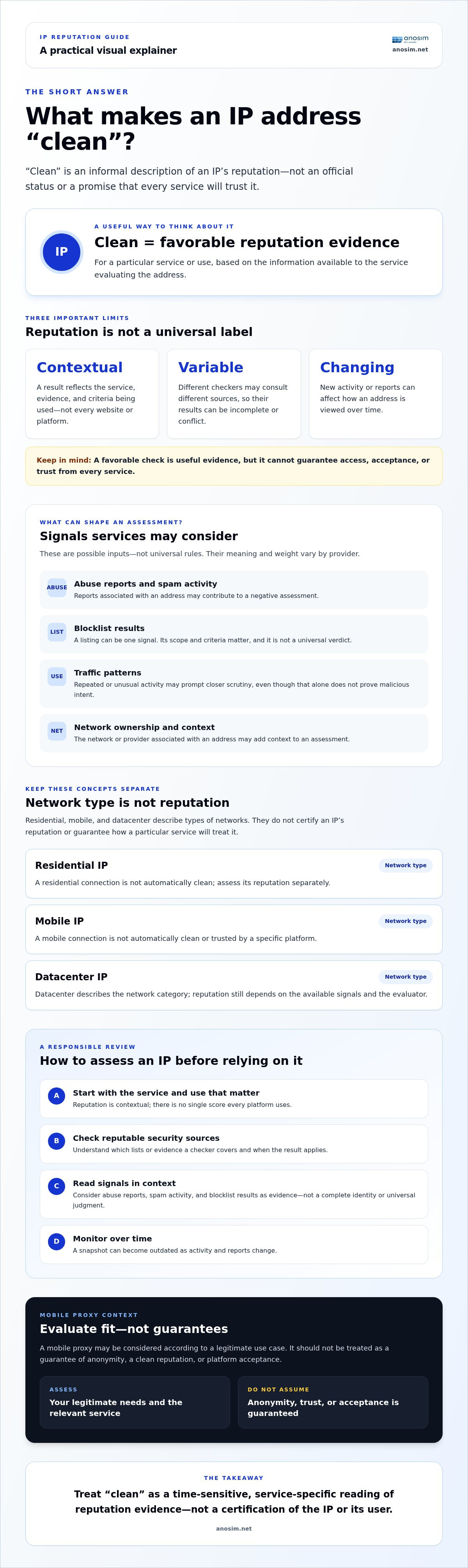
A clean IP address is an informal description of an address with no known, significant reputation problems for a particular service or use. It isn’t a universal certification. An IP may have no reported abuse in one source but still be flagged by another. Its reputation can also change as new activity is observed.
So, what is a clean ip address in practical terms? It’s an IP that appears low-risk based on the evidence available to the service evaluating it. That assessment is separate from who owns the address, where it is registered or appears to be located, and whether it comes from a residential, mobile, or datacenter network. Those details describe the IP or its connection, not whether its reputation is favorable.
IP reputation also doesn’t establish who is using an address or whether that person is trustworthy. A public IP may be shared by multiple devices or users, while an individual may connect through different IPs over time. Reputation reflects signals associated with the address, not a complete identity or character profile.
What does IP reputation describe?
Services may assess observed behavior associated with an IP, including reported abuse, spam activity, or whether the address appears on a blocklist. For example, email systems can consult a Domain Name System blocklist (DNSBL) to check listed addresses. A listing is one signal, not a universal verdict. Services choose their own data sources, criteria, and thresholds, so results can be incomplete or conflict.
There’s no single reputation score that every platform uses. Interpret a result in the context of the service and activity you care about, rather than as a general judgment about a user.
Is “clean IP” an official technical classification?
No single standardized status makes an IP officially “clean.” The phrase is commonly used as shorthand for a favorable reputation, while a security service’s result applies to its own list or assessment. Check what a provider means by the term: which sources it consults, when it checked the address, and what the result covers. Claims of guaranteed cleanliness need independent verification.
This distinction matters because reputation is contextual and time-sensitive. A favorable check is useful evidence, but it can’t establish how every website, email provider, or security system will treat the address. Treat “clean” as a qualified description of available reputation data, not a promise of access or acceptance.
How IP Address Reputation Is Built, Checked, and Changed
An IP’s reputation develops from signals that security services and online platforms observe or receive over time. These may include abuse reports, spam activity, traffic patterns that appear automated, or presence on a relevant blocklist. Some systems may also consider network ownership or the Autonomous System Number (ASN) associated with an address. The exact signals and their weight vary by provider, so one platform’s assessment may not match another’s.
Proofpoint describes IP reputation as a digital trustworthiness score that can influence how email traffic is treated. The idea is useful, but don’t assume every service uses one shared score or consults the same public databases. A check can reflect only the lists and evidence available to that source at the time.
Which signals may affect an IP address reputation?
Reported abuse and spam can contribute to a negative assessment, as can recurring traffic patterns that a service considers suspicious or automated. An IP’s appearance on a blocklist may provide another signal, but a listing’s meaning depends on the list’s scope and criteria. Network ownership can add context too: a provider may evaluate an address differently depending on whether it belongs to a hosting network, an internet service provider, or another type of network. These are possible inputs, not universal rules.
Why can a previously clean IP develop a poor reputation?
IP reputation reflects observed signals, not an address’s permanent identity. On shared infrastructure, an IP may be used by different customers over time. Activity from a previous user or a compromised device could affect how the address is viewed, even if the current user wasn’t responsible for it.
Traffic patterns can matter as well. A sudden burst of repeated requests, or activity that differs sharply from expected use, may prompt a service to scrutinize an address more closely. That doesn’t automatically mean the activity is malicious, but the system may treat the pattern as a risk signal. Different services can assess the same IP differently because their evidence and thresholds vary.
Reputation isn’t fixed. New reports or observed behavior may worsen an assessment, while changed activity and updated data may alter it in the other direction. If a result matters to your use case, check more than one relevant source and note when each result was returned. Treat disagreements as a reason to investigate, not proof that one checker is necessarily wrong.
Clean IP vs. Residential, Mobile, and Datacenter IPs
These terms describe different things. “Clean” refers to reputation evidence; residential, mobile, and datacenter describe the network or connection associated with an IP. So, what is a clean ip address? It’s an address with no known, significant reputation problems for the service assessing it, not a particular category of connection.
- Clean IP: describes a reputation assessment based on available evidence and a specific service’s criteria; it doesn’t tell you who owns or uses the address, its connection type, or how every platform will treat it.
- Residential IP: describes an address associated with an internet service provider’s residential network; it doesn’t tell you whether the address has a favorable history or is shared.
- Mobile IP: describes an address associated with mobile network infrastructure; it doesn’t tell you whether its reputation is clear or a particular service will accept its traffic.
- Datacenter IP: describes an address associated with a server or hosting network; it doesn’t tell you whether it has been involved in abuse or has a negative reputation.
Does a residential or mobile IP automatically count as clean?
No. Connection type and reputation are separate. A residential or mobile address may have a history of problematic activity, and shared usage can mean its current user wasn’t responsible for earlier behavior. Datacenter IPs can also vary in reputation. Network category offers context, but it doesn’t reveal an address’s complete history or predict how a service will assess it. No category guarantees that traffic will bypass platform checks.
Clean IP, private IP, and anonymous IP: what is the difference?
A public IP address is used to identify a network connection to other networks on the internet. A private IP address is used within a local network, such as the addresses assigned to devices behind a home router. It isn’t directly reachable across the public internet in the same way; a router typically handles communication between the local network and the internet.
Neither term describes reputation. A favorable IP reputation doesn’t conceal identity or encrypt traffic. A proxy routes traffic through an intermediary, changing the IP address a destination sees, but that alone doesn’t ensure anonymity. Account details, browser settings, and other identifying information may still matter. Use secure account practices and choose routing for a legitimate need, rather than treating an IP category as a complete privacy measure.
Assess the use case and available evidence, not the IP category alone. Anosim’s partner proxied.com offers mobile proxies for traffic routed through mobile network infrastructure. Choosing that connection type doesn’t guarantee a clean reputation, anonymity, or acceptance by a third-party platform. If a platform also asks for a phone number, Anosim offers one-time numbers for SMS verification.
How to Assess an IP Address Before Relying on It
An IP reputation check is a useful starting point, not a final approval. Match your checks to the service and task, then confirm the connection behaves as expected during normal, authorized use. Record what you checked and when, since reputation data and observed activity can change.
A practical checklist for evaluating an IP
- Define the use case. Identify the service you need to access and review its published rules. Consider whether the connection type, apparent location, and expected traffic fit that legitimate task.
- Check relevant reputation sources. Review reputable security or blocklist services, such as Spamhaus, Trend Micro, or APIVoid. Note the address, source, result, and time checked so you can compare findings later.
- Compare results. Look for consistent signals across sources. If one reports a listing and another doesn’t, check what each source covers and whether the result is current before drawing conclusions.
- Test normal workflows. Use the IP for expected, authorized activity. Watch for unusual verification prompts, access errors, or other changes, and investigate them rather than attempting to evade a platform’s controls.
- Monitor over time. Recheck when the task continues or the connection changes. A past result describes the evidence available at that moment, not a permanent status.
If you’re comparing network setups, the mobile proxy technical guide can help you explore proxy infrastructure. Assess the connection against your task rather than assuming a particular network category will determine the outcome.
What an IP reputation check cannot tell you
Public checks may be partial, outdated, or inconsistent with a platform’s private signals. A clean result in one database doesn’t prove that an address has no history, that every service will trust it, or that a connection will avoid additional checks. Treat results as evidence to weigh, not a universal verdict.
If your traffic needs mobile network routing, compare mobile proxy options as one part of your network setup. A proxy choice doesn’t guarantee a clean reputation, anonymity, or acceptance by a third-party service. Keep the intended use, applicable platform rules, and ongoing monitoring central to your decision.
When a Mobile Proxy May Help, and What It Cannot Guarantee
A mobile proxy routes traffic through mobile network infrastructure. It may suit a legitimate task when that network context is specifically relevant, such as testing how a service behaves over mobile connections or separating work traffic from a personal connection. Choose based on the task, not on an assumption that mobile routing automatically improves reputation or privacy.
When might mobile proxy routing be appropriate?
Consider mobile routing when a testing or operational requirement calls for traffic to come through mobile network infrastructure. Before using a proxy with a particular service, review that platform’s terms and any local requirements that apply. Routing is only one part of your setup; account security, careful handling of credentials, and responsible use still matter.
- Potential benefit: Traffic is routed through mobile network infrastructure, which may fit a mobile-specific test or workflow.
- Limitation: Network type alone doesn’t establish an IP’s reputation or determine how a platform will assess the traffic.
A mobile proxy does not guarantee a clean IP reputation, anonymity, or platform acceptance. If you’re asking what is a clean ip address, remember that cleanliness is an assessment of reputation evidence, not a feature guaranteed by a connection category. A proxy also doesn’t replace secure account practices or remove identifying information you provide to a service.
What should you verify with a proxy provider?
Confirm current details before choosing a service. Check which locations are available, how routing works, and whether session controls fit your use case. Find out how access is provided and how to get technical support if you need help. These details can vary, so rely on current provider information rather than assumptions about how mobile proxies generally operate.
Compare the stated setup with your intended task and any relevant platform terms. Anosim’s partner proxied.com offers mobile proxy access for users who need traffic routed through mobile network infrastructure. Review the available details and decide whether they fit your requirements, without treating the service as a guarantee of reputation or acceptance.
Review mobile proxy access at Anosim’s partner proxied.com.
Choose an IP Setup Based on Evidence and Your Needs
So, what is a clean ip address? It’s an informal, context-dependent description of an IP with no known, significant reputation issues, not a permanent status or a guarantee of access. Reputation checks can help you make an informed choice, but their results may vary and change over time.
Keep two distinctions in mind: an IP’s reputation is separate from its network type, and residential or mobile routing doesn’t automatically mean an address is clean. Check relevant sources, consider whether the connection fits your legitimate use, and monitor results rather than relying on a single check.
Anosim’s partner proxied.com offers mobile proxy access through mobile network infrastructure for users seeking high-trust IP use cases. Proxy choice is one part of a responsible network setup, not a promise of cleanliness, anonymity, or platform acceptance. If mobile routing fits your needs, review proxied.com mobile proxy access and assess the available details before choosing.
With a clear use case and realistic expectations, you can make a more confident, evidence-led decision.
Frequently Asked Questions
What is a clean IP address?
A clean IP address is an informal term for an address with no known, significant reputation problems in the sources relevant to a particular service. It isn’t a universal certification or permanent status. Different platforms may use different evidence and thresholds, and an address’s history can change. The phrase describes reputation, not whether an IP is residential, mobile, or associated with a trustworthy person.
How can I check whether an IP address is clean?
Check reputable security or blocklist sources, such as Spamhaus, Trend Micro, or APIVoid, and note the source and time of each result. Compare findings rather than relying on one lookup. A listing may apply only to a particular type of activity, while an unlisted result doesn’t mean every platform will trust the address. If the IP is for a specific service, follow its rules and test normal, authorized workflows.
Is a residential IP address always clean?
No. Residential describes the type of network associated with an IP, not its reputation history. The address may have been shared or used previously, and past activity can influence how some services assess it. Check reputation evidence relevant to your task instead of assuming the residential label proves trustworthiness. The same principle applies to mobile and datacenter IPs.
Are mobile IP addresses more trustworthy than datacenter IPs?
Not in every context. Some services may view mobile network addresses as higher trust, while datacenter IPs can be easier to identify as hosting traffic. But these are network-type signals, not guarantees about a specific address. Reputation history, observed behavior, and a platform’s own assessment can also matter. Choose based on your legitimate use case and verify the address where possible.
Can an IP address become unclean over time?
Yes. Reputation can worsen if services receive abuse reports, observe spam or suspicious traffic, or add the address to a relevant blocklist. On shared infrastructure, activity from an earlier user may also affect how an address is assessed. Results can change in the other direction as new evidence accumulates. Recheck an IP when its reputation matters, and treat each result as time-specific rather than permanent.
Does a clean IP address make me anonymous?
No. A favorable reputation result doesn’t hide your identity or encrypt your traffic. Websites may still receive information from your account, browser, or activity, and an IP address is only one part of an online connection. A proxy changes the address a destination sees, but it doesn’t guarantee anonymity. Use secure account practices and choose privacy measures that match your actual needs.
Does using a mobile proxy guarantee access to an account or website?
No. A mobile proxy routes traffic through mobile network infrastructure, but it can’t guarantee that an IP has a clean reputation, that you’ll remain anonymous, or that a third-party platform will allow access. Services apply their own rules and checks. Review the platform’s terms and assess current provider details before choosing a proxy. Treat network routing as one part of a responsible setup, not a way to ensure acceptance.