What determines whether SMS verification can scale: the code parser, or the number and API behind it? If you need to automate sms verification, the answer is the full workflow. Manual code entry slows operations, while managing physical SIM cards adds device and assignment tasks. A number that a platform rejects can also stop an otherwise sound integration.
This guide explains how to receive verification messages programmatically, then capture and parse codes for authorized workflows. You’ll learn when to choose a one-time activation or a longer-term number rental, what to check when platform acceptance matters, and how to handle delays without assuming every number works with every service.
We’ll cover the core integration steps: connecting to an SMS API, handling inbound messages, extracting codes, and managing timeouts and failures. Anosim supports the Anosim API (v1) and SMS-Activate Standard API for inbound verification workflows. Whether you’re evaluating a setup for services such as Telegram, Tinder, or Google, match the number type to the task and check each platform’s requirements.
Key Takeaways
- Match the number type to the workflow: use a one-time activation for a single code or consider a rental if you may need future verification.
- Understand how the SMS gateway delivers inbound messages through API polling or webhooks before designing your code-capture flow.
- Choose between Anosim API (v1) and the SMS-Activate Standard API based on your integration requirements, and protect API credentials in your application.
- Handle message delays, timeouts, and parsing errors explicitly so temporary delivery issues don’t stall the broader workflow.
- Check platform compatibility and number requirements before scaling. Acceptance can vary by service and number type.
Table of Contents
- Why Manual Verification Fails at Scale
- Mechanisms for Automating SMS Verification Capture
- Short-Term Activations vs. Long-Term Rentals
- Integrating SMS Automation into Your Development Workflow
- Scaling with Anosim: High-Trust Infrastructure for 2026
Why Manual Verification Fails at Scale
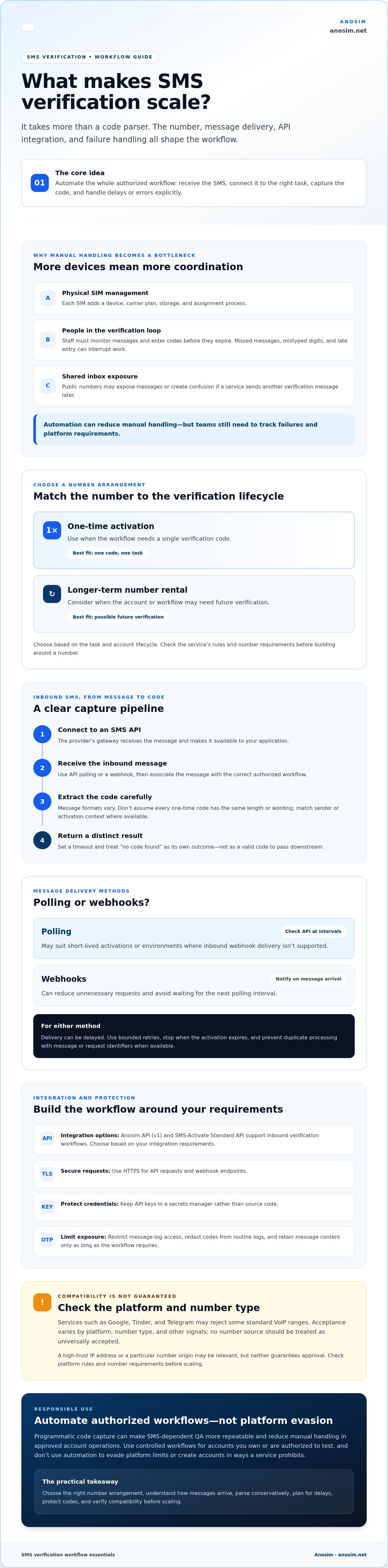
Manual SMS verification can work for an occasional signup, but it becomes a bottleneck when a team handles repeated, legitimate checks. Each physical SIM card adds a device, carrier plan, storage, and assignment process. Staff must track which number belongs to which workflow, monitor incoming messages, and enter each code before it expires. As the number of devices grows, so does the coordination required to prevent a number from being misplaced or used in the wrong test.
Manual entry also adds latency and opportunities for error. A person may miss a message, mistype a digit, or enter a code after it expires. Those delays can interrupt QA runs and make results harder to reproduce. When staff repeatedly receive and enter codes, the cost of each completed verification includes their time and troubleshooting, not just access to a number. Automation can reduce that manual work, but teams still need to track failures and platform requirements.
Public numbers create a separate risk: other users may be able to view messages, and the number may be reused. That can expose a one-time code or cause confusion if a service sends another verification message later. For sensitive accounts, avoid shared public inboxes and choose a number arrangement that fits the account’s verification lifecycle.
The Limitations of Consumer-Grade Virtual Numbers
Major platforms such as Google, Tinder, and Telegram may reject some standard VoIP ranges as part of their anti-abuse checks. Acceptance depends on the platform, number type, and other signals, so no number source should be treated as universally accepted. A high-trust IP address or a particular number origin may be relevant, but neither guarantees approval. In 2026 anti-fraud systems, a number trust score is an assessment of how likely a phone number is to represent legitimate use based on available risk signals.
SMS is one possible factor in multi-factor authentication, but it isn’t the only option. For accounts you own or authorized testing, check the platform’s rules and test number compatibility before building a workflow around it.
Automation as a Competitive Advantage
To automate sms verification responsibly, use controlled workflows, such as managing authorized accounts, researching platform behavior within applicable rules, or testing an app you’re building. Programmatic code capture can make SMS-dependent QA more repeatable and reduce manual handling in approved account operations. Don’t use automation to evade platform limits or create accounts in ways a service prohibits.
For privacy considerations when choosing a number for verification, see the Temporary Phone Number: 2026 Privacy Guide. Separating personal numbers from test workflows can simplify operations and reduce unnecessary exposure of personal contact details.
Mechanisms for Automating SMS Verification Capture
Inbound automation starts with a number that can receive the verification message. The provider’s gateway handles the incoming SMS and makes its contents available to your application through an API. Your code can then wait for a new message, associate it with the correct authorized workflow, and extract the code. This differs from an app-specific SMS retrieval tool, which is generally designed for an app you control rather than messages sent to a third-party number.
Parse captured messages conservatively. A regular expression can identify a short numeric code, but message formats vary, so don’t assume every OTP has the same length or wording. Where the API provides the information, match the message to the expected sender or activation context. Set a timeout, and handle “no code found” as a distinct outcome rather than passing an empty or incorrect value downstream.
Webhooks vs. Polling in SMS Automation
Polling checks the API at intervals; webhooks notify your application when a message arrives. Webhooks can reduce unnecessary requests and avoid waiting for the next polling interval. Polling may suit short-lived activations or environments where inbound webhook delivery isn’t supported. Either way, carrier delivery can be delayed. Use a bounded retry schedule, stop when the activation expires, and prevent duplicate processing by recording message or request identifiers when available.
Protect the code throughout the workflow. Use HTTPS for API requests and webhook endpoints, keep API keys in a secrets manager rather than source code, and restrict access to message logs. OTPs are sensitive credentials, so redact them from routine logs and retain message content only as long as the workflow requires. The NIST Digital Identity Guidelines discuss security limitations of SMS-based out-of-band authentication. Use SMS only where it fits your risk requirements.
Use Network Signals Responsibly
For authorized testing, network location may be relevant when diagnosing region-specific behavior. Mobile proxies and number origin are separate signals, and aligning them doesn’t guarantee a platform will accept a number or treat an account as legitimate. Don’t use proxies or number selection to evade anti-bot controls, account limits, or a service’s rules. The “Mobile Identity” triad describes three signals considered together: IP address, phone number, and device fingerprint. Platforms may also classify mobile VoIP numbers differently. Test compatibility within permitted workflows rather than assuming a particular trust level.
To automate sms verification for systems you own or are authorized to test, define the message lifecycle first: request, wait, parse, validate, and expire. Anosim supports inbound SMS workflows through its APIs. Review the Anosim API documentation for integration details.
Short-Term Activations vs. Long-Term Rentals
The right number depends on what happens after the first code arrives. A one-time activation is designed for a single inbound verification, while a rental keeps a number available for later messages during its rental period. Choose based on the account’s expected lifecycle, not just how quickly you need the first code.
For an authorized, one-time test or signup with no expected future verification, an activation avoids maintaining a number beyond the immediate task. If the account may need a password reset, periodic identity check, or recovery code, a rental can preserve access to incoming messages on the same number during the rental period. Before choosing either option, confirm that the service and number type fit the platform’s current requirements. Acceptance can vary, and neither option guarantees a platform will accept a number.
When to Use SMS Activations
SMS Activation suits workflows that need one inbound code and have no planned need for the number afterward. Developers might use it to test a verification flow they’re authorized to evaluate. Account operators should follow each platform’s rules rather than use activations to bypass limits or create prohibited accounts. For repeated, independent tests, compare the effort and cost of separate activations with keeping a number available longer.
Review the available options for SMS Activation and check the relevant platform and service terms before proceeding.
The Strategic Value of Number Rentals
A rental is worth considering when continued access to inbound messages matters. It may suit legitimate accounts that need future verification or recovery, including business-critical identities where losing access could disrupt operations. Treat the number as part of the account’s recovery plan: document its assignment, limit access to verification messages, and confirm what happens when the rental period ends.
Some platforms may require access to the original number for later checks; others may offer different recovery methods. Don’t assume a rental is necessary or sufficient without checking the platform’s guidance. Anosim offers longer-term number rental options, and its number rental information can help you assess that route.
Compare the models beyond the initial code. An activation’s pay-per-use structure may suit isolated verifications, while a rental’s term-based charge may make more sense when repeat access matters. Billing terms vary, so check current service details rather than assuming every rental is monthly. To automate sms verification reliably, choose the option that fits the expected message pattern, account recovery needs, and platform rules.
Integrating SMS Automation into Your Development Workflow
Choose the API that fits your existing integration and the workflow you need to support. Anosim provides the Anosim API (v1) and the SMS-Activate Standard API. Compare their documentation, request and response formats, and status-handling requirements before building against either one. A consistent interface can make provider-specific logic easier to manage, but don’t assume endpoints or parameters are interchangeable between APIs.
Build the Request Lifecycle
For an authorized test or verification flow, structure the integration as a controlled sequence:
- Authenticate: Send requests using the API key and authentication method specified in the relevant documentation. Store credentials in a secrets manager or protected environment variables, never in client-side code or a public repository.
- Select: Provide the required country and service parameters, such as a service identifier for Google or WhatsApp, only where the selected API supports them and the platform permits their use.
- Wait and process: Save the returned number and request identifier, then check for the inbound SMS or handle a webhook if the API supports one. Parse the expected code, record the outcome without logging the OTP, and close or update the request according to the documented lifecycle.
Use the provider’s current documentation as the source of truth for request fields, status values, and timeouts. A number assignment does not mean a message has been delivered, so represent those as separate states in your application.
Leveraging the SMS-Activate Standard API
Standard API conventions can help teams keep provider-specific logic behind a consistent interface. In an integration using the SMS-Activate Standard API, lifecycle actions may map to operations such as getNumber, getStatus, and setStatus. Confirm exact method names, parameters, and allowed status changes in the API documentation rather than assuming another implementation uses identical routes.
If a code doesn’t arrive, check the request state and message-waiting window before retrying. Apply bounded retries with delays, avoid creating a new number request after every timeout, and return a clear failure state when the documented wait period ends. This prevents a delayed message from triggering uncontrolled repeat requests.
Use Automation in QA Pipelines
For apps your team owns, include verification in CI/CD testing to check how signup and recovery flows handle valid codes, delayed messages, and failure states. Keep test credentials and message data out of build logs, and use only accounts and services you’re authorized to test. API-driven verification supports headless automation because a script or CI job can request, receive, and process inbound messages without someone copying codes into a browser.
To automate sms verification with a documented integration, review the Anosim API documentation and confirm which API version and workflow match your implementation.
Scaling with Anosim: High-Trust Infrastructure for 2026
Scaling verification requires more than increasing request volume. Your workflow needs suitable number types, secure API-key handling, clear ownership of each number, and a plan for delayed or failed messages. Anosim provides inbound SMS activations, longer-term number rentals, and mobile VoIP options; mobile proxies are available through its partner proxied.com. Developers can assess these services for authorized workflows, while platform acceptance and message delivery still depend on the service, number, and its verification rules.
An inbound-only workflow focuses on receiving verification messages rather than sending SMS or placing calls. That can keep the integration’s scope clear, but it doesn’t guarantee higher deliverability or acceptance by a particular platform. Anosim’s global coverage for inbound verification can help teams assess numbers from different regions. Check the platform’s requirements and applicable rules first; don’t use geographic selection to evade geo-restrictions.
Virtual numbers can also help separate personal contact details from a signup or test workflow. Treat the number and any received code as sensitive data: restrict access, avoid exposing OTPs in logs, and document which authorized workflow uses each number.
Beyond SMS: The Mobile Proxy Advantage
For legitimate regional testing, a mobile proxy can provide a mobile-network IP connection, while a virtual number supports inbound SMS. Teams may compare the proxy’s location with the number’s country when diagnosing region-specific behavior, but matching them doesn’t establish a “real” identity or prevent fraud checks. Scale gradually, monitor platform responses, and stop if a workflow conflicts with the service’s rules. No setup can promise scaling from one account to a thousand without alerts or restrictions.
Get Started with Anosim
Start with a small, authorized workflow. Review the requirements for your chosen platform, select an appropriate activation or rental, and follow the API documentation to create and protect credentials. Store the API key outside application code, limit its access, and test message receipt and error handling before expanding usage. Where relevant, track the number’s purpose and rental lifecycle.
To assess number options for your workflow, review Anosim’s Rent Service details. Consult the relevant program and support resources for reseller or troubleshooting information before scaling. A measured rollout makes integration issues easier to identify without assuming that a particular number, proxy, or region will be accepted everywhere. With the right controls, Anosim can support automate sms verification workflows for authorized operations.
Build a Verification Workflow That Scales
To automate sms verification effectively, match the number type to the account’s expected lifecycle, then build a clear API flow for requesting a number, receiving inbound messages, parsing codes, and handling timeouts. Protect API keys and verification data, and test only within the rules of the platforms involved. These practices reduce manual handling without assuming every number will be accepted everywhere.
Anosim supports the Anosim API (v1) and SMS-Activate Standard API, alongside global coverage for inbound verification, number rentals, and mobile VoIP options; mobile proxies come from its partner proxied.com. These services can support developers building authorized verification workflows. Check platform compatibility and requirements for each use case.
Ready to put the integration into practice? Start automating SMS verification with Anosim and build your workflow one tested step at a time. A thoughtful setup can make verification more manageable while keeping privacy and operational control in view.
Frequently Asked Questions
Is it possible to automate SMS verification for any app?
No. An API can automate receiving and processing an SMS, but it can’t make every app accept a virtual number or guarantee that SMS is offered as a verification method. Platforms set their own requirements and may reject certain number types or request another authentication step. Use automation only for accounts and testing you’re authorized to manage, and check the app’s terms before building around SMS.
How do I use an API to receive SMS verification codes?
Authenticate with the provider’s API, request or select a number for a supported workflow, then wait for the inbound message using the documented polling or webhook method. Parse the expected code and handle delays, timeouts, and errors explicitly. Keep API credentials out of client-side code, restrict access to received messages, and avoid writing OTPs to routine logs. Anosim supports the Anosim API (v1) and SMS-Activate Standard API.
What is the difference between an SMS activation and a number rental?
An SMS Activation is intended for receiving a one-time verification code. A number rental keeps a number available for a longer period, which may suit accounts that need future verification or recovery messages. Choose based on whether you expect to need the same number again. Before relying on either option, confirm that the platform accepts the number type and check the provider’s current terms and pricing.
Can automated SMS verification bypass Tinder or Telegram security?
No. Automating code receipt doesn’t bypass a platform’s security checks, account limits, or verification requirements. Tinder, Telegram, and other services decide which numbers and verification methods they accept, and they may request additional checks. Don’t use APIs, virtual numbers, or proxies to evade controls or platform rules. For legitimate testing, use accounts and workflows you’re authorized to manage and follow the service’s terms.
Why are some virtual numbers blocked by Google or WhatsApp?
Platforms may classify number ranges by type, origin, or risk signals and reject numbers they consider unsuitable for verification. Shared, recycled, or standard VoIP numbers may not be accepted by every service. These checks and supported number types can change, so compatibility isn’t guaranteed. Review the platform’s requirements and test your authorized workflow before depending on a particular number for ongoing access.
How much does it cost to automate SMS verification at scale?
There isn’t one universal cost. Expenses depend on whether your workflow uses one-time activations or longer-term rentals, as well as the required regions, volume, retries, and operational monitoring. Calculate the full cost per successful verification, including failed or delayed attempts and staff time. Check current provider pricing and terms directly, since rates and availability can vary by service and location.
Do I need a mobile proxy to use automated SMS verification?
No. A mobile proxy isn’t required to receive an SMS through an API. It may be relevant for authorized regional testing or workflows with a documented network requirement, but it doesn’t guarantee that a platform will accept a number or improve message delivery. Use proxies only in line with the platform’s rules, and don’t treat location matching as a way to evade security checks.
Is using a virtual number for verification legal and safe?
It depends on your location, the platform’s terms, and how you use the number, so there’s no universal answer. Check applicable requirements and service policies, and use numbers only for accounts or testing you’re authorized to manage. For privacy, avoid public shared inboxes for sensitive accounts, protect API keys, and limit access to received codes. A virtual number doesn’t remove the security risks associated with SMS verification.