What does an AI app actually gain when you enter your phone number? If you’re asking, “is it safe to give my phone number to ai apps,” the answer depends less on the AI itself and more on how the app handles account data. A number may be used to verify a signup or recover an account, but it can also connect that account to your real-world identity.
That concern is reasonable, but sharing your number doesn’t automatically mean it will be used for marketing, model training, or exposed in a breach. The app’s privacy policy, security practices, and account settings matter. This guide explains what an AI app may do with your number, how to assess its risks, and when providing it may be a reasonable trade-off.
A separate number, including SMS activation or a virtual number rental, can keep your primary number off a signup. It won’t control the app’s data practices or guarantee anonymity. Before using one, consider whether the app accepts it and how you’ll maintain access for account recovery.
Key Takeaways
- Sharing a number isn’t automatically unsafe. Assess why the app requests it and how it handles account data.
- Providing your number is different from granting access to your contacts or messages. Check app permissions separately.
- To decide whether is it safe to give my phone number to ai apps, review the app’s purpose, privacy policy, settings, and recovery options.
- Be cautious when the reason for collecting your number or the app’s retention and deletion practices are unclear.
- A separate number can keep your primary number off a signup, but it won’t change the app’s data practices or guarantee anonymity.
Table of Contents
- Is It Safe to Give Your Phone Number to an AI App?
- What Can Happen to Your Number After AI App Signup?
- When Is Sharing a Phone Number With an AI App Riskier?
- How to Decide Whether to Share Your Number With an AI App
- Can a Separate Number Reduce Exposure to AI Apps?
Is It Safe to Give Your Phone Number to an AI App?
Sharing your phone number with an AI app isn’t automatically unsafe. The risk depends on why the app requests it, what its privacy policy says, and how it stores, uses, or shares account information. A number may help verify that you control an account, support account recovery, or reduce abuse such as automated signups. Some apps may also request one for optional profile features or account updates.
Signup risk concerns how your number is collected and linked to your account; broader AI-data practices concern what happens to information you share with the app. These are related privacy questions, but entering a number alone doesn’t reveal how the app handles your prompts or other data. To answer “is it safe to give my phone number to ai apps,” assess the signup request separately from the app’s overall data practices.
Why does an AI app ask for a phone number?
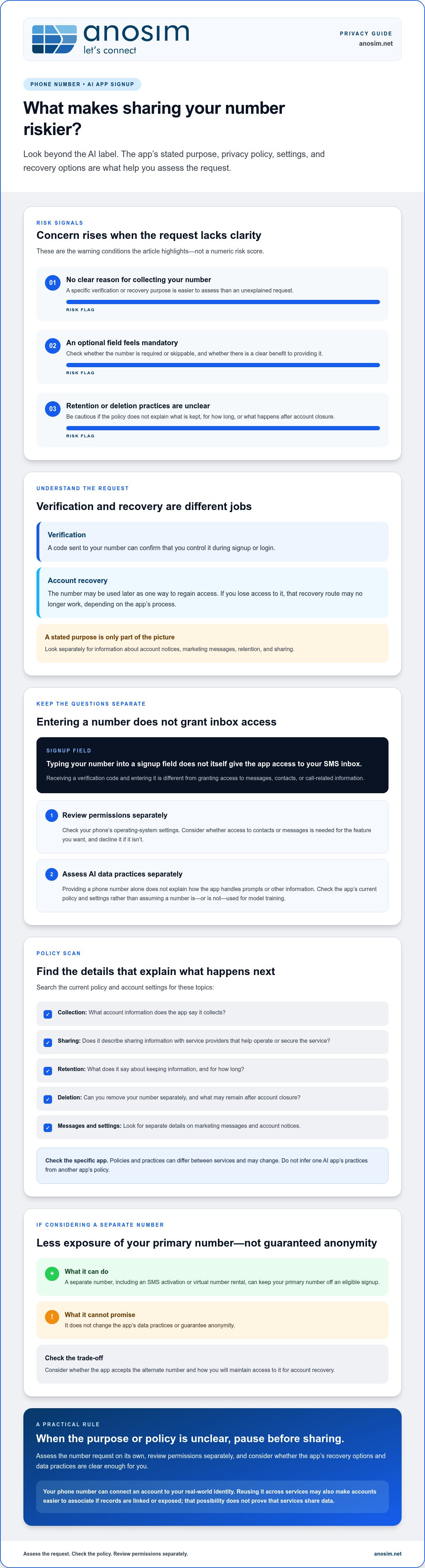
Verification and recovery serve different purposes. Verification usually means entering a code sent to your number to confirm access during signup or login. Recovery uses a number as a way to help regain access later. An app might also request one to discourage abuse or enable optional account features.
Read the explanation beside the phone-number field and check whether it’s required or skippable. A stated verification purpose doesn’t, by itself, explain every later use. Look for separate information about marketing messages, account notices, retention, and sharing in the app’s policy and settings.
Does sharing a number mean the AI can read your texts?
No. Typing a number into a signup field doesn’t itself give an app access to your SMS inbox. A verification code is a message you receive and enter to confirm control of the number. That’s different from granting an app permission to access messages, contacts, or call-related information.
Review permissions separately in your phone’s operating-system settings. If an app requests access to contacts or messages, consider whether that permission is needed for the feature you want and decline it if it isn’t. A signup field alone doesn’t grant that access, but a separate permission request should be considered on its own.
Your number can also act as a personal identifier outside the app if it’s linked with other records. Data brokers collect and share personal information, which may include contact details; see the overview of a data broker. That possibility isn’t proof that a particular AI app sells numbers. Check the app’s policy for its stated collection, sharing, and deletion practices, and avoid providing optional information without a clear benefit.
What Can Happen to Your Number After AI App Signup?
After signup, an app may keep your number as part of your account record, use it for login verification, or rely on it for recovery. That collection is separate from using information to train an AI model. Don’t assume a phone number is used for training, or that it isn’t; the app’s current policy and settings describe its stated practices.
A privacy policy, not the AI label, determines how an app says it handles your number. Read the policy for details on collection, sharing with service providers, retention, and deletion. The answer to “is it safe to give my phone number to ai apps” varies between apps, and policies may change, so check the current version rather than relying on a general assumption.
Verification, recovery, and account linking
A number can remain attached to your profile after it has served its original verification purpose. It may also act as a recovery route if you lose access. Reusing the same number across several services can make those accounts easier to associate if records are linked or exposed. This doesn’t prove that the services share data, but it does mean the number can connect otherwise separate accounts.
Secure the email address and recovery methods tied to your AI account, too. Use a strong, unique password for the email account and keep recovery details current. If you lose access to the number, you may also lose a route to account recovery, depending on the app’s process.
Retention, sharing, and deletion policies
Search the policy for terms such as “personal data,” “service providers,” “retention,” “delete,” and “account closure.” Check whether the app says it shares information with vendors that help operate or secure the service, and whether you can remove your number separately from the account. Deleting an account may not immediately erase every record; the app’s policy should explain what it retains and for how long.
For a specific app, verify these details against its current policy and account settings. Don’t infer one AI app’s practices from another service’s policy. The FCC’s guidance on protecting personal data covers protections for certain information held by communications providers; it doesn’t establish how an AI app handles data you submit directly.
If you want to keep an eligible signup separate from your primary number, virtual number rental is one option. Consider the app’s rules and your need for number continuity before using an alternate number.
When Is Sharing a Phone Number With an AI App Riskier?
The risk is higher when an app asks for your number without explaining why, makes an optional profile field feel mandatory, or gives no clear information about retention and deletion. A required verification request with a specific purpose is easier to assess than a number request bundled with marketing or profile completion. If the purpose and policy remain unclear, postpone signup rather than sharing by default.
A phone number is personal data and can help connect an account to you, but it isn’t the same as a password or one-time authentication code. Sharing it doesn’t make an account fully anonymous, even if you use a different email or limit profile details. If you’re weighing “is it safe to give my phone number to ai apps,” focus on what the app needs and what you give it permission to access.
Lower-risk and higher-risk signup situations
A clearly explained request for a code to verify a new account may be reasonable if you need the service. An unexplained demand to complete an optional profile deserves more caution, especially if the app also asks for permissions unrelated to the feature you want. Check whether the number field can be skipped and whether the app explains its use. If those details aren’t clear, wait.
Could your number increase account-security risks?
Knowing your number doesn’t automatically let someone take over your account. However, a number may be targeted in phishing attempts or SIM-swap fraud, where an attacker tries to redirect your calls or texts. The National Law Review describes how phone-number exposure can help attackers defeat the two-factor authentication that relies on SMS. Treat this as a possible security risk, not an inevitable result of signing up.
Protect your account with a few basic checks:
- Never share one-time codes with a person who contacts you or with an unrelated service. Enter a code only in the app or site you’re signing into.
- Use stronger authentication, such as an authenticator app or security key, if the service supports it.
- Limit permissions to what the app’s features need. A phone-number field alone doesn’t justify access to contacts or messages.
These steps reduce avoidable exposure, but no single signup choice removes every link to your identity. Assess the number request alongside the app’s permissions and account-security options.
How to Decide Whether to Share Your Number With an AI App
Use a short check before you submit your number. The goal isn’t to eliminate every privacy risk; it’s to understand what the app needs, what you’re agreeing to, and whether you can keep access to the account later. If you’re asking “is it safe to give my phone number to ai apps,” make the decision based on the specific app and feature you want, not on the AI label alone.
A five-point check before entering your number
- Identify the purpose. Is the number required for verification or recovery, or is it an optional profile or marketing field? If the reason isn’t clear, pause.
- Review the policy. Look for what the app collects, whether it shares data with service providers, how long it retains information, and how deletion works.
- Check settings and permissions. Review privacy controls and available authentication options. Don’t grant access to contacts or messages unless it’s needed for a feature you want.
- Assess recovery. Find out whether the number is used to regain access and what alternatives are available if you lose it or change numbers.
- Share only what’s needed. Skip optional details and provide the minimum information required to use the feature you want.
When should you use a separate number?
A separate number may make sense if you want to keep your primary number off a particular signup and the app accepts the alternative. It can separate that signup from your main contact number, but it won’t change the app’s retention or sharing practices, hide information you provide in prompts, or guarantee anonymity.
Consider continuity before using a temporary or short-term number. If the app later sends a login or recovery code to that number, losing access could make account recovery difficult. Follow the app’s terms and don’t use an alternate number to evade enforcement or account restrictions.
If a separate number suits your needs, consider virtual number rental for receiving verification codes. Choose an option with your future access needs in mind, and make sure the app accepts the number you plan to use.
Can a Separate Number Reduce Exposure to AI Apps?
Yes, a separate number can keep your primary number off a particular AI app signup. That’s a limited privacy measure: it separates the contact number you use for that account, but doesn’t make the account anonymous or control what the app does with information you submit.
A different number won’t hide prompts, change the app’s retention or sharing practices, or prevent a breach. The app still handles the account details you provide under its own policies. So if you’re asking “is it safe to give my phone number to ai apps,” a secondary number may reduce one kind of exposure, but it doesn’t replace reviewing the app’s data practices.
What a virtual number can and cannot do
A virtual number can provide a separate destination for an inbound verification code instead of using your primary contact number. Whether a specific app accepts virtual or rented numbers can vary, so don’t assume one will work for every signup. Consider the app’s terms and the purpose of the number before using an alternative.
Number separation also doesn’t prevent the app from linking your account to other details you provide, such as an email address or profile information. It’s one privacy layer, not a guarantee of anonymity or protection from the app’s own data handling.
Choosing an option without losing account access
SMS activation can suit a verification step when you need to receive an inbound code. Renting a number may be more appropriate when you expect to need continued access to that number. These options serve different needs, and neither should be treated as a substitute for checking the app’s recovery process.
If the AI app may send future login or recovery codes to the same number, plan for continuity before choosing a short-term option. Losing access can complicate account recovery. Follow the app’s terms, and don’t use a separate number to bypass account restrictions or enforcement.
For a signup that accepts this method, explore SMS activation for verification to receive an inbound code without entering your primary number. Consider the app’s number requirements and your recovery needs before proceeding.
Make a Deliberate Choice Before You Sign Up
Sharing a number with an AI app isn’t automatically unsafe. The app’s purpose for collecting it, its privacy and retention policies, and the account recovery options all matter. Before you decide whether is it safe to give my phone number to ai apps, check whether the number is required, what permissions the app requests, and whether you’ll need ongoing access to the number.
A separate number can keep your primary number off one signup, but it doesn’t hide your prompts, change the app’s data practices, or guarantee anonymity. Share only what’s needed for the feature you want, and make sure you can still recover the account if the number is needed later.
Anosim offers SMS activation for receiving verification codes and virtual number rental options. If separating a signup from your primary number fits your needs, explore virtual number options. Review the AI app’s number requirements and plan for account access before choosing. Explore Anosim’s options to receive verification codes without using your primary number.
Frequently Asked Questions
Is it safe to give my phone number to AI apps?
It can be reasonable if the app clearly explains why it needs your number and how it handles account data. If you’re asking, “is it safe to give my phone number to ai apps,” check whether the field is required, review the privacy policy, and consider recovery needs before submitting it. A separate number may limit exposure of your primary number, but it doesn’t guarantee anonymity or control the app’s data practices.
Can AI apps see my text messages if I give them my phone number?
No, entering your number doesn’t by itself grant access to your text messages. A verification code is sent to your messaging service, and you enter it in the app to confirm access to the number. That’s different from granting an app permission to read messages or access contacts. Review permissions in your phone’s settings separately, and only allow access that’s necessary for a feature you intend to use.
What happens if I use my phone number to verify an AI app?
The app sends a code to your number, which you enter to verify control of it. The number may remain associated with your account or be used for recovery, depending on the app’s current policy and settings. Check the app’s privacy information for retention, sharing, and deletion details. Never share a one-time code with someone who contacts you or with an unrelated service.
Can I use a virtual number for an AI app?
Sometimes, but acceptance varies by app and use case. A virtual number can keep your primary number off a signup, but it won’t change how the app handles your account data or guarantee anonymity. Anosim offers SMS activation and virtual number rental for receiving verification codes. Before using an alternative, review the app’s terms and consider whether you’ll need continued access for future login or account recovery.
Is a phone number more sensitive than an email address?
Neither is always more sensitive; the risk depends on how each identifier is used and connected to other information. A phone number may link accounts or serve as a recovery route, while an email address can also identify you and provide access to password resets. Treat both as personal information. Avoid reusing identifiers unnecessarily, secure the accounts attached to them, and provide only what the app requires.
Should I give an AI app my main phone number?
Use your main number only if the app has a clear reason to require it and you’re comfortable with its stated data practices. It may be useful for ongoing recovery, but it can also connect that account to your regular contact details. If the number is optional, consider skipping it. If you use another number, first check acceptance, account terms, and whether you can keep access to it.
How can I protect my phone number when signing up for AI apps?
Check whether the number field is required, read the app’s current privacy and retention policy, and review permissions separately from signup. Skip optional fields and don’t grant unnecessary access to contacts or messages. Consider a separate number if the app accepts it, but plan for account recovery and continuity. Use stronger authentication where available, and never disclose one-time verification codes to people or unrelated services.