The number you use to sign up could be the one you need to recover your account later. If you want to register on websites without personal phone number exposure, start by checking whether the site allows email signup or another option. If it requires a number, choose one you can access again, since websites don’t accept every number type.
Limiting where you share your personal number can help reduce unnecessary exposure. A website might expose stored information in a data breach or use your number to connect accounts. A temporary number carries a different risk: if you lose access to it, you may not receive a future login or recovery code.
This guide compares practical signup options, including email, authenticator apps, temporary numbers, and longer-term virtual number rentals. You’ll learn how to check what a site accepts, weigh privacy against account recovery, and choose a method that fits the account’s importance. Virtual-number verification can separate a signup from your primary line when a website accepts it, but it doesn’t guarantee anonymity or future access. The key question is whether you’ll need that number again.
Key Takeaways
- Phone-number privacy means limiting unnecessary disclosure, not becoming untraceable. Consider how a number could connect accounts before sharing it.
- Compare email-only signup, an alternate personal number, and a virtual number by acceptance, privacy exposure, and future recovery needs.
- Before you register on websites without personal phone number exposure, assess the account’s importance and choose a verification method you can keep accessing.
- Review the website’s terms and privacy settings, then set up recovery options before relying on a number for verification.
- An inbound SMS number may help separate a signup from your primary line when accepted, but plan for continued access and understand its limits.
Table of Contents
- Why register on websites without your personal phone number?
- How signup verification works, and what a phone number does
- Compare ways to sign up without sharing your primary number
- Follow these steps to register while limiting phone-number exposure
- Use a virtual number responsibly and plan for future access
Why register on websites without your personal phone number?
A phone number can do more than receive a signup code. If you use the same number across services, it may help connect accounts and personal details you’d rather keep separate. Choosing to register on websites without personal phone number exposure can limit unnecessary disclosure, but it won’t make you untraceable.
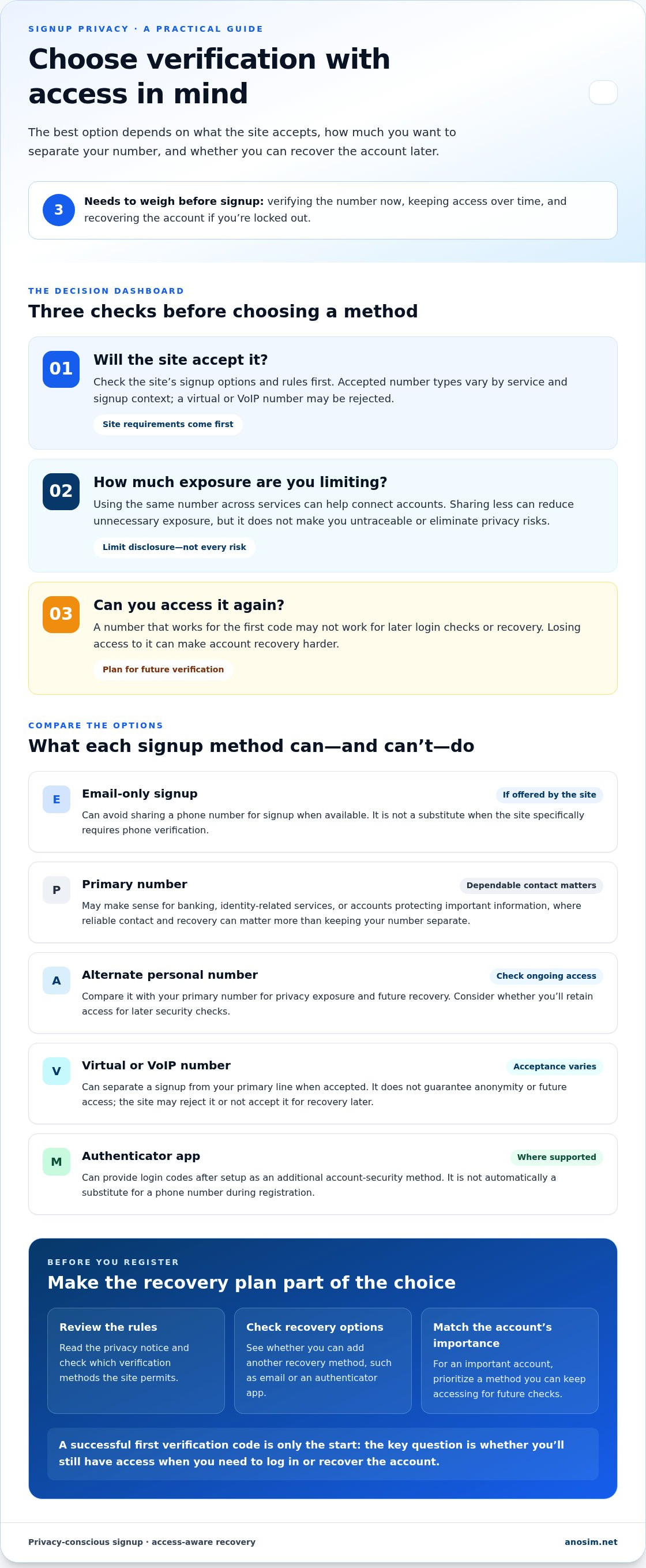
Consider three separate needs: verifying a number during signup, keeping account access over time, and recovering the account if you’re locked out. A method that works for the first code may not work for later login checks or account recovery. Weigh all three before choosing how to sign up.
What information can a signup phone number reveal?
A number can act as a recurring identifier. When it appears on different services or alongside public profiles, it may make it easier to associate those accounts with one person. If a website experiences a data breach, the number could be exposed with other stored information. It may also lead to unwanted calls or texts, although sharing a number doesn’t make those outcomes certain. A phone number alone doesn’t reveal everything about its owner, but it can contribute to a broader profile.
Minimizing the personal data you share reduces what could be exposed or linked, but it can’t eliminate privacy risks. For an overview of how virtual phone numbers work, see the linked reference.
When is using your primary number still sensible?
For banking, identity-related services, or accounts that protect important information, dependable contact and recovery may matter more than keeping your primary number separate. If you use another number, consider whether you’ll retain access to it for future security checks. Losing access can make account recovery harder.
Before signing up, read the site’s privacy notice to understand how it handles phone details, and review its recovery options. Check whether you can add another recovery method, such as an email address or authenticator app. Choose based on the account’s importance and the access you can maintain.
Privacy-conscious signup choices are legitimate, but they’re different from evading a website’s rules or safeguards. If a service requires a particular type of verification, use an accepted method or decide whether to create the account. A number-based option can reduce exposure only if the site accepts it and you can keep accessing it for future verification.
How signup verification works, and what a phone number does
A signup form may ask for your number, then send a code by text or place an automated call. Entering the code helps confirm that you can access the number. It doesn’t necessarily prove your legal identity or, by itself, secure the account against later threats.
A one-time passcode (OTP) is a temporary code used to confirm access to a phone number or another contact method. Number verification is just one check a service may use. Identity verification may involve additional information or documents, while multi-factor authentication (MFA) adds another verification step at login, such as an authenticator-app code. These checks serve different purposes: completing signup verification doesn’t automatically confirm your identity or enable MFA.
Each service sets its own accepted number types and verification rules. Requirements can vary by service and signup context. If you want to register on websites without personal phone number exposure, first check which methods the specific site permits.
SMS codes, voice calls, and other signup methods
With SMS verification, the site sends a code to the number you enter. Some sites offer a voice call that reads out a code. Others may let you verify by email or, where supported, set up a passkey or authenticator app. These options aren’t universal, and a site may still require phone verification during registration even if it offers other account-security methods.
Choose an available option you can access again if the site requests another check. An email code confirms access to your inbox; an authenticator app can generate login codes after setup. Neither is an automatic substitute for a phone number when the site specifically requires one during registration.
Why virtual and VoIP numbers may not always work
Some services restrict virtual or VoIP numbers, or apply additional checks when a number doesn’t meet their requirements. Acceptance can vary by website, country, and account context, so a number that works for one signup may be rejected by another. A successful first code also doesn’t guarantee that the site will accept the number for later recovery.
Follow the platform’s terms and stated verification process. If a number is rejected, repeatedly trying different numbers to get around controls may violate the site’s rules or trigger additional restrictions. For sites that accept inbound SMS verification, virtual number SMS activation is one option. Plan for future access before using any number.
Compare ways to sign up without sharing your primary number
The right method depends on what the site accepts and how important the account is. Email-only signup may be enough for a low-risk service, while an account you rely on may need a recovery method you can keep using. Compare the trade-offs before you decide.
- Email-only signup: keeps your phone number off the signup form, if the site supports it. Works only where phone verification isn’t required. Continued access depends on retaining access to the email account and any recovery options.
- Alternate personal number: separates the signup from your primary number, but still shares a personal number. May work where the site accepts that number type and region. Can support future codes if you keep control of the number.
- Virtual number: can limit direct exposure of your primary number. Acceptance varies by website, country, and account context. Continued access depends on keeping the number; a temporary number may leave you unable to receive later codes.
Email, passkeys, and authenticator apps
Use email verification, a passkey, or an authenticator app as an alternative only when the website offers it. A passkey or authenticator app can reduce reliance on SMS for later sign-ins, but may not replace a phone number required during registration. If the site provides recovery codes, store them somewhere secure and separate from the account they protect.
Secondary numbers and virtual number services
A secondary personal number is one you control separately from your primary line. A rented number is provided for use over a defined arrangement, so consider whether you can maintain access for future verification. Inbound SMS verification is an option when the site accepts the number. Virtual number rentals may suit people who need longer-term access, but no method guarantees acceptance or recovery.
If you want to register on websites without personal phone number exposure, email or a passkey may fit when supported and when you have a recovery plan. For an important account, prioritize reliable future access. Follow the site’s rules, and don’t rely on a temporary number if losing it could lock you out.
Follow these steps to register while limiting phone-number exposure
A few checks before signup can prevent unnecessary disclosure and reduce the risk of losing access later. Use this checklist to match your method to the site’s requirements and the account’s importance.
- Assess the account’s importance. For a low-risk account, start with email or another non-phone option if the site supports it. For banking, identity, or other critical accounts, prioritize dependable verification and recovery over short-term convenience.
- Review signup choices and site rules. Read the site’s terms and privacy notice before entering a number. Check which verification methods it accepts, how it uses phone details, and what recovery options are available. Don’t use a method to bypass the platform’s rules or safeguards.
- Select a method you can keep accessing. If the site accepts a virtual number, consider whether you can retain access for as long as the account may need future verification. A temporary number may work for an initial code but leave you unable to receive a later login or recovery code.
- Secure the account and its recovery path. Use a unique password and enable the strongest supported second factor. Save recovery codes securely, and keep recovery details current if your email address or number changes.
Choose a method based on account risk
For a casual account, email verification or another supported non-phone method may be sufficient. For an account that protects money, identity, or important data, choose a recovery route you can depend on over time. A virtual number can help separate a signup from your primary line when the site accepts it, but make sure you can maintain access before relying on it.
Secure the account after registration
After signup, check the account’s security settings and add recovery methods you control. Don’t share verification codes with anyone or reuse a code across services. If the site provides recovery codes, store them in a secure place that remains accessible if you lose your usual device.
To register on websites without personal phone number exposure, match the signup method to the site’s rules and your future access needs. If inbound SMS verification fits those requirements, explore SMS activation options.
Use a virtual number responsibly and plan for future access
An inbound SMS number can help separate a website signup from your primary line if the site accepts it. It may not work if the platform rejects virtual numbers or if you can’t retain access for future login checks and account changes. Choose based on the account’s recovery needs, not just whether the number can receive the first code.
Plan for recovery before using a non-primary number
Before registering, check whether the website lets you change your number or add other recovery methods, such as an email address or authenticator app. Consider whether you’ll be able to access the number whenever the site requests another code. If a critical account would depend on temporary access, choose a more dependable recovery path.
- Review the site’s account settings and recovery process before signing up.
- Use a number you can access for as long as the account may require verification.
- Add recovery options you control and keep them up to date.
For longer-term verification access, Anosim offers number rental. The service handles inbound SMS and doesn’t provide physical SIM delivery or outgoing messages. A rented number may help when the site accepts it and you can maintain access, but it doesn’t guarantee that the site will approve the number or that account recovery will always be possible.
Set realistic privacy expectations
A virtual number can reduce exposure of your primary number, but it doesn’t make you anonymous. A website may collect other identifying information during signup or account use, and a virtual number may still be subject to the site’s verification checks. Use the number in line with the platform’s terms and policies.
To register on websites without personal phone number exposure responsibly, weigh privacy against future access and follow the service’s stated verification requirements. If a virtual number fits your needs, review virtual number options for longer-term use.
Choose a signup method you can keep using
To register on websites without personal phone number exposure, match the verification method to the account’s importance and the site’s rules. Email or another supported non-phone option may suit a low-risk signup. For accounts you rely on, prioritize dependable access and recovery, and don’t use a temporary number if losing it could lock you out.
A virtual number can help separate a signup from your primary line when the website accepts it, but it doesn’t guarantee anonymity or future account access. Anosim offers inbound SMS verification, longer-term virtual number rentals, and API integrations for Anosim and SMS-Activate Standard API.
If inbound SMS fits your signup needs, Explore SMS activation options. Review the platform’s verification and recovery requirements, then choose a method you can manage over time. The right approach can reduce unnecessary sharing while keeping your account accessible.
Frequently Asked Questions
Can I register on a website without a phone number?
Yes, if the website offers email signup or another verification method that doesn’t require a phone number. Some sites require phone verification during signup, while others offer alternatives such as passkeys or authenticator apps for certain steps. Review the signup choices and account recovery options before proceeding. If a number is mandatory, choose one you can access for any future verification the account may require.
How can I sign up without giving a website my personal number?
Start by checking whether the site supports email-only registration, a passkey, or another non-phone option. If phone verification is required, an alternate personal number or virtual number may help separate the signup from your primary line, provided the site accepts it. To register on websites without personal phone number exposure, consider recovery as well as signup: make sure you can access the method again if the service requests another code.
Are virtual numbers accepted for website verification?
Some websites accept virtual numbers, but acceptance varies by service, country, number type, and account context. A site may also apply additional verification checks or reject a number even if it can receive SMS. Read the platform’s verification rules and use an accepted method. Avoid repeated attempts to get around a rejection, since this may conflict with the service’s terms or trigger further checks.
Is it safe to use a temporary number for account verification?
A temporary number can receive a signup code, but it may be a poor choice for an account that could require future login or recovery codes. If access expires, you might not be able to verify ownership later. Shared or publicly accessible numbers can also expose incoming codes to others. Use a temporary number only when the account’s importance and recovery options make that access risk acceptable.
What happens if I lose access to the number used for signup?
You may be unable to receive a security code or complete account recovery if the site relies on that number. The outcome depends on the service’s recovery process and whether you added other options, such as a recovery email or authenticator app. Before losing access, update your account details where possible and save any recovery codes securely. Don’t assume support can restore access without verification.
Can a virtual number protect my identity online?
A virtual number can reduce exposure of your primary number by keeping it off a signup form, but it doesn’t guarantee anonymity or prevent all data exposure. A website may collect other identifying details through your profile, transactions, or account activity. Treat a virtual number as one privacy measure, not a complete security solution, and follow the platform’s terms and verification policies.
Should I use a rented number for banking or other important accounts?
For banking or other critical accounts, prioritize reliable access and recovery over short-term convenience. A rented number may be unsuitable if you can’t maintain access for later verification or if the service doesn’t accept that number type. Review the platform’s requirements and recovery options first. If the account depends on dependable contact details, a number you control long term may be the more practical choice.